
Medicine Reminder App
Health & Fitness
Best Medication Tracker to Never Miss a Dose Again
- Rating
- 5.0
- 10 ratings
- Downloads
- 10+
- on Google Play
- Price
- Free
- No in-app purchases
- Updated
- Mar 24
- 2021 · v1.0.0.09
Screenshots


About Medicine Reminder App
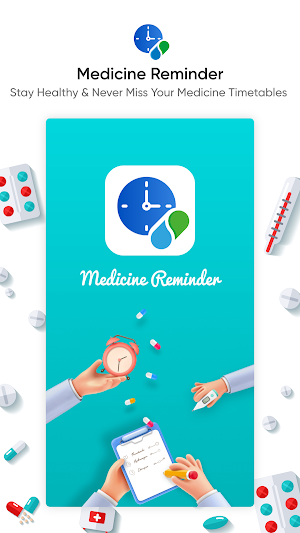
To stay healthy and to reduce the risk of adverse health events, adhering to the medicine timetable is a must. Yet due to our busy schedule or forgetfulness, 50% of the world’s population fails to take their prescribed medicine. Owing to this, Systweak has designed an app called Medicine Reminder.
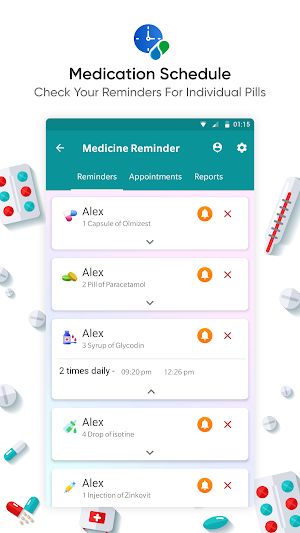
Using this Medicine Reminder App for Android, patients and their families can keep track of medications, doctor's appointments, add reports, and spend more time living rather than keeping an eye on the clock.
In addition to this, the Medicine Reminder app has a preloaded list of common diseases and ailments under the Reports tab. This makes the bifurcation of reports easy.
Features:
• Medicine Reminder and medication notifications
• Pre-defined disease list for ease of use (diabetes, asthma, blood pressure, arthritis etc.)
• One place to manage medication reminder
• Flexible scheduling
• Appointment reminders
• Allows adding a prescription image or take pictures
• Repeat pill alter
• Customizable Medicine Reminder notifications
• Add Reports and disease selection
How to use the Medicine Reminder App?
Using the Medicine Reminder app is simple. To use it follow the steps below:
1. Download and install the Medicine Reminder app from the Play Store.
2. Launch Medicine Reminder app.
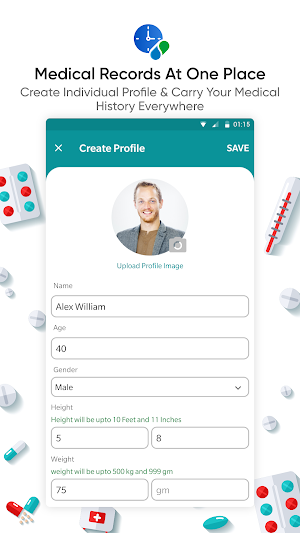
3. Tap Create Profile and enter patient details like name, gender, age, height, weight, and so on.
4. Once done click Save.
Note: You can Skip both the steps by tapping Skip.
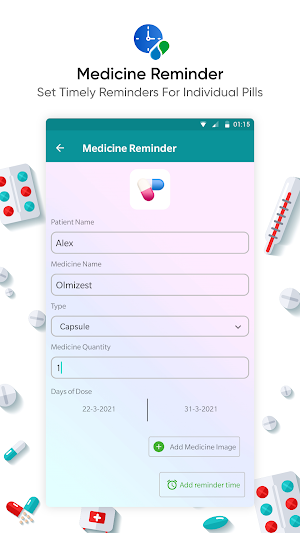
5. Thereafter, tap + icon, enter patients and pill details.
6. To get reminders, tap Add reminder time > Click on Add Reminder button.
7. Next by tapping the Appointments tap you can set Appointment. To do so, tap + icon.
8. Thereafter, enter Doctor’s name, phone number, email address, doctor’s address, description > Set Reminder Date-Time > Click on Set Reminder button.
9. Add Reports by tapping, Add reports tab
10. Enter patient name, gender, age, height, weight, other details, and images > tap Done.
That's it now you will get Medicine Reminders and notifications at a scheduled time.
What makes the Medicine Reminder app different from other apps?
The Medicine Reminder app gives you peace of mind so that you can focus on other things. It is one of the best medication trackers that helps to stay in control of your health. Moreover, you can take your medication timely and ensure each family member takes it on time.
It also allows you to add reports, set appointments, and stay healthy.
Using this Medicine Reminder App for Android, patients and their families can keep track of medications, doctor's appointments, add reports, and spend more time living rather than keeping an eye on the clock.
In addition to this, the Medicine Reminder app has a preloaded list of common diseases and ailments under the Reports tab. This makes the bifurcation of reports easy.
Features:
• Medicine Reminder and medication notifications
• Pre-defined disease list for ease of use (diabetes, asthma, blood pressure, arthritis etc.)
• One place to manage medication reminder
• Flexible scheduling
• Appointment reminders
• Allows adding a prescription image or take pictures
• Repeat pill alter
• Customizable Medicine Reminder notifications
• Add Reports and disease selection
How to use the Medicine Reminder App?
Using the Medicine Reminder app is simple. To use it follow the steps below:
1. Download and install the Medicine Reminder app from the Play Store.
2. Launch Medicine Reminder app.
3. Tap Create Profile and enter patient details like name, gender, age, height, weight, and so on.
4. Once done click Save.
Note: You can Skip both the steps by tapping Skip.
5. Thereafter, tap + icon, enter patients and pill details.
6. To get reminders, tap Add reminder time > Click on Add Reminder button.
7. Next by tapping the Appointments tap you can set Appointment. To do so, tap + icon.
8. Thereafter, enter Doctor’s name, phone number, email address, doctor’s address, description > Set Reminder Date-Time > Click on Set Reminder button.
9. Add Reports by tapping, Add reports tab
10. Enter patient name, gender, age, height, weight, other details, and images > tap Done.
That's it now you will get Medicine Reminders and notifications at a scheduled time.
What makes the Medicine Reminder app different from other apps?
The Medicine Reminder app gives you peace of mind so that you can focus on other things. It is one of the best medication trackers that helps to stay in control of your health. Moreover, you can take your medication timely and ensure each family member takes it on time.
It also allows you to add reports, set appointments, and stay healthy.
What’s new
Version 1.0.0.09 · Updated March 24, 2021
• Medicine Reminder and medication notifications • Pre-defined disease list for ease of use (diabetes, asthma, blood pressure, arthritis etc.) • One place to manage medication reminder • Flexible scheduling • Appointment reminders
User reviews

I must say it is a very useful application. My father takes 3 to 4 medicines daily so it is important for me that he should never miss a dose. This app reminds me everytime about his medicines. Really liked the Interface of this application.

Very helpful and easy to use app for tracking medicines.

This is a much needed app in present to take care of health while having a busy life.

App is running well and I am not stuck anywhere during the reminder set. Easy to use and very user friendly.

During this time this help a lot and easy to use and layout is also awesome.

This app is really helpful to remind my mother's medicine on time. And i can access reports anytime on this app.
Alternatives to Medicine Reminder App
Looking for apps like Medicine Reminder App? Here are 6 similar Android apps on Google Play. The highest rated is My Pill Reminder - Medication (4.7/5), and all 6 are free to download.
-
My Pill Reminder - Medication 4.7
-
Pill Reminder & Medication Tra 4.4
-
Lady pill reminder
-
ePharmacy
-
Bell Pill Reminder : Medicatio 3.3
-
Medicine Stockist
| App | Rating | Price | Installs | Last updated | Compare |
|---|---|---|---|---|---|
| Medicine Reminder App | 5.0 / 5 | Free | 10+ | Mar 24, 2021 | |
| My Pill Reminder - Medication | 4.7 / 5 | Free | 10,000+ | Feb 21, 2023 | Compare |
| Pill Reminder & Medication Tra | 4.4 / 5 | Free | 50,000+ | Jul 6, 2020 | Compare |
| Lady pill reminder | – | Free | 5,000+ | Jan 5, 2024 | Compare |
| ePharmacy | – | Free | 100,000+ | Jun 4, 2026 | Compare |
| Bell Pill Reminder : Medicatio | 3.3 / 5 | Free | 5,000+ | Apr 23, 2021 | Compare |
| Medicine Stockist | – | Free | 50,000+ | Sep 26, 2026 | Compare |