

Fleet Guardian Mobile
CalAmp Student Safety (Formerly Synovia) Tools
Speed up new installs and tablet swaps.
- Downloads
- 10+
- on Google Play
- Price
- Free
- No in-app purchases
- Updated
- Sep 21
- 2026 · v1.2.0
Screenshots


About Fleet Guardian Mobile
Fleet Guardian Mobile is the field-install companion for CalAmp Fleet Guardian. Built for installer technicians, it replaces error-prone manual ESN entry and back-office paperwork with a guided in-vehicle workflow.
INSTALL WORKFLOWS
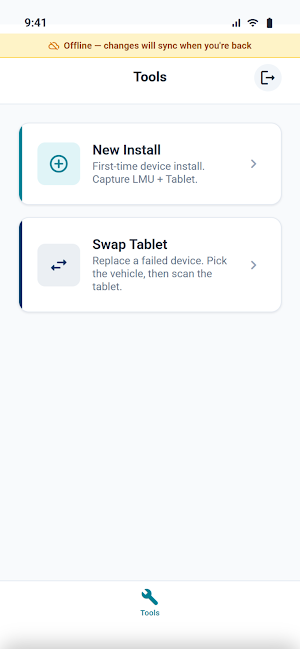
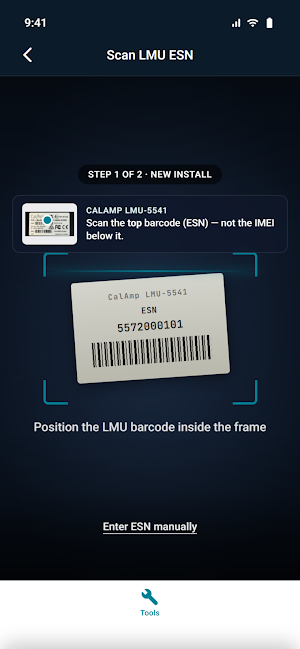
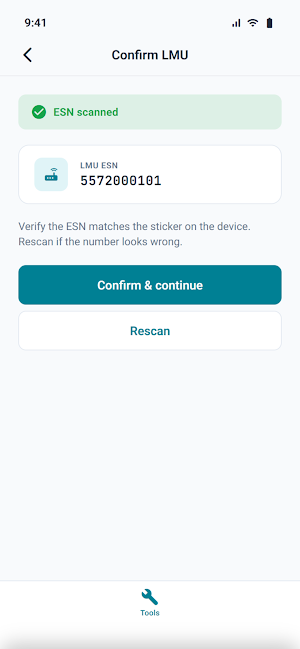
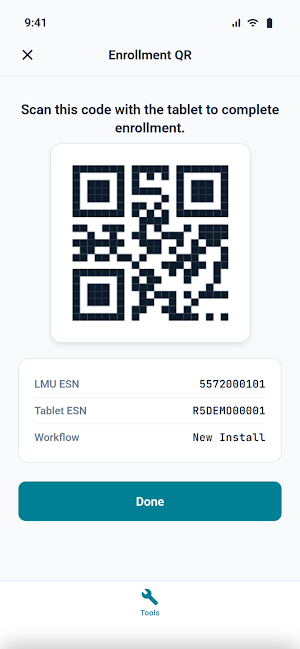
• New Install — scan the LMU's barcode, confirm the ESN, scan the tablet's S/N, generate a pairing QR. The Fleet Guardian tablet reads the QR to complete pairing in seconds.
• Tablet Swap — replace a failed device on an already-provisioned vehicle. Pick the vehicle, scan the new tablet, generate the pairing QR. No re-enrollment of the LMU.
ACCURATE BY DESIGN
• ESN format validation catches the most common misentries on the spot. LMU labels carry both an ESN (10 digits) and an IMEI (15 digits) — Fleet Guardian Mobile rejects the wrong one with a clear "this looks like the IMEI" message before it ever reaches the back office.
• Manual entry available with the same validation rules when a barcode won't scan.
• Server-issued enrollment errors (LMU not found, tablet already enrolled) surface as actionable dialogs with the right next step — including the CalAmp Support number for stuck cases.
WORKS WHERE YOU INSTALL
• Outdoor-ready scanner UI with screen brightness boost.
• Persistent offline indicator. Changes made out of cell range queue locally and sync when you're back.
WHO IT'S FOR
• CalAmp installer technicians provisioning LMU-5541s and Samsung Tab Active 5s in fleet vehicles.
• Global Tech Support staff handling tablet swaps and field service.
• Installer managers overseeing fleet rollouts.
Requires a Fleet Guardian account — your account number is provided by your CalAmp dealer or operator.
More installer tools (replace LMU, barcode-scanner swaps, engine diagnostics, RMA submission) are landing in future releases.
INSTALL WORKFLOWS
• New Install — scan the LMU's barcode, confirm the ESN, scan the tablet's S/N, generate a pairing QR. The Fleet Guardian tablet reads the QR to complete pairing in seconds.
• Tablet Swap — replace a failed device on an already-provisioned vehicle. Pick the vehicle, scan the new tablet, generate the pairing QR. No re-enrollment of the LMU.
ACCURATE BY DESIGN
• ESN format validation catches the most common misentries on the spot. LMU labels carry both an ESN (10 digits) and an IMEI (15 digits) — Fleet Guardian Mobile rejects the wrong one with a clear "this looks like the IMEI" message before it ever reaches the back office.
• Manual entry available with the same validation rules when a barcode won't scan.
• Server-issued enrollment errors (LMU not found, tablet already enrolled) surface as actionable dialogs with the right next step — including the CalAmp Support number for stuck cases.
WORKS WHERE YOU INSTALL
• Outdoor-ready scanner UI with screen brightness boost.
• Persistent offline indicator. Changes made out of cell range queue locally and sync when you're back.
WHO IT'S FOR
• CalAmp installer technicians provisioning LMU-5541s and Samsung Tab Active 5s in fleet vehicles.
• Global Tech Support staff handling tablet swaps and field service.
• Installer managers overseeing fleet rollouts.
Requires a Fleet Guardian account — your account number is provided by your CalAmp dealer or operator.
More installer tools (replace LMU, barcode-scanner swaps, engine diagnostics, RMA submission) are landing in future releases.
What’s new
Version 1.2.0 · Updated September 21, 2026
Live fleet map • Track your fleet on a live map that refreshes automatically • Tap a vehicle for details, or follow it as it drives • Search by vehicle and filter to active or offline • Get turn-by-turn directions to any vehicle Plus stability fixes across the install workflows
Alternatives to Fleet Guardian Mobile
Looking for apps like Fleet Guardian Mobile? Here are 6 similar Android apps on Google Play. The highest rated is Brandon Blackwood (4.9/5), and all 6 are free to download.
-
Urban Sports Club 4.1
-
Brandon Blackwood 5.0
-
Goldman Sachs Wellness 3.9
-
Halter
-
Sport Clips Haircuts Check-In 4.8
-
Evolia - Employee Scheduling 4.7
| App | Rating | Price | Installs | Last updated | Compare |
|---|---|---|---|---|---|
| Fleet Guardian Mobile | – | Free | 10+ | Sep 21, 2026 | |
| Urban Sports Club | 4.1 / 5 | Free | 500,000+ | Oct 5, 2026 | Compare |
| Brandon Blackwood | 4.9 / 5 | Free | 5,000+ | Oct 23, 2026 | Compare |
| Goldman Sachs Wellness | 3.9 / 5 | Free | 5,000+ | Oct 18, 2026 | Compare |
| Halter | – | Free | 10,000+ | Nov 6, 2026 | Compare |
| Sport Clips Haircuts Check-In | 4.8 / 5 | Free | 1,000,000+ | Oct 20, 2026 | Compare |
| Evolia - Employee Scheduling | 4.7 / 5 | Free | 100,000+ | Sep 18, 2026 | Compare |