

Watermark Pro - Batch Editor
Santosh Panwar Lifestyle Contains ads
Batch add watermarks & logo to photos. Protect images with auto-save to gallery.
- Downloads
- 153+
- on Google Play
- Price
- Free
- No in-app purchases
- Updated
- May 24
- 2026 · v1.0.8
Screenshots



About Watermark Pro - Batch Editor
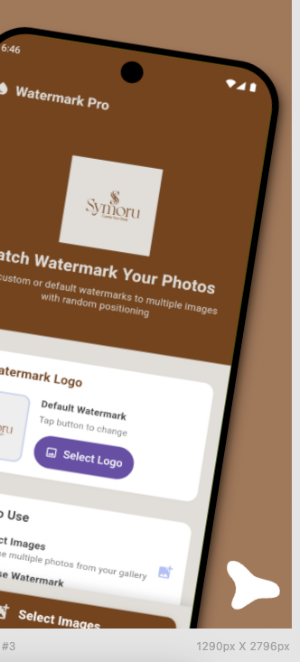
Protect your photos with professional watermarks in seconds! Watermark Pro lets
you add custom logo watermarks to hundreds of images at once — with smart random
positioning, high-quality output, and instant gallery save.
Whether you're a photographer protecting your portfolio, a content creator
branding your images, or a business securing product photos — Watermark Pro is
the fastest, easiest watermark maker for Android.
━━━━━━━━━━━━━━━━━━━━━━━━━━━━━━
⚡ KEY FEATURES
━━━━━━━━━━━━━━━━━━━━━━━━━━━━━━
🖼️ BATCH WATERMARK PROCESSING
• Add watermarks to 100+ photos in one tap
• Process an entire photo batch in ~3 minutes
• No need to edit images one by one — save hours of work
🎯 SMART RANDOM POSITIONING
• Watermarks are placed at random positions on every image
• Intelligent margin protection — watermarks never get cut off
• Every photo looks unique and professionally watermarked
🎨 CUSTOM WATERMARK / LOGO SUPPORT
• Use your own brand logo as a watermark
• PNG with transparency support for clean overlay
• Switch between your custom logo and the built-in default watermark
📸 WIDE FORMAT SUPPORT
• Input: JPG, JPEG, PNG, HEIC, HEIF
• Output: High-quality WebP format (92% quality)
• Supports HEIC/HEIF — perfect for iPhone photos & modern cameras
👁️ FULL-SCREEN IMAGE PREVIEW
• Tap any photo to preview in full screen before processing
• Pinch to zoom & swipe between images
• Review selections before adding watermarks
💾 AUTO-SAVE TO GALLERY
• Watermarked images saved automatically
• Find them in Gallery → Pictures → Watermarked album
• No manual file management needed
📱 CLEAN MATERIAL DESIGN UI
• Beautiful Material Design 3 interface
• Works perfectly on all Android devices (5.5" to 6.7" screens)
• Smooth, fast, and lightweight app experience
🚀 AD-FREE MODE
• Watch a short video to unlock 10 minutes of ad-free processing
• No subscription required
• Use it as much as you want
⚙️ SETTINGS & PREFERENCES
• Auto-save toggle
• Built-in User Guide — step-by-step instructions
• FAQ & Help section
• Privacy Policy & Terms of Service
━━━━━━━━━━━━━━━━━━━━━━━━━━━━━━
📖 HOW TO USE
━━━━━━━━━━━━━━━━━━━━━━━━━━━━━━
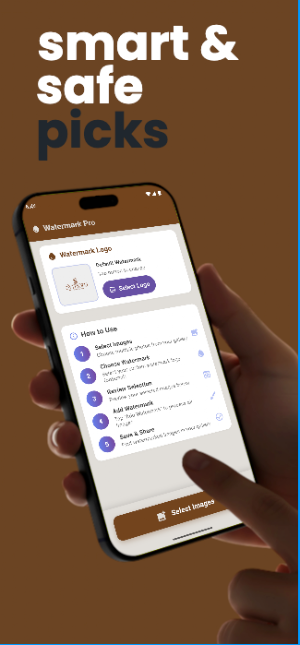
1️⃣ Tap "Select Images" — choose multiple photos from gallery
2️⃣ Tap "Watermark Logo" — use your own logo (optional)
3️⃣ Tap any image to preview full screen before exporting
4️⃣ Tap "Add Watermark" — batch process all selected images
5️⃣ Done! Find watermarked photos in your gallery instantly
━━━━━━━━━━━━━━━━━━━━━━━━━━━━━━
👥 PERFECT FOR
━━━━━━━━━━━━━━━━━━━━━━━━━━━━━━
📷 Photographers — protect your portfolio from image theft
🎨 Content Creators — brand every image with your logo
🛒 Online Sellers — watermark product photos for listings
🏢 Businesses — secure marketing and promotional images
📱 Social Media Users — brand your photos before posting
━━━━━━━━━━━━━━━━━━━━━━━━━━━━━━
🔒 PRIVACY & SECURITY
━━━━━━━━━━━━━━━━━━━━━━━━━━━━━━
• All image processing is done 100% on your device
• No photos are uploaded to any server
• No account or login required
• Your images stay private — always
━━━━━━━━━━━━━━━━━━━━━━━━━━━━━━
💬 SUPPORT
━━━━━━━━━━━━━━━━━━━━━━━━━━━━━━
Questions or feedback? We'd love to hear from you!
📧 [email protected]
🌐 symoru.com
Download Watermark Pro now and start protecting your photos today! 💧
What’s new
Version 1.0.8 · Updated May 24, 2026
• Added a new 3-step watermark workflow for a cleaner and easier experience. • Added Text Watermark support with custom text and color options. • Improved watermark placement controls with adjustable positioning and live preview. • Enhanced UI responsiveness with cleaner layouts, better spacing, and removed duplicate sections. • Added automatic reset after export so you can quickly start a new watermark project. • General performance improvements and bug fixes for a smoother experience.
User reviews

This Best app for the watermark app for images. It's completely free this very good thing in this app.

Very good technical approach for watermark application. I love ui.

Very interesting app. Very easy to use for watermark apply on any image.
Alternatives to Watermark Pro - Batch Editor
Looking for apps like Watermark Pro - Batch Editor? Here are 6 similar Android apps on Google Play. All of them are free to download.
-
Gift Card Maker Hub
-
Photos Sync Wifi Pro
-
Banner Maker – Photo Editor
-
GS1 Barcode Pro – QR & Barcode
-
Event Planner Pro
-
Image Catalog Maker Pro
| App | Rating | Price | Installs | Last updated | Compare |
|---|---|---|---|---|---|
| Watermark Pro - Batch Editor | – | Free | 100+ | May 24, 2026 | |
| Gift Card Maker Hub | – | Free | 100+ | Jun 22, 2026 | Compare |
| Photos Sync Wifi Pro | – | Free | 10+ | Jul 3, 2026 | Compare |
| Banner Maker – Photo Editor | – | Free | 100+ | Jul 2, 2026 | Compare |
| GS1 Barcode Pro – QR & Barcode | – | Free | 10+ | May 28, 2026 | Compare |
| Event Planner Pro | – | Free | 10+ | Apr 28, 2026 | Compare |
| Image Catalog Maker Pro | – | Free | 100+ | May 21, 2026 | Compare |