

Photos Sync Wifi Pro
Santosh Panwar Tools
Sync photos and files to router USB storage over WiFi using FTP
- Downloads
- 13+
- on Google Play
- Price
- Free
- No in-app purchases
- Updated
- Jul 3
- 2026 · v1.0.3
Screenshots
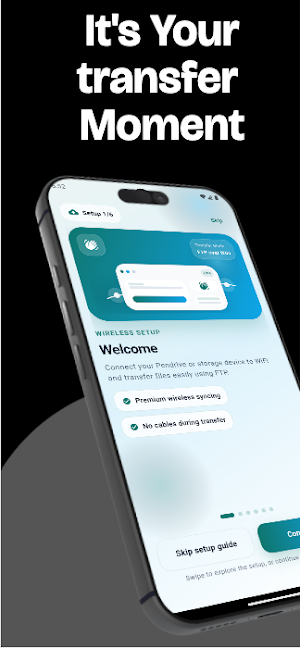

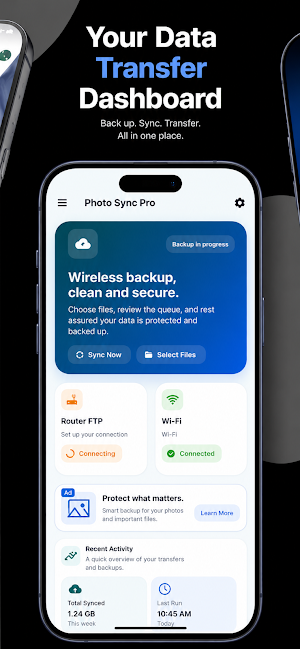
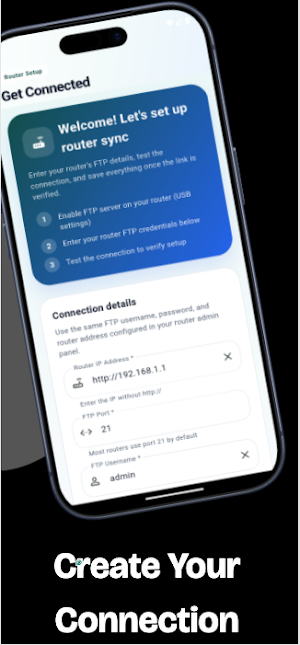


About Photos Sync Wifi Pro
Photos Sync Wifi Pro
Photos Sync Wifi Pro helps you wirelessly transfer, sync, and manage photos, videos, and files from your Android device to USB storage connected to your WiFi router. It is designed for users who want a simple local network solution for moving files without cables, cloud uploads, or desktop software.
If your router supports USB storage sharing, SMB, Samba, or FTP access, the app makes it easy to connect and transfer content between your phone and router-connected storage such as USB pen drives, flash drives, SSDs, and external hard disks.
The app works entirely over your local WiFi network and is useful for home, office, backup, and media management workflows.
## Main Features
* Wireless photo, video, and file transfer over WiFi
* Connect to compatible routers with USB storage support
* FTP-based local network file transfer
* Select and sync media folders from Android storage
* Save router IP, FTP login, and destination settings
* Detect newly added photos for sync workflows
* Local notifications for transfer and sync status
* Move large files without cloud storage
* Easy setup for home and office networks
Ideal Use Cases
Use Photos Sync Wifi Pro to:
* Back up photos to router-connected USB storage
* Transfer large videos and media files wirelessly
* Free up storage space on your Android device
* Create a local wireless backup workflow
* Organize files on external hard disks connected to routers
* Access local network storage without a computer
How It Works
1. Connect a USB drive or hard disk to your WiFi router.
2. Enable USB sharing, SMB, Samba, or FTP access in router settings.
3. Connect your Android phone to the same WiFi network.
4. Enter the router IP address and FTP details in the app.
5. Select files and start wireless transfer or syncing.
Transfers happen over your local WiFi network for faster and more private file management.
Router Compatibility
Supported router features include:
* USB storage sharing
* FTP server support
* SMB or Samba sharing
* Local network storage access
Compatibility depends on router hardware, firmware, and available network-sharing features.
Some routers may require:
* FTP server enabled
* Firewall settings adjusted for local access
* AP Isolation or Client Isolation disabled
* LAN access permissions enabled
Quick Setup Guide
Step 1 - Connect USB Storage
Insert a USB pen drive or hard disk into the router USB port.
Step 2 - Connect to the Same WiFi
Connect your Android device to the same WiFi network as the router.
Step 3 - Open Router Settings
Open:
* [http://192.168.0.1](http://192.168.0.1)
* or [http://192.168.1.1](http://192.168.1.1)
Log in using your router administrator credentials.
Step 4 - Enable Sharing Features
Enable:
* USB Storage Sharing
* FTP Server
* SMB or Samba Sharing
* Local Network Access
Step 5 - Configure Network Settings
If the app cannot detect router storage:
* Lower firewall security to Medium or Low
* Disable AP Isolation or Client Isolation
* Disable VPN on the phone during setup
Common Issues
App Cannot Detect Router
Possible reasons:
* FTP disabled
* AP Isolation enabled
* Firewall restrictions
* Devices on different WiFi networks
* VPN enabled on phone
Connection Timeout
Check:
* Router IP address is correct
* FTP server is enabled
* Devices are on the same WiFi network
* Local network access is allowed
Recommended Router Settings
* Firewall: Medium or Low
* FTP Server: Enabled
* SMB Sharing: Enabled
* AP Isolation: Disabled
* Same WiFi Network: Required
* VPN: Disabled during setup
Privacy and Data Handling
Photos Sync Wifi Pro accesses photos, videos, and selected files only to provide transfer and syncing features requested by the user.
* Router connection settings may be stored locally on your device
* File transfers are based on user configuration
* No unnecessary cloud upload is required
* The app is designed for local network workflows
Photos Sync Wifi Pro helps you wirelessly transfer, sync, and manage photos, videos, and files from your Android device to USB storage connected to your WiFi router. It is designed for users who want a simple local network solution for moving files without cables, cloud uploads, or desktop software.
If your router supports USB storage sharing, SMB, Samba, or FTP access, the app makes it easy to connect and transfer content between your phone and router-connected storage such as USB pen drives, flash drives, SSDs, and external hard disks.
The app works entirely over your local WiFi network and is useful for home, office, backup, and media management workflows.
## Main Features
* Wireless photo, video, and file transfer over WiFi
* Connect to compatible routers with USB storage support
* FTP-based local network file transfer
* Select and sync media folders from Android storage
* Save router IP, FTP login, and destination settings
* Detect newly added photos for sync workflows
* Local notifications for transfer and sync status
* Move large files without cloud storage
* Easy setup for home and office networks
Ideal Use Cases
Use Photos Sync Wifi Pro to:
* Back up photos to router-connected USB storage
* Transfer large videos and media files wirelessly
* Free up storage space on your Android device
* Create a local wireless backup workflow
* Organize files on external hard disks connected to routers
* Access local network storage without a computer
How It Works
1. Connect a USB drive or hard disk to your WiFi router.
2. Enable USB sharing, SMB, Samba, or FTP access in router settings.
3. Connect your Android phone to the same WiFi network.
4. Enter the router IP address and FTP details in the app.
5. Select files and start wireless transfer or syncing.
Transfers happen over your local WiFi network for faster and more private file management.
Router Compatibility
Supported router features include:
* USB storage sharing
* FTP server support
* SMB or Samba sharing
* Local network storage access
Compatibility depends on router hardware, firmware, and available network-sharing features.
Some routers may require:
* FTP server enabled
* Firewall settings adjusted for local access
* AP Isolation or Client Isolation disabled
* LAN access permissions enabled
Quick Setup Guide
Step 1 - Connect USB Storage
Insert a USB pen drive or hard disk into the router USB port.
Step 2 - Connect to the Same WiFi
Connect your Android device to the same WiFi network as the router.
Step 3 - Open Router Settings
Open:
* [http://192.168.0.1](http://192.168.0.1)
* or [http://192.168.1.1](http://192.168.1.1)
Log in using your router administrator credentials.
Step 4 - Enable Sharing Features
Enable:
* USB Storage Sharing
* FTP Server
* SMB or Samba Sharing
* Local Network Access
Step 5 - Configure Network Settings
If the app cannot detect router storage:
* Lower firewall security to Medium or Low
* Disable AP Isolation or Client Isolation
* Disable VPN on the phone during setup
Common Issues
App Cannot Detect Router
Possible reasons:
* FTP disabled
* AP Isolation enabled
* Firewall restrictions
* Devices on different WiFi networks
* VPN enabled on phone
Connection Timeout
Check:
* Router IP address is correct
* FTP server is enabled
* Devices are on the same WiFi network
* Local network access is allowed
Recommended Router Settings
* Firewall: Medium or Low
* FTP Server: Enabled
* SMB Sharing: Enabled
* AP Isolation: Disabled
* Same WiFi Network: Required
* VPN: Disabled during setup
Privacy and Data Handling
Photos Sync Wifi Pro accesses photos, videos, and selected files only to provide transfer and syncing features requested by the user.
* Router connection settings may be stored locally on your device
* File transfers are based on user configuration
* No unnecessary cloud upload is required
* The app is designed for local network workflows
What’s new
Version 1.0.3 · Updated July 3, 2026
Version 1.0.0 - Initial release of Photos Sync Wifi Pro - Connect to compatible WiFi router USB storage using FTP - Transfer photos, videos, and files over local WiFi - Save connection details and manage sync more easily - Background monitoring and notification support - Some bugs fixes.
User reviews

This is tricky but concept is very unique. This will very help for the photos transfer phone to hard drive via wifi connection. Before this app use frist need to understand the app connection guidelines.
Alternatives to Photos Sync Wifi Pro
Looking for apps like Photos Sync Wifi Pro? Here are 6 similar Android apps on Google Play. The highest rated is eero wifi system (4.8/5), and all 6 are free to download.
-
Wi-Fi Toolkit 4.0
-
TAP Kiln Control Mobile 4.1
-
NETGEAR Orbi – WiFi System App 4.4
-
Rheem EcoNet 4.1
-
eero wifi system 4.8
-
ISO Today 4.3
| App | Rating | Price | Installs | Last updated | Compare |
|---|---|---|---|---|---|
| Photos Sync Wifi Pro | – | Free | 10+ | Jul 3, 2026 | |
| Wi-Fi Toolkit | 4.0 / 5 | Free | 1,000,000+ | Sep 10, 2026 | Compare |
| TAP Kiln Control Mobile | 4.1 / 5 | Free | 5,000+ | Oct 22, 2026 | Compare |
| NETGEAR Orbi – WiFi System App | 4.4 / 5 | Free | 1,000,000+ | Oct 9, 2026 | Compare |
| Rheem EcoNet | 4.1 / 5 | Free | 100,000+ | Aug 13, 2026 | Compare |
| eero wifi system | 4.8 / 5 | Free | 5,000,000+ | Oct 21, 2026 | Compare |
| ISO Today | 4.3 / 5 | Free | 10,000+ | May 7, 2026 | Compare |