
FingerDeck - BT PC Controller
Tools In-app purchases
Turn your phone into a Bluetooth keyboard, mouse, and gamepad for your PC.
- Downloads
- 2.1K+
- on Google Play
- Price
- Free
- In-app purchases
- Updated
- Aug 28
- 2026 · v1.2.5
Screenshots


About FingerDeck - BT PC Controller
FingerDeck turns your Android smartphone into a powerful Bluetooth HID controller for your PC — no software installation needed on your computer.
Simply connect via Bluetooth and start controlling your PC with 9 versatile input modes:
🔢 NUMPAD
A full numeric keypad for laptop users. Toggle NumLock for number or navigation mode.
📝 TEXT SENDER
Type text on your phone and send it to your PC. Voice input (STT) supported for hands-free typing.
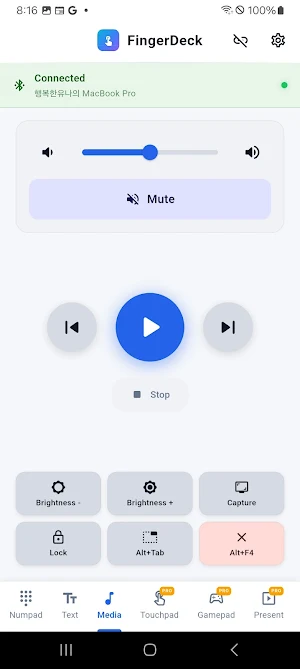
🎵 MEDIA CONTROL
Play/pause, skip tracks, adjust volume, control brightness, take screenshots, lock screen, and switch windows (Alt+Tab / Cmd+Tab).
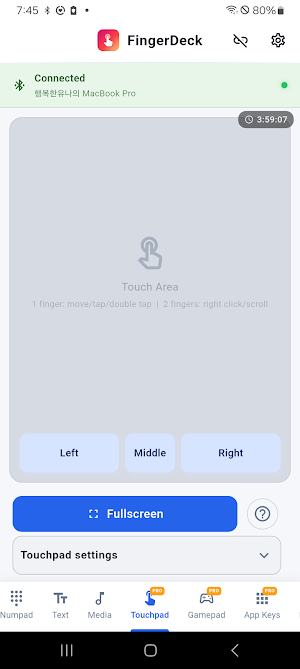
🖱️ TOUCHPAD
Move the mouse cursor, tap to click, two-finger tap for right-click, two-finger drag to scroll. Adjustable sensitivity.
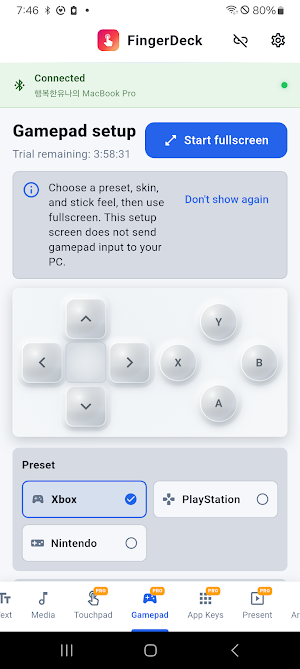
🎮 GAMEPAD
Full Xbox-style gamepad with D-Pad, dual analog sticks, ABXY buttons, L1/L2/R1/R2 triggers, and Select/Start. Runs in fullscreen landscape mode.
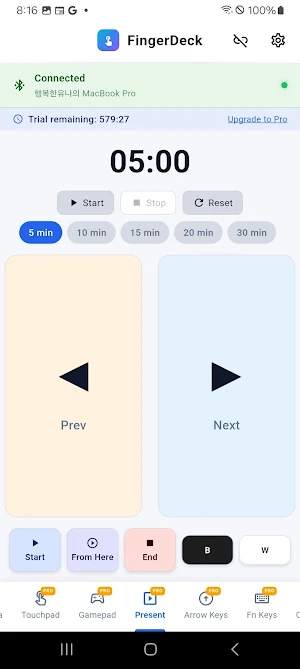
📊 PRESENTATION
Control your slides with previous/next buttons, start/end slideshow, presentation timer, and blackout/whiteout screen.
⌨️ FUNCTION KEYS
F1-F12 with Ctrl/Shift/Alt/Win modifiers. Toggle between standard F-keys and media keys (brightness, volume, playback). Automatically adapts to Windows or macOS.
↕️ NAVIGATION
Arrow keys with Home/End/PgUp/PgDn. Combine with modifiers for shortcuts.
⚡ CUSTOM GRID
Create custom shortcut buttons with key combinations and macros. Save multiple profiles for different use cases. Macro support lets you automate complex key sequences.
━━━━━━━━━━━━━━━━━━━━━
KEY FEATURES:
✅ No PC Software Required — Connects directly via Bluetooth HID. No drivers, no server apps.
✅ Windows & macOS Support — Automatically switches keyboard shortcuts based on your target OS.
✅ 10 Languages — English, Korean, Japanese, Spanish, Chinese, German, French, Italian, Portuguese, Russian.
✅ Auto-Reconnect — Exponential backoff reconnection when connection drops.
✅ Mouse Jiggle — Prevent your PC from going idle (Pro).
✅ Voice Input — Speak and send text to your PC using speech recognition (Pro).
✅ Macro Support — Automate multi-step key sequences with customizable delays (Pro).
━━━━━━━━━━━━━━━━━━━━━
FREE vs PRO ($2.99 one-time):
Free: Numpad, Text Sender, Media Control, Custom Grid (basic)
Pro: All 9 modes unlimited + Mouse Jiggle + Macros + Voice Input + Haptic Feedback + Theme Customization
Each Pro mode includes a generous 10-hour free trial.
━━━━━━━━━━━━━━━━━━━━━
REQUIREMENTS:
• Android 9.0 (API 28) or higher
• Bluetooth enabled on both phone and PC
• PC must support Bluetooth HID profile
PRIVACY:
FingerDeck does not collect any personal data. All data stays on your device.
Website: https://fingerdeck.suparain.com
Privacy Policy: https://fingerdeck.suparain.com/privacy
```
Simply connect via Bluetooth and start controlling your PC with 9 versatile input modes:
🔢 NUMPAD
A full numeric keypad for laptop users. Toggle NumLock for number or navigation mode.
📝 TEXT SENDER
Type text on your phone and send it to your PC. Voice input (STT) supported for hands-free typing.
🎵 MEDIA CONTROL
Play/pause, skip tracks, adjust volume, control brightness, take screenshots, lock screen, and switch windows (Alt+Tab / Cmd+Tab).
🖱️ TOUCHPAD
Move the mouse cursor, tap to click, two-finger tap for right-click, two-finger drag to scroll. Adjustable sensitivity.
🎮 GAMEPAD
Full Xbox-style gamepad with D-Pad, dual analog sticks, ABXY buttons, L1/L2/R1/R2 triggers, and Select/Start. Runs in fullscreen landscape mode.
📊 PRESENTATION
Control your slides with previous/next buttons, start/end slideshow, presentation timer, and blackout/whiteout screen.
⌨️ FUNCTION KEYS
F1-F12 with Ctrl/Shift/Alt/Win modifiers. Toggle between standard F-keys and media keys (brightness, volume, playback). Automatically adapts to Windows or macOS.
↕️ NAVIGATION
Arrow keys with Home/End/PgUp/PgDn. Combine with modifiers for shortcuts.
⚡ CUSTOM GRID
Create custom shortcut buttons with key combinations and macros. Save multiple profiles for different use cases. Macro support lets you automate complex key sequences.
━━━━━━━━━━━━━━━━━━━━━
KEY FEATURES:
✅ No PC Software Required — Connects directly via Bluetooth HID. No drivers, no server apps.
✅ Windows & macOS Support — Automatically switches keyboard shortcuts based on your target OS.
✅ 10 Languages — English, Korean, Japanese, Spanish, Chinese, German, French, Italian, Portuguese, Russian.
✅ Auto-Reconnect — Exponential backoff reconnection when connection drops.
✅ Mouse Jiggle — Prevent your PC from going idle (Pro).
✅ Voice Input — Speak and send text to your PC using speech recognition (Pro).
✅ Macro Support — Automate multi-step key sequences with customizable delays (Pro).
━━━━━━━━━━━━━━━━━━━━━
FREE vs PRO ($2.99 one-time):
Free: Numpad, Text Sender, Media Control, Custom Grid (basic)
Pro: All 9 modes unlimited + Mouse Jiggle + Macros + Voice Input + Haptic Feedback + Theme Customization
Each Pro mode includes a generous 10-hour free trial.
━━━━━━━━━━━━━━━━━━━━━
REQUIREMENTS:
• Android 9.0 (API 28) or higher
• Bluetooth enabled on both phone and PC
• PC must support Bluetooth HID profile
PRIVACY:
FingerDeck does not collect any personal data. All data stays on your device.
Website: https://fingerdeck.suparain.com
Privacy Policy: https://fingerdeck.suparain.com/privacy
```
Alternatives to FingerDeck - BT PC Controller
Looking for apps like FingerDeck - BT PC Controller? Here are 6 similar Android apps on Google Play. 4 of the 6 are free to download.
-
SupaTarot: AI Live Voice Tarot
-
SupaWOL - Wake On Lan
-
FD Gamepad
-
FD Touchpad
-
VuDrop
-
DAD ICM Calculator
| App | Rating | Price | Installs | Last updated | Compare |
|---|---|---|---|---|---|
| FingerDeck - BT PC Controller | – | Free | 1,000+ | Aug 28, 2026 | |
| SupaTarot: AI Live Voice Tarot | – | Free | 10+ | Sep 29, 2026 | Compare |
| SupaWOL - Wake On Lan | – | Free | 100+ | Aug 28, 2026 | Compare |
| FD Gamepad | – | 1.99 USD | 10+ | Aug 28, 2026 | Compare |
| FD Touchpad | – | 1.99 USD | 0+ | Aug 28, 2026 | Compare |
| VuDrop | – | Free | 5+ | Aug 8, 2026 | Compare |
| DAD ICM Calculator | – | Free | 10+ | Mar 25, 2026 | Compare |