
VideFlow sports video analysis
Video Players & Editors In-app purchases
Slow motion player, AI full body map, trackers & tracers. Sports video analysis.
- Downloads
- 5K+
- on Google Play
- Price
- Free
- In-app purchases
- Updated
- May 12
- 2026 · v1.2
Screenshots


About VideFlow sports video analysis
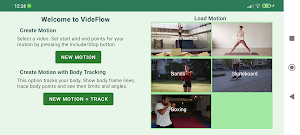
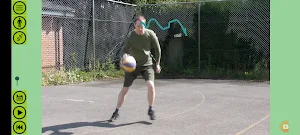
VideFlow is a slow motion player for studying sporting motions. Film yourself and play it frame-by-frame to see the detailed motion. The app is based on a video player with slow down, pause, and fast frame advance. Useful for many sports activities, such as tennis and golf swings, martial arts, gymnastics, jumps in basketball, dance, boxing, yoga, skateboarding, football/soccer and others.
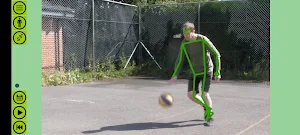
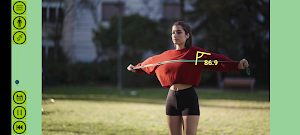
Add visualisations to the video with AI computer vision to see it more clearly. Body mapping tracks your body through the motion. Turn on body frame lines and draw traces of body points. You can also find limits of body points in four directions, show body frame angles and find their maximum/minimum limits.
There are two custom trackers that can follow any object in the video, such as sports equipment. Draw traces of a racquet or ball, or show the height of a skateboard wheel from the ground. Traces and direction limit visualisations are available for the trackers.
Motions can be exported to MP4 video for reference and sharing with friends (watermarked). You may save your motions at different stages and revert back to them later on.
VideFlow runs entirely on your device . There is no need for an internet connection and you can use it anywhere. The main app is free with no adverts. We do not collect any personal data. There is one in-app purchase available to remove the watermark from exported videos.
Technical Notes:
VideFlow is designed for short segments of video, typically from five to thirty seconds.
Video processing uses large amounts of memory, so it's necessary to keep the motions short.
It checks available system resources on startup and if necessary limits the maximum recording time, or reduces the app's internal working resolution.
The body mapping AI pipeline works best on a fast, modern android device. We recommend a CPU speed above 1.4GHz.
The AI tracker works on slower devices, but may not keep up with fast moving objects. For rapid movement you should film at a high frame rate such as 60 frames-per-second or higher. This gives the tracker more frames to work with.
We hope you enjoy using VideFlow. For feedback or technical support email [email protected]
Add visualisations to the video with AI computer vision to see it more clearly. Body mapping tracks your body through the motion. Turn on body frame lines and draw traces of body points. You can also find limits of body points in four directions, show body frame angles and find their maximum/minimum limits.
There are two custom trackers that can follow any object in the video, such as sports equipment. Draw traces of a racquet or ball, or show the height of a skateboard wheel from the ground. Traces and direction limit visualisations are available for the trackers.
Motions can be exported to MP4 video for reference and sharing with friends (watermarked). You may save your motions at different stages and revert back to them later on.
VideFlow runs entirely on your device . There is no need for an internet connection and you can use it anywhere. The main app is free with no adverts. We do not collect any personal data. There is one in-app purchase available to remove the watermark from exported videos.
Technical Notes:
VideFlow is designed for short segments of video, typically from five to thirty seconds.
Video processing uses large amounts of memory, so it's necessary to keep the motions short.
It checks available system resources on startup and if necessary limits the maximum recording time, or reduces the app's internal working resolution.
The body mapping AI pipeline works best on a fast, modern android device. We recommend a CPU speed above 1.4GHz.
The AI tracker works on slower devices, but may not keep up with fast moving objects. For rapid movement you should film at a high frame rate such as 60 frames-per-second or higher. This gives the tracker more frames to work with.
We hope you enjoy using VideFlow. For feedback or technical support email [email protected]
What’s new
Version 1.2 · Updated May 12, 2026
A license viewer is added for viewing the open source software components used within the app and their licenses. A Windows version is now available - find more details at www.sportsvideoanalysis.com. For questions or feedback contact the developer at [email protected].
Alternatives to VideFlow sports video analysis
Looking for apps like VideFlow sports video analysis? Here are 2 similar Android apps on Google Play. 1 of the 2 are free to download.

| App | Rating | Price | Installs | Last updated | Compare |
|---|---|---|---|---|---|
| VideFlow sports video analysis | – | Free | 5,000+ | May 12, 2026 | |
| VideFlow Plus sports analysis | – | 2.49 USD | 50+ | May 12, 2026 | Compare |
| SceneMax video sequence maker | – | Free | 100+ | – | Compare |