

Studer monitoring
Tools
Monitor your studer system
- Downloads
- 3.4K+
- on Google Play
- Price
- Free
- No in-app purchases
- Updated
- Mar 17
- 2026 · v1.6.2
Screenshots


About Studer monitoring
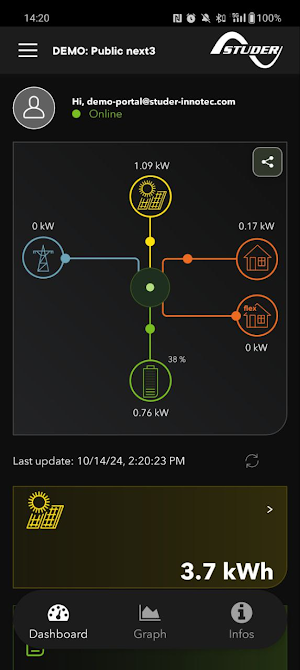
Designed to offer you a fluid and intuitive experience, the Studer monitoring application allows you to keep an eye on your energy installation, wherever you are. Thanks to its user-friendly design, you can access key data and monitor all aspects of your Studer system when the installation is connected to the internet.
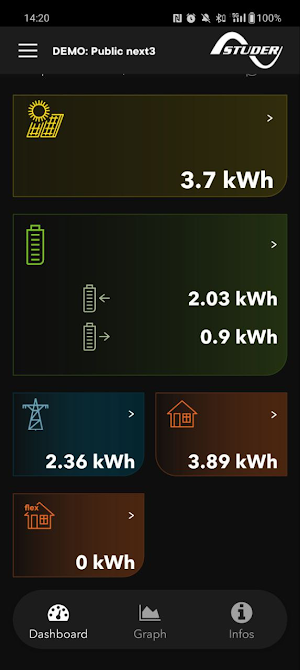
The dashboard tab provides a visual overview of all the energy flows in your system (grid, solar, battery, etc.). You will find data on your total solar output for the day, which can be compared with the previous day. All battery information, including charge/discharge current, state of charge (SOC), and voltage, is displayed. Energy consumption and export to the grid, as well as your total loads, are all displayed.
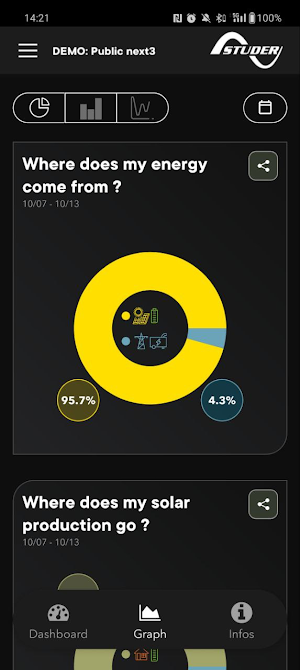
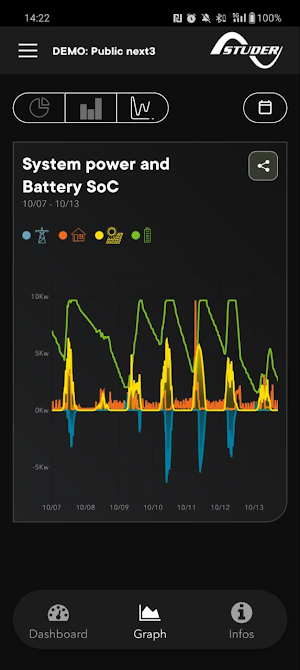
The graph tab allows you to perform a more detailed analysis of your installation by entering the desired dates. The different types of graphs display data on solar production, consumption and more.
The info section provides you with information about your system, as well as notifications, event messages, and more.
The dashboard tab provides a visual overview of all the energy flows in your system (grid, solar, battery, etc.). You will find data on your total solar output for the day, which can be compared with the previous day. All battery information, including charge/discharge current, state of charge (SOC), and voltage, is displayed. Energy consumption and export to the grid, as well as your total loads, are all displayed.
The graph tab allows you to perform a more detailed analysis of your installation by entering the desired dates. The different types of graphs display data on solar production, consumption and more.
The info section provides you with information about your system, as well as notifications, event messages, and more.
What’s new
Version 1.6.2 · Updated March 17, 2026
- Firmware updates: You can now remotely update your next devices directly from the app - Datepicker fixes: Resolved an issue causing empty data and a crash in the date picker - Dashboard battery view: Fixed an incorrect gradient display - Graph improvements & fixes
User reviews

Great job

Very Good app. Easily get the system information.

Well done team Studer!
Alternatives to Studer monitoring
Looking for apps like Studer monitoring? Here is 1 similar Android app on Google Play.
| App | Rating | Price | Installs | Last updated | Compare |
|---|---|---|---|---|---|
| Studer monitoring | – | Free | 1,000+ | Mar 17, 2026 | |
| Studer easy monitoring | – | Free | 1,000+ | Dec 10, 2019 | Compare |
Compare Studer monitoring with the top alternatives: ratings, updates, ASO score and keyword gaps →