
InDocEdit: Scanner & Editor
Productivity In-app purchases Contains ads
Scan, OCR & edit text in photos, PDFs & videos. Fix, search & export anywhere.
- Downloads
- 100+
- on Google Play
- Price
- Free
- In-app purchases
- Updated
- Sep 22
- 2026 · v26.911.42
Screenshots


About InDocEdit: Scanner & Editor
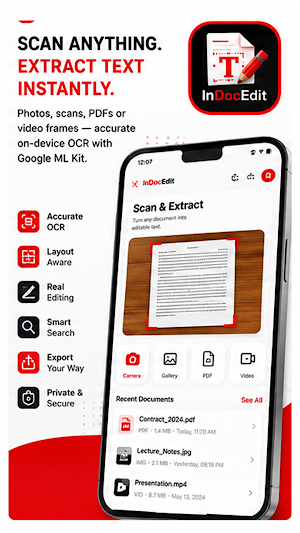
InDocEdit turns anything with text -- photos, scanned pages, PDFs, even video frames -- into clean, editable, searchable text. Powered by on‑device Google ML Kit OCR, it reads your documents instantly, preserves their layout (including tables and columns), and lets you fix, rewrite, search, and export them in seconds. No account required. Your documents never leave your device.
Whether you're a student digitizing notes, a professional editing contracts, or anyone who hates retyping, InDocEdit is the fastest way to capture text and actually do something with it.
WHY INDOCEDIT
• Accurate on‑device OCR -- extract text from images and scans with Google ML Kit.
• Real editing -- change, correct, and rewrite the extracted text, not just copy it.
• Layout aware -- keeps line breaks, paragraphs, columns and tables intact.
• PDF text extraction -- pull editable text straight out of PDF files.
• Video text -- capture on‑screen text from video documents (Pro).
• Lightning search -- real‑time, fuzzy, and similarity search across everything you've scanned.
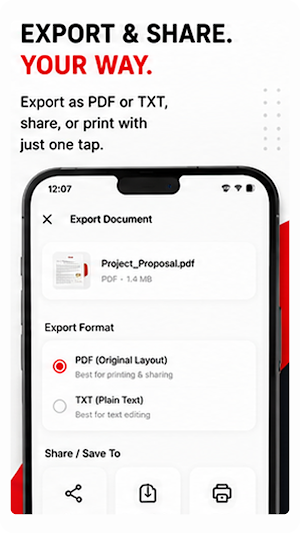
• Export your way -- save as PDF or TXT, share, or print with one tap.
• Private by design -- everything is processed and stored locally on your device.
• Beautiful, distraction‑free design with full light & dark themes.
KEY FEATURES
SCAN & EXTRACT
Scan paper with your camera or import images, PDFs and videos. InDocEdit extracts the text and rebuilds the page layout so it reads exactly like the original.
EDIT EVERYTHING
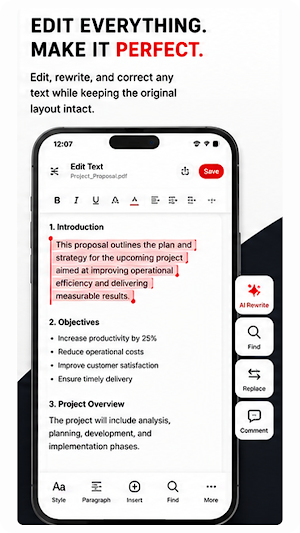
Tap Edit Text and change anything -- typos, names, numbers, whole paragraphs. Edits are saved automatically and preserved every time you reopen the document.
FIND IT FAST
Real‑time search highlights matches as you type. Fuzzy matching forgives typos, and similarity search surfaces related documents instantly.
TABLES & COLUMNS
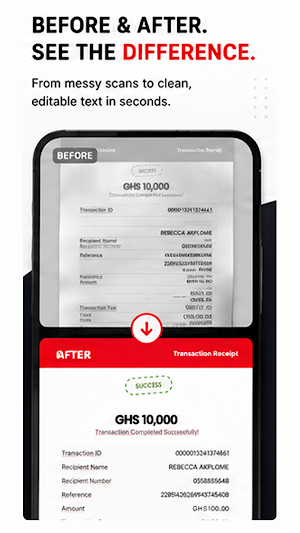
InDocEdit detects tabular layouts and preserves columns so spreadsheets, receipts and reports stay readable.
EXPORT & SHARE
Export the edited document to PDF or TXT, keep the original format, share to any app, or send straight to a printer.
PREMIUM DESIGN
A clean, modern interface with consistent typography, a refined red/black/white theme, and true dark mode.
PERFECT FOR
• Students -- digitize and edit lecture notes, textbooks and handouts.
• Business -- edit contracts, invoices, receipts and reports.
• Writers & researchers -- pull quotes and passages from books and papers.
• Everyone -- stop retyping. Scan it, fix it, send it.
INDOCEDIT PRO
Upgrade to Pro for unlimited documents, unlimited exports with no ads, video OCR, similarity search and priority processing. Available as monthly, annual or one‑time lifetime -- cancel anytime.
Download InDocEdit and turn every document into editable text -- scan, edit, search, export.
What you get in InDocEdit: ocr, text scanner, document scanner, pdf editor, scan to text, image to text, text recognition, edit pdf, extract text, scanner app, note scanner, photo to text.
Whether you're a student digitizing notes, a professional editing contracts, or anyone who hates retyping, InDocEdit is the fastest way to capture text and actually do something with it.
WHY INDOCEDIT
• Accurate on‑device OCR -- extract text from images and scans with Google ML Kit.
• Real editing -- change, correct, and rewrite the extracted text, not just copy it.
• Layout aware -- keeps line breaks, paragraphs, columns and tables intact.
• PDF text extraction -- pull editable text straight out of PDF files.
• Video text -- capture on‑screen text from video documents (Pro).
• Lightning search -- real‑time, fuzzy, and similarity search across everything you've scanned.
• Export your way -- save as PDF or TXT, share, or print with one tap.
• Private by design -- everything is processed and stored locally on your device.
• Beautiful, distraction‑free design with full light & dark themes.
KEY FEATURES
SCAN & EXTRACT
Scan paper with your camera or import images, PDFs and videos. InDocEdit extracts the text and rebuilds the page layout so it reads exactly like the original.
EDIT EVERYTHING
Tap Edit Text and change anything -- typos, names, numbers, whole paragraphs. Edits are saved automatically and preserved every time you reopen the document.
FIND IT FAST
Real‑time search highlights matches as you type. Fuzzy matching forgives typos, and similarity search surfaces related documents instantly.
TABLES & COLUMNS
InDocEdit detects tabular layouts and preserves columns so spreadsheets, receipts and reports stay readable.
EXPORT & SHARE
Export the edited document to PDF or TXT, keep the original format, share to any app, or send straight to a printer.
PREMIUM DESIGN
A clean, modern interface with consistent typography, a refined red/black/white theme, and true dark mode.
PERFECT FOR
• Students -- digitize and edit lecture notes, textbooks and handouts.
• Business -- edit contracts, invoices, receipts and reports.
• Writers & researchers -- pull quotes and passages from books and papers.
• Everyone -- stop retyping. Scan it, fix it, send it.
INDOCEDIT PRO
Upgrade to Pro for unlimited documents, unlimited exports with no ads, video OCR, similarity search and priority processing. Available as monthly, annual or one‑time lifetime -- cancel anytime.
Download InDocEdit and turn every document into editable text -- scan, edit, search, export.
What you get in InDocEdit: ocr, text scanner, document scanner, pdf editor, scan to text, image to text, text recognition, edit pdf, extract text, scanner app, note scanner, photo to text.
What’s new
Version 26.911.42 · Updated September 22, 2026
Fixed white boxes appearing over erased text on some pages Fixed erased letters cutting into neighboring lines Erased text now blends into the photo instead of leaving a visible patch Edited text now keeps its original color, weight, and style Faster and cleaner results overall
User reviews

The best ocr image-text editor, best of a kind

very useful app

useful app

perfect. as described
Alternatives to InDocEdit: Scanner & Editor
Looking for apps like InDocEdit: Scanner & Editor? Here are 6 similar Android apps on Google Play. The highest rated is Muvees: Movies, TV & Watchlist (4.7/5), and all 6 are free to download.
-
IILuk: AI Photo Editor 4.7
-
BinMatrix - BIN Checker
-
InWebEdit: Live Website Editor
-
Muvees: Movies, TV & Watchlist 4.7
-
FemCare+ self care wellness
-
SubsWatcher: Stop free trials
| App | Rating | Price | Installs | Last updated | Compare |
|---|---|---|---|---|---|
| InDocEdit: Scanner & Editor | – | Free | 100+ | Sep 22, 2026 | |
| IILuk: AI Photo Editor | 4.7 / 5 | Free | 100+ | – | Compare |
| BinMatrix - BIN Checker | – | Free | 100+ | Oct 22, 2026 | Compare |
| InWebEdit: Live Website Editor | – | Free | 100+ | Sep 23, 2026 | Compare |
| Muvees: Movies, TV & Watchlist | 4.7 / 5 | Free | 1,000+ | Sep 21, 2026 | Compare |
| FemCare+ self care wellness | – | Free | 10+ | Sep 24, 2026 | Compare |
| SubsWatcher: Stop free trials | – | Free | 50+ | Sep 24, 2026 | Compare |