
XREMS – EMS Remote for XR
Health & Fitness
Control your Eaglefit EMS suit remotely for XR and other programs
- Downloads
- 1+
- on Google Play
- Price
- Free
- No in-app purchases
- Updated
- Aug 29
- 2026 · v1.1
Screenshots



About XREMS – EMS Remote for XR
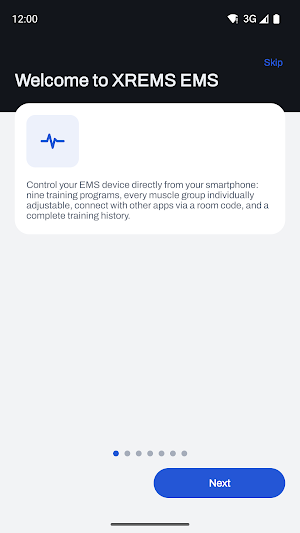
XREMS EMS controls your Eaglefit EMS devices directly from your smartphone – via Bluetooth LE, with no detours.
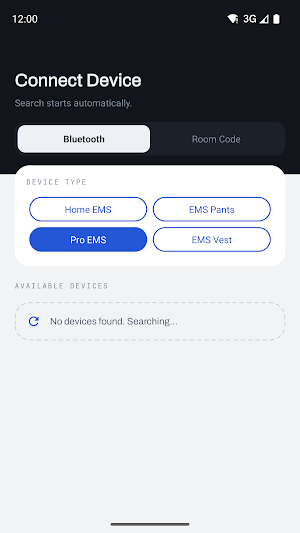
SUPPORTED DEVICES
• Home EMS – 10-channel suit for home use
• EMS Pants – 7 channels for the lower body
• Pro EMS – 12-channel professional vest
• EMS Vest – 9 channels for the upper body
CONTROL YOUR TRAINING
• Switch each channel on and off individually
• Adjust intensity per muscle group steplessly from 0 to 100 percent
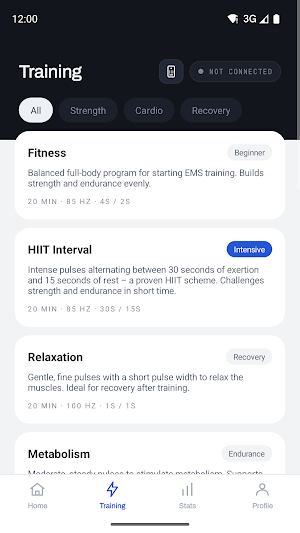
• Switch training modes: Fitness, Metabolism, Relax, Fat Burning, Mobility, Power and more
• Freely set frequency, pulse width, pulse and pause duration, and training time
• Start, pause and safely end training – ending resets all channels to zero
CUSTOM PROGRAMS
• Nine ready-made standard programs as a starting point
• Create, name and permanently save your own programs
• Transfer saved programs to the device with a single tap
TRACK YOUR PROGRESS
• Every session is automatically logged in your training history
• Statistics on duration, frequency and programs used
• Set and track your own goals
• Multiple profiles for anyone sharing a device
REMOTE CONTROL VIA ROOM CODE
Share a room code so a second device can adjust the intensity during the session – for example in a studio or when training together. This also lets you use your suit in virtual reality applications and in online training offers: the application controls the intensity to match the action while you focus entirely on your workout.
SAFETY FIRST
On first launch, an onboarding guides you through the most important safety information. EMS training isn't suitable for everyone: follow your device's instructions and, if in doubt, check with a doctor before use. The app is not a medical device and does not provide diagnoses.
LANGUAGES
German, English, French, Italian and Dutch.
NOTE
XREMS EMS is not an official Eaglefit app. It is a compatible app developed specifically for the remote-control features.
Requires a compatible Eaglefit EMS device and Bluetooth LE.
SUPPORTED DEVICES
• Home EMS – 10-channel suit for home use
• EMS Pants – 7 channels for the lower body
• Pro EMS – 12-channel professional vest
• EMS Vest – 9 channels for the upper body
CONTROL YOUR TRAINING
• Switch each channel on and off individually
• Adjust intensity per muscle group steplessly from 0 to 100 percent
• Switch training modes: Fitness, Metabolism, Relax, Fat Burning, Mobility, Power and more
• Freely set frequency, pulse width, pulse and pause duration, and training time
• Start, pause and safely end training – ending resets all channels to zero
CUSTOM PROGRAMS
• Nine ready-made standard programs as a starting point
• Create, name and permanently save your own programs
• Transfer saved programs to the device with a single tap
TRACK YOUR PROGRESS
• Every session is automatically logged in your training history
• Statistics on duration, frequency and programs used
• Set and track your own goals
• Multiple profiles for anyone sharing a device
REMOTE CONTROL VIA ROOM CODE
Share a room code so a second device can adjust the intensity during the session – for example in a studio or when training together. This also lets you use your suit in virtual reality applications and in online training offers: the application controls the intensity to match the action while you focus entirely on your workout.
SAFETY FIRST
On first launch, an onboarding guides you through the most important safety information. EMS training isn't suitable for everyone: follow your device's instructions and, if in doubt, check with a doctor before use. The app is not a medical device and does not provide diagnoses.
LANGUAGES
German, English, French, Italian and Dutch.
NOTE
XREMS EMS is not an official Eaglefit app. It is a compatible app developed specifically for the remote-control features.
Requires a compatible Eaglefit EMS device and Bluetooth LE.
What’s new
Version 1.1 · Updated August 29, 2026
Fullscreen mode in the channel control: the header row and the toggle now sit below the status bar and are easy to tap again. Input dialogs – including “New Program” under Custom Programs and the profile dialogs – now use a light surface with high-contrast text instead of a grey background with barely readable text.
Alternatives to XREMS – EMS Remote for XR
Looking for apps like XREMS – EMS Remote for XR? Here are 5 similar Android apps on Google Play. All of them are free to download.
-
Noise Ambient: Focus & Sleep
-
SuperRepTrack: Voice Workout
-
Hard Workout Radio
-
Santa OnAir - Christmas Radio
-
SunDTracker: Vitamin D & UV
| App | Rating | Price | Installs | Last updated | Compare |
|---|---|---|---|---|---|
| XREMS – EMS Remote for XR | – | Free | 1+ | Aug 29, 2026 | |
| Noise Ambient: Focus & Sleep | – | Free | 0+ | – | Compare |
| SuperRepTrack: Voice Workout | – | Free | 1+ | Aug 31, 2026 | Compare |
| Hard Workout Radio | – | Free | 10+ | – | Compare |
| Santa OnAir - Christmas Radio | – | Free | 100+ | Dec 14, 2025 | Compare |
| SunDTracker: Vitamin D & UV | – | Free | 100+ | Aug 28, 2026 | Compare |