
Josephus
SparklySparky Tools
A free, lightweight application usage tracker with graphs and widgets.
- Downloads
- 256+
- on Google Play
- Price
- Free
- No in-app purchases
- Updated
- Apr 19
- 2026 · vrelease-1.0.0
Screenshots
About Josephus
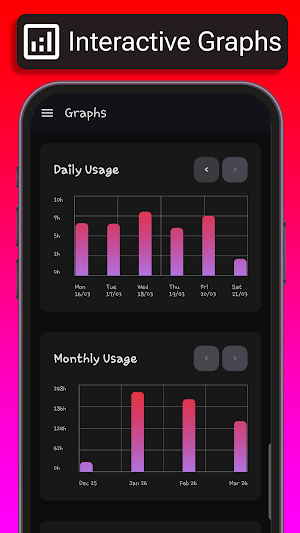
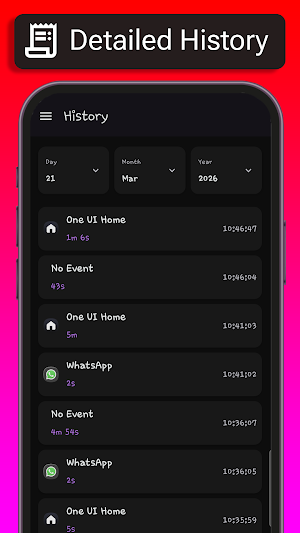
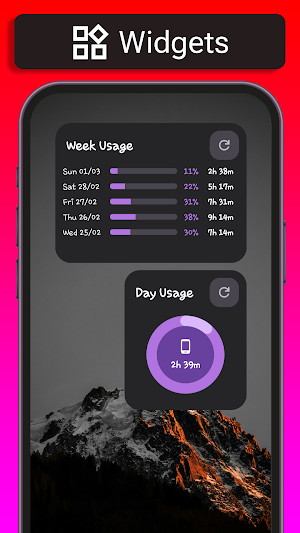
Josephus is an application usage tracker with a simple interface and homescreen widgets that allow you to consult your usage data and visualize it with graphs. Specifically, it provides:
• Graphs for Daily, Monthly and Yearly usage in Bar, Line or Pie form
• Daily usage details with per-application usage and total usage in percentage of 24 hours
• Daily usage History with timeline down to the second
Its core tenets are:
• It is entirely free to use and ad-free
• It saves your data locally (scroll to the "HOW DOES IT WORK?" section for more info)
• It doesn't send any data to anyone, and is therefore completely usable offline.
LIMITATIONS
For Samsung phone users: usage of "Secure Folder" and of all "Secure Folder" apps is not trackable by Josephus. This means that if you open an app from the "Secure Folder", it's usage will appear as "No Event", the same behavior as if you had turned off your screen.
HOW DOES IT WORK?
Put simply, Josephus uses a feature you already have in your Android phone, which is the usage tracking of all applications. Josephus saves this data locally to your device, with the option to export it from the app whenever you want, as many times as you want, and then shows it to you. In fact, saving your data is its fundamental feature, because most Android phones delete your usage data after a relatively short amount of time (on our phones it's 15 days).
For those interested in the technical details, Josephus uses the android.app.usage API to retrieve usage data. It then saves it to its private application folder, a section of storage inaccessible to all other apps due to Android's security features. This is why the data export function is needed. The data is saved in a minified, human-readable and easy to understand (as easy as possible, at least) JSON format. This is because, while it's obviously much easier to read your data in this format using Josephus, it is still your data, and you have complete ownership of it. One day, when the development of this application will cease, and the relentless march of Entropy will be ever so slightly closer to its inevitable conclusion, you'll still have your data, and you'll be free to use it in whichever way you most please.
• Graphs for Daily, Monthly and Yearly usage in Bar, Line or Pie form
• Daily usage details with per-application usage and total usage in percentage of 24 hours
• Daily usage History with timeline down to the second
Its core tenets are:
• It is entirely free to use and ad-free
• It saves your data locally (scroll to the "HOW DOES IT WORK?" section for more info)
• It doesn't send any data to anyone, and is therefore completely usable offline.
LIMITATIONS
For Samsung phone users: usage of "Secure Folder" and of all "Secure Folder" apps is not trackable by Josephus. This means that if you open an app from the "Secure Folder", it's usage will appear as "No Event", the same behavior as if you had turned off your screen.
HOW DOES IT WORK?
Put simply, Josephus uses a feature you already have in your Android phone, which is the usage tracking of all applications. Josephus saves this data locally to your device, with the option to export it from the app whenever you want, as many times as you want, and then shows it to you. In fact, saving your data is its fundamental feature, because most Android phones delete your usage data after a relatively short amount of time (on our phones it's 15 days).
For those interested in the technical details, Josephus uses the android.app.usage API to retrieve usage data. It then saves it to its private application folder, a section of storage inaccessible to all other apps due to Android's security features. This is why the data export function is needed. The data is saved in a minified, human-readable and easy to understand (as easy as possible, at least) JSON format. This is because, while it's obviously much easier to read your data in this format using Josephus, it is still your data, and you have complete ownership of it. One day, when the development of this application will cease, and the relentless march of Entropy will be ever so slightly closer to its inevitable conclusion, you'll still have your data, and you'll be free to use it in whichever way you most please.
What’s new
Version release-1.0.0 · Updated April 19, 2026
Initial App Release
Alternatives to Josephus
Looking for apps like Josephus? Here are 6 similar Android apps on Google Play. 5 of the 6 are free to download.
-
Sanitär-Guide
-
Duplicate Contacts Cleaner
-
CodeWard QR Scanner & Creator
-
Briskwire™
-
My Ginpon
-
Keydentials: Password Manager
| App | Rating | Price | Installs | Last updated | Compare |
|---|---|---|---|---|---|
| Josephus | – | Free | 100+ | Apr 19, 2026 | |
| Sanitär-Guide | – | Free | 10+ | May 8, 2026 | Compare |
| Duplicate Contacts Cleaner | – | Free | 100+ | Jul 22, 2026 | Compare |
| CodeWard QR Scanner & Creator | – | Free | 0+ | Aug 30, 2026 | Compare |
| Briskwire™ | – | 1.99 USD | 5+ | Nov 10, 2026 | Compare |
| My Ginpon | – | Free | 1+ | – | Compare |
| Keydentials: Password Manager | – | Free | 5,000+ | Sep 21, 2026 | Compare |
Compare Josephus with the top alternatives: ratings, updates, ASO score and keyword gaps →
Similar apps on Google Play
- Sanitär-Guide
- Duplicate Contacts Cleaner
- CodeWard QR Scanner & Creator
- Briskwire™
- My Ginpon
- Keydentials: Password Manager
- Pubky Ring
- Exy: Scientific Calculator
- AI Tom Bud
- AimTools
- Palomero Plus
- Bienesol
- FileSlim
- Cogent Analytics
- SimplyNet: LAN & WiFi Scanner
- DropLeaf - Spraying Meter
- Kafes Pro
- Jewel Pantry
- ZMC
- MYJ Utilities
- SignalPulse
- V99 Cam
- Work Order Management
- BuildingFlow
- MeisterCalc Construction Calc