
Keydentials: Password Manager
Tools Contains ads
Keydentials is a password manager, credentials and crucial info storage solution
- Downloads
- 5K+
- on Google Play
- Price
- Free
- No in-app purchases
- Updated
- Sep 21
- 2026 · v4.4.2
Screenshots
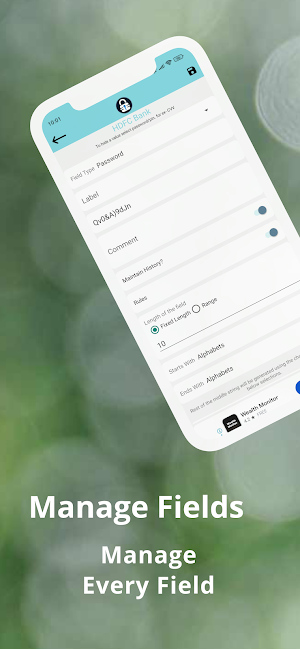


About Keydentials: Password Manager
Keydentials – The Ultimate Offline Password Manager & Secure Vault
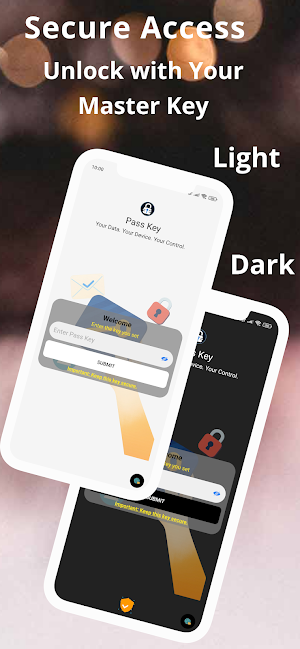
Tired of managing dozens of passwords? 😩 Keydentials is the secure, cloud-free password manager you've been waiting for. We've just rolled out a fresh new UI/UX, added support for Hindi and Marathi languages, and introduced a self-destruct feature for ultimate security. Your logins, credentials, and sensitive data are 100% protected with military-grade AES-256 encryption and stored offline on your device—meaning no breaches, no worries! 🛡️
🌟 What's New in Keydentials!
🔹Fresh UI/UX: Enjoy a modern, intuitive, and beautiful interface.
🔹Multilingual Support: Now available in Hindi and Marathi.
🔹Self-Destruct Data: For ultimate security, your vault can securely erase data after multiple incorrect key attempts.
🔹Category Icons: Set custom icons for your categories and entries to personalize your vault.
🔒 Why Keydentials is the Most Secure Choice
🔹True Offline Security: ☁️ Your passwords and data are stored exclusively on your device. Zero cloud storage means zero risk of online data breaches.
🔹Military-Grade Encryption: 🔑 We use industry-leading AES-256 encryption to ensure no one but you can access your secure vault.
🔹Biometric Authentication: 👆 Instantly unlock your vault with your Fingerprint or Face ID for quick, secure access.
🔹Self-Destruct Data: 💣 Enable this feature for an extra layer of protection. If an unauthorized user enters the wrong key multiple times, your data will be securely erased.
🚀 Key Features to Simplify Your Digital Life
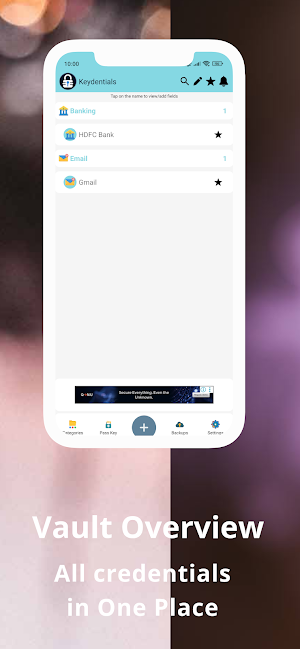
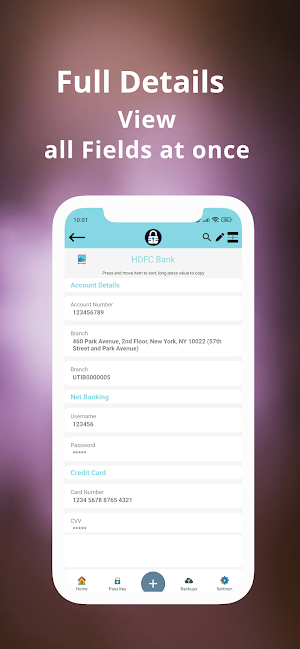
🔹Password Manager & Secure Vault: 🔐 Store an unlimited number of logins, credentials, notes, and files effortlessly.
🔹Powerful Password Generator: ⚙️ Create strong, unique passwords with a single tap to protect every account.
🔹Autofill Login: ✍️ Securely and quickly log into your accounts with a single tap.
🔹Floating Widget: 🤳 Access your credentials instantly from any screen without opening the app.
🔹Organized Data with Categories: 🗂️ Use custom categories with unique icons to keep your password vault neat and easy to search.
🔹Attach Files to Entries: 📎 Store important documents and files safely alongside your credentials.
💾 Backup & Restore with Ease
🔹 Google Drive Auto-Backup: 🔄 Set up automatic backups to your personal Google Drive account for convenience and peace of mind.
🔹 Keep 5 Recent Backups: 📂 Restore from up to five of your most recent backups.
🔹 CSV Import/Export: 📊 Easily import data from other password managers or export your data securely across devices.
🔎 Who is Keydentials For?
🔹Professionals: Managing multiple logins and credentials for work.
🔹Security-Conscious Users: Looking for a cloud-free security solution.
🔹Anyone: Who wants a secure and reliable password manager with fast and safe autofill.
Your Privacy. Your Control. Your Security.
Download Keydentials NOW to protect your logins and credentials with the most secure, feature-rich, and easy-to-use password manager available. Your privacy and security are our promise. 🤝
Tired of managing dozens of passwords? 😩 Keydentials is the secure, cloud-free password manager you've been waiting for. We've just rolled out a fresh new UI/UX, added support for Hindi and Marathi languages, and introduced a self-destruct feature for ultimate security. Your logins, credentials, and sensitive data are 100% protected with military-grade AES-256 encryption and stored offline on your device—meaning no breaches, no worries! 🛡️
🌟 What's New in Keydentials!
🔹Fresh UI/UX: Enjoy a modern, intuitive, and beautiful interface.
🔹Multilingual Support: Now available in Hindi and Marathi.
🔹Self-Destruct Data: For ultimate security, your vault can securely erase data after multiple incorrect key attempts.
🔹Category Icons: Set custom icons for your categories and entries to personalize your vault.
🔒 Why Keydentials is the Most Secure Choice
🔹True Offline Security: ☁️ Your passwords and data are stored exclusively on your device. Zero cloud storage means zero risk of online data breaches.
🔹Military-Grade Encryption: 🔑 We use industry-leading AES-256 encryption to ensure no one but you can access your secure vault.
🔹Biometric Authentication: 👆 Instantly unlock your vault with your Fingerprint or Face ID for quick, secure access.
🔹Self-Destruct Data: 💣 Enable this feature for an extra layer of protection. If an unauthorized user enters the wrong key multiple times, your data will be securely erased.
🚀 Key Features to Simplify Your Digital Life
🔹Password Manager & Secure Vault: 🔐 Store an unlimited number of logins, credentials, notes, and files effortlessly.
🔹Powerful Password Generator: ⚙️ Create strong, unique passwords with a single tap to protect every account.
🔹Autofill Login: ✍️ Securely and quickly log into your accounts with a single tap.
🔹Floating Widget: 🤳 Access your credentials instantly from any screen without opening the app.
🔹Organized Data with Categories: 🗂️ Use custom categories with unique icons to keep your password vault neat and easy to search.
🔹Attach Files to Entries: 📎 Store important documents and files safely alongside your credentials.
💾 Backup & Restore with Ease
🔹 Google Drive Auto-Backup: 🔄 Set up automatic backups to your personal Google Drive account for convenience and peace of mind.
🔹 Keep 5 Recent Backups: 📂 Restore from up to five of your most recent backups.
🔹 CSV Import/Export: 📊 Easily import data from other password managers or export your data securely across devices.
🔎 Who is Keydentials For?
🔹Professionals: Managing multiple logins and credentials for work.
🔹Security-Conscious Users: Looking for a cloud-free security solution.
🔹Anyone: Who wants a secure and reliable password manager with fast and safe autofill.
Your Privacy. Your Control. Your Security.
Download Keydentials NOW to protect your logins and credentials with the most secure, feature-rich, and easy-to-use password manager available. Your privacy and security are our promise. 🤝
What’s new
Version 4.4.2 · Updated September 21, 2026
- New: Authenticator (2FA/TOTP) support - add, scan, import and export codes from a dedicated page - Fixed: Change Passkey now correctly re-encrypts all your data with the new passkey - Fixed: several dialogs and buttons had invisible or hard-to-read text in dark mode - Fixed: language picker not matching the selected app theme - Various other bug fixes and improvements
User reviews

mizan

Hindi option bht badhiya h

Good app

The recent version looks great. I installed this app again on my new device and happy with this new version. Looking forward for more features. It helps managing my important credentials and informations. Thank You

A simple minimilastic app to store your important information. I'll suggest that the developers should include a tutorial section where they could teach the user about the various options that are available. It would make the app a lot more user friendly.

the apl is very useful and easy to use it helped me a lot to manage the password.
Alternatives to Keydentials: Password Manager
Looking for apps like Keydentials: Password Manager? Here are 6 similar Android apps on Google Play. All of them are free to download.
-
GK Gyani: GK Quiz App
-
DownTheMemory - Cloud Storage
-
CineBuffs: Movie Charades
-
FlashPal
-
AnyFile: Markdown & LaTeX
-
Word Search - Fun Mind Puzzles
| App | Rating | Price | Installs | Last updated | Compare |
|---|---|---|---|---|---|
| Keydentials: Password Manager | – | Free | 5,000+ | Sep 21, 2026 | |
| GK Gyani: GK Quiz App | – | Free | 1+ | – | Compare |
| DownTheMemory - Cloud Storage | – | Free | 1+ | Aug 9, 2026 | Compare |
| CineBuffs: Movie Charades | – | Free | 1+ | – | Compare |
| FlashPal | – | Free | 1+ | Aug 15, 2026 | Compare |
| AnyFile: Markdown & LaTeX | – | Free | 10+ | Aug 26, 2026 | Compare |
| Word Search - Fun Mind Puzzles | – | Free | 10+ | Aug 15, 2026 | Compare |