

Reception With App
soroban Productivity In-app purchases
Visitor management system
- Downloads
- 994+
- on Google Play
- Price
- Free
- In-app purchases
- Updated
- May 23
- 2026 · v2.7.0
Screenshots


About Reception With App
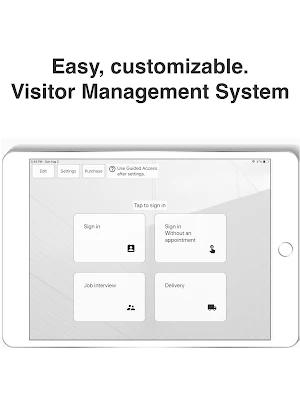
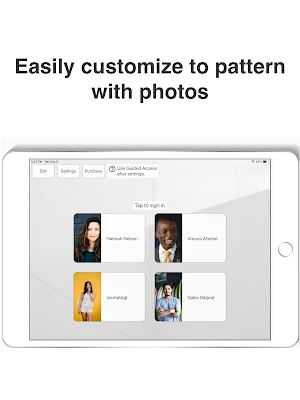
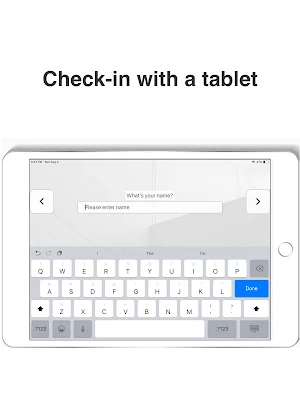
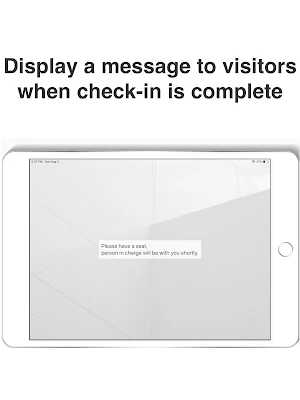
The app is a visitor management system. Accept and notify your visitors with your chat tool. You can set up your own messages, buttons, and background pictures.
Chat Tool is
-Slack
-Chatwork
-Microsoft Teams (Microsoft 365 User)
When the screen is fixed after setting, the app is fixed and the buttons displayed at the top can be hidden.
https://support.google.com/android/answer/9455138?hl=en
Turn on app pinning
1. Open your phone's Settings app.
2. Tap Security or Security & location and then Advanced and then App pinning.
3. Turn on App pinning.
Pin a screen
After turning on app pinning:
1. Go to the screen you want to pin.
2. Swipe up to the middle of your screen.
3. At the top of the image, tap the app's icon.
4. Tap Pin .
[Edit mode]
-You can edit message text and buttons
[Sleep mode]
If sleep is set to 'ON', the screen brightness will turn down when there is no operation for 30 seconds. Touch the screen and the brightness will turn up.
[Background]
You can set your favorite background picture.
[Subscription]
After 31 days, We will display a page asking for billing. You can continue using it, but if you do not want this to display, Please pay $5.99(USD) per month.
[How the app works]
https://reception-312a9.firebaseapp.com/q1_en
- Slack -
https://reception-312a9.firebaseapp.com/q2_en
- Chatwork -
https://reception-312a9.firebaseapp.com/q3_en
-Teams -
https://reception-312a9.firebaseapp.com/q4_en
• Privacy Policy
https://reception-312a9.firebaseapp.com/privacy/en
• Terms for in-app purchases
https://reception-312a9.firebaseapp.com/tos
Thank you for the lovely pictures.
Photo by Hannah Nelson from Pexels(https://www.pexels.com/photo/close-up-photography-of-a-woman-near-wall-1065084/)
Photo by Areous Ahmad from Pexels(https://www.pexels.com/photo/close-up-photo-of-smiling-man-2122949/)
Photo by mentatdgt from Pexels(https://www.pexels.com/photo/woman-wearing-white-sleeveless-shirt-and-white-denim-shorts-1082962/)
Photo by Dalila Dalprat from Pexels(https://www.pexels.com/photo/man-in-gray-shirt-standing-while-smiling-1844547/)
Rawpixel.com - jp.freepik.com (https://jp.freepik.com/psd/background)
Chat Tool is
-Slack
-Chatwork
-Microsoft Teams (Microsoft 365 User)
When the screen is fixed after setting, the app is fixed and the buttons displayed at the top can be hidden.
https://support.google.com/android/answer/9455138?hl=en
Turn on app pinning
1. Open your phone's Settings app.
2. Tap Security or Security & location and then Advanced and then App pinning.
3. Turn on App pinning.
Pin a screen
After turning on app pinning:
1. Go to the screen you want to pin.
2. Swipe up to the middle of your screen.
3. At the top of the image, tap the app's icon.
4. Tap Pin .
[Edit mode]
-You can edit message text and buttons
[Sleep mode]
If sleep is set to 'ON', the screen brightness will turn down when there is no operation for 30 seconds. Touch the screen and the brightness will turn up.
[Background]
You can set your favorite background picture.
[Subscription]
After 31 days, We will display a page asking for billing. You can continue using it, but if you do not want this to display, Please pay $5.99(USD) per month.
[How the app works]
https://reception-312a9.firebaseapp.com/q1_en
- Slack -
https://reception-312a9.firebaseapp.com/q2_en
- Chatwork -
https://reception-312a9.firebaseapp.com/q3_en
-Teams -
https://reception-312a9.firebaseapp.com/q4_en
• Privacy Policy
https://reception-312a9.firebaseapp.com/privacy/en
• Terms for in-app purchases
https://reception-312a9.firebaseapp.com/tos
Thank you for the lovely pictures.
Photo by Hannah Nelson from Pexels(https://www.pexels.com/photo/close-up-photography-of-a-woman-near-wall-1065084/)
Photo by Areous Ahmad from Pexels(https://www.pexels.com/photo/close-up-photo-of-smiling-man-2122949/)
Photo by mentatdgt from Pexels(https://www.pexels.com/photo/woman-wearing-white-sleeveless-shirt-and-white-denim-shorts-1082962/)
Photo by Dalila Dalprat from Pexels(https://www.pexels.com/photo/man-in-gray-shirt-standing-while-smiling-1844547/)
Rawpixel.com - jp.freepik.com (https://jp.freepik.com/psd/background)
What’s new
Version 2.7.0 · Updated May 23, 2026
Minor bug fixes and performance improvements.
Alternatives to Reception With App
Looking for apps like Reception With App? Here are 6 similar Android apps on Google Play. The highest rated is Fun Habit - Habit Tracker (4.7/5), and all 6 are free to download.
-
Todo Agenda 4.3
-
DoDay: Your To Do List 4.1
-
Timecap: Habit tracker & To-do 4.2
-
Edifi Christian Podcast Player 4.5
-
Fun Habit - Habit Tracker 4.7
-
Habit Tracker Planner HabitYou 4.6
| App | Rating | Price | Installs | Last updated | Compare |
|---|---|---|---|---|---|
| Reception With App | – | Free | 500+ | May 23, 2026 | |
| Todo Agenda | 4.3 / 5 | Free | 50,000+ | – | Compare |
| DoDay: Your To Do List | 4.1 / 5 | Free | 50,000+ | Jun 15, 2026 | Compare |
| Timecap: Habit tracker & To-do | 4.2 / 5 | Free | 100,000+ | Feb 9, 2026 | Compare |
| Edifi Christian Podcast Player | 4.5 / 5 | Free | 10,000+ | Feb 14, 2022 | Compare |
| Fun Habit - Habit Tracker | 4.7 / 5 | Free | 100,000+ | Oct 27, 2026 | Compare |
| Habit Tracker Planner HabitYou | 4.6 / 5 | Free | 100,000+ | Sep 2, 2026 | Compare |
Compare Reception With App with the top alternatives: ratings, updates, ASO score and keyword gaps →