

Orbit
Loomic Parenting In-app purchases
Boredom builds builders. Parent-controlled phone experience for kids.
- Downloads
- 66+
- on Google Play
- Price
- Free
- In-app purchases
- Updated
- Apr 10
- 2026 · v1.0.3
Screenshots


About Orbit
Boredom builds builders.
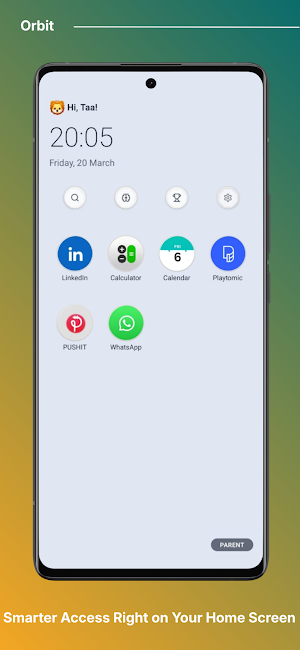
Orbit is the parent-controlled phone experience for kids that protects the empty space children need to grow into creators, not just consumers.
Most apps fight for your child's attention. Orbit does the opposite. It helps you replace endless
scrolling with intentional screen time, clear boundaries, and room for real-world creativity.
Why parents use Orbit:
• Protect your child from algorithm-driven distraction
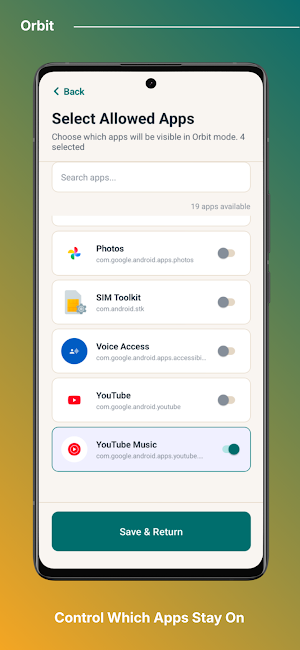
• Keep only approved apps visible with a kid-friendly launcher
• Lock parent settings behind a secure PIN
• Run Focus Mode sessions for homework, reading, or quiet time
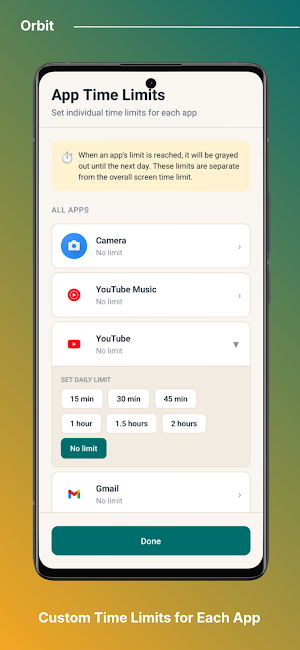
• Set daily screen-time limits and track remaining time
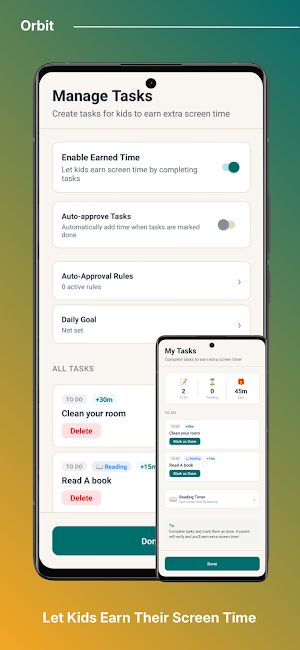
• Add bonus time when needed without losing structure
Built for busy parents. If you're tired, short on time, and want a better way to start, Orbit gives you one clear system:
• Earned screen time
• Curated apps
• Protected empty space
No complicated setup. No guilt spiral. Just a practical way to help your child build focus, resilience, and better habits with technology.
Download Orbit and protect your child's boredom and future.
Accessibility Service Disclosure
Orbit uses the Android AccessibilityService API to deliver its core parental-control functionality. Without it, the kiosk cannot prevent children from leaving approved apps.
How Orbit uses the AccessibilityService:
• Foreground app monitoring — Orbit observes window state changes to detect which app is in the foreground, so it can enforce the parent-approved app whitelist.
• Kiosk enforcement — When a non-whitelisted app is launched (e.g. Settings, Play Store, or any unapproved app), Orbit returns the device to the approved Home screen.
• Screen time & Focus Mode enforcement — The service detects app transitions so daily screen-time limits and Focus Mode sessions cannot be bypassed.
What Orbit does NOT do with the AccessibilityService:
• It does not read, collect, log, transmit, or store any on-screen content, text, passwords, keystrokes, or personal data.
• It does not record user activity or send any accessibility data off the device.
• It is not used for advertising, analytics, or any purpose unrelated to parental controls.
All AccessibilityService processing happens entirely on-device. The service is only active while Orbit's kiosk mode is enabled by the parent, and can be disabled at any time in Android Settings Accesibility.
Orbit is the parent-controlled phone experience for kids that protects the empty space children need to grow into creators, not just consumers.
Most apps fight for your child's attention. Orbit does the opposite. It helps you replace endless
scrolling with intentional screen time, clear boundaries, and room for real-world creativity.
Why parents use Orbit:
• Protect your child from algorithm-driven distraction
• Keep only approved apps visible with a kid-friendly launcher
• Lock parent settings behind a secure PIN
• Run Focus Mode sessions for homework, reading, or quiet time
• Set daily screen-time limits and track remaining time
• Add bonus time when needed without losing structure
Built for busy parents. If you're tired, short on time, and want a better way to start, Orbit gives you one clear system:
• Earned screen time
• Curated apps
• Protected empty space
No complicated setup. No guilt spiral. Just a practical way to help your child build focus, resilience, and better habits with technology.
Download Orbit and protect your child's boredom and future.
Accessibility Service Disclosure
Orbit uses the Android AccessibilityService API to deliver its core parental-control functionality. Without it, the kiosk cannot prevent children from leaving approved apps.
How Orbit uses the AccessibilityService:
• Foreground app monitoring — Orbit observes window state changes to detect which app is in the foreground, so it can enforce the parent-approved app whitelist.
• Kiosk enforcement — When a non-whitelisted app is launched (e.g. Settings, Play Store, or any unapproved app), Orbit returns the device to the approved Home screen.
• Screen time & Focus Mode enforcement — The service detects app transitions so daily screen-time limits and Focus Mode sessions cannot be bypassed.
What Orbit does NOT do with the AccessibilityService:
• It does not read, collect, log, transmit, or store any on-screen content, text, passwords, keystrokes, or personal data.
• It does not record user activity or send any accessibility data off the device.
• It is not used for advertising, analytics, or any purpose unrelated to parental controls.
All AccessibilityService processing happens entirely on-device. The service is only active while Orbit's kiosk mode is enabled by the parent, and can be disabled at any time in Android Settings Accesibility.
Alternatives to Orbit
Looking for apps like Orbit? Here are 6 similar Android apps on Google Play. All of them are free to download.






| App | Rating | Price | Installs | Last updated | Compare |
|---|---|---|---|---|---|
| Orbit | – | Free | 50+ | Apr 10, 2026 | |
| KiddyV: Healthy Screen Habits | – | Free | 50+ | Jun 16, 2026 | Compare |
| NameBloom | – | Free | 10+ | Apr 30, 2025 | Compare |
| Are You Okay? | – | Free | 1,000+ | Apr 19, 2026 | Compare |
| ParentPA | – | Free | 10+ | Sep 11, 2026 | Compare |
| Soneca | – | Free | 5+ | – | Compare |
| 난임상담톡톡 | – | Free | 50+ | Oct 7, 2026 | Compare |
Compare Orbit with the top alternatives: ratings, updates, ASO score and keyword gaps →
Similar apps on Google Play
- KiddyV: Healthy Screen Habits
- NameBloom
- Are You Okay?
- ParentPA
- Soneca
- 난임상담톡톡
- Summer Sitters
- BabyLogi: Newborn Baby Tracker
- BondBirthing
- Kids Police: Fake Call Prank
- Baby Sleep
- Dream Valley
- Pluto
- Elder Parent Care Log
- Baby Daily Care: AI Tracker
- Kindi - Baby Diary
- Kids Calculator (with Audio)
- Anna Mary
- 하루하루: 육아일기
- TALENT SMART
- SuperDuper: Family Assistant
- Bebeğim | Bebek uyku ve takip
- withdaddy -AI Parenting Outing
- AusomeFriend: Autism Tracker
- Child Growth Tracker