
KiddyV: Healthy Screen Habits
KiddyV Parenting In-app purchases
Kids read to unlock apps and games. Parents stay in control
- Downloads
- 94+
- on Google Play
- Price
- Free
- In-app purchases
- Updated
- Jun 16
- 2026 · v2.1.3
Screenshots




About KiddyV: Healthy Screen Habits
Your child learns discipline, curiosity, and responsibility before screens take over. KiddyV helps you turn screen time into a reward — not a habit.
Most parental control apps try to block.
KiddyV teaches.
Why parents choose KiddyV? Because they don’t just want less screen time.
They want a child who is:
focused instead of distracted
curious instead of passive
disciplined instead of dependent
respectful of limits — even when no one is watching
KiddyV builds those traits daily, through small, repeatable actions.
For parents:
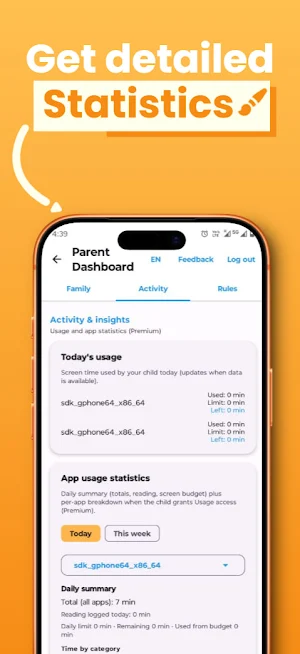
One Parent Dashboard
Control daily limits and choose exactly which apps are blocked — all in one locked place.
Daily screen time limits
Set how many minutes per day your child can use selected apps. When time runs out, those apps are automatically blocked.
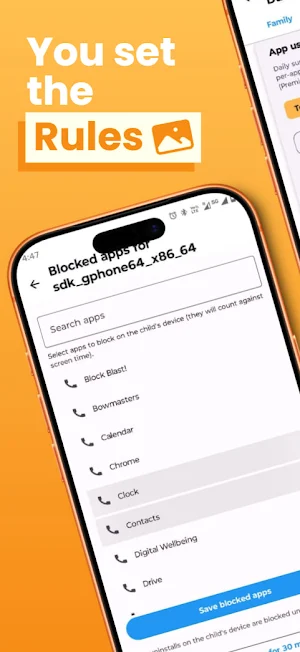
Smart app blocking
Choose which apps (YouTube, games, social media, etc.) require earned time to access.
For kids
Simple child home screen
No clutter. No distractions. Just reading and the apps parents allow.
Read to unlock apps
When daily time is used up, blocked apps can only be unlocked by reading.
Effort = reward
Children naturally connect action with outcome. No arguments. No negotiations.
This is how habits stick.
How it works?
Parents set a daily time limit and select which apps are restricted.
When the limit runs out, the app uses an accessibility service to return the child to the home screen if they open a blocked app.
To unlock access again, the child reads and earns screen time.
Parents manage everything from the locked Parent Dashboard.
Accessibility API Policy: This app uses the Android Accessibility Service API exclusively for enforcing screen time limits and app blocking functionality. When a child's daily screen time limit is reached or when attempting to open a blocked app, the Accessibility Service monitors which applications are launched and automatically returns the device to the home screen to prevent further usage. The service only monitors app launch events (TYPE_WINDOW_STATE_CHANGED) and does not collect, store, or transmit any personal data, content, or user interactions. The Accessibility Service is used solely to help parents enforce configured screen time rules and is essential for the app blocking feature to function properly. Users are presented with a clear consent dialog explaining the purpose before permission is requested, and the service can be disabled at any time through Android Settings.
Most parental control apps try to block.
KiddyV teaches.
Why parents choose KiddyV? Because they don’t just want less screen time.
They want a child who is:
focused instead of distracted
curious instead of passive
disciplined instead of dependent
respectful of limits — even when no one is watching
KiddyV builds those traits daily, through small, repeatable actions.
For parents:
One Parent Dashboard
Control daily limits and choose exactly which apps are blocked — all in one locked place.
Daily screen time limits
Set how many minutes per day your child can use selected apps. When time runs out, those apps are automatically blocked.
Smart app blocking
Choose which apps (YouTube, games, social media, etc.) require earned time to access.
For kids
Simple child home screen
No clutter. No distractions. Just reading and the apps parents allow.
Read to unlock apps
When daily time is used up, blocked apps can only be unlocked by reading.
Effort = reward
Children naturally connect action with outcome. No arguments. No negotiations.
This is how habits stick.
How it works?
Parents set a daily time limit and select which apps are restricted.
When the limit runs out, the app uses an accessibility service to return the child to the home screen if they open a blocked app.
To unlock access again, the child reads and earns screen time.
Parents manage everything from the locked Parent Dashboard.
Accessibility API Policy: This app uses the Android Accessibility Service API exclusively for enforcing screen time limits and app blocking functionality. When a child's daily screen time limit is reached or when attempting to open a blocked app, the Accessibility Service monitors which applications are launched and automatically returns the device to the home screen to prevent further usage. The service only monitors app launch events (TYPE_WINDOW_STATE_CHANGED) and does not collect, store, or transmit any personal data, content, or user interactions. The Accessibility Service is used solely to help parents enforce configured screen time rules and is essential for the app blocking feature to function properly. Users are presented with a clear consent dialog explaining the purpose before permission is requested, and the service can be disabled at any time through Android Settings.
What’s new
Version 2.1.3 · Updated June 16, 2026
KiddyV 2.1.3 What’s new Custom app groups with per-group daily limits Global daily limit syncs to child devices Rules update on child phones faster after you save Fixes Fixed app closing immediately on open on some devices
Alternatives to KiddyV: Healthy Screen Habits
Looking for apps like KiddyV: Healthy Screen Habits? Here are 4 similar Android apps on Google Play. 1 of the 4 are free to download.
-
Theater: AI Movie & TV Tracker
-
Smart Cleanup – Phone Cleaner
-
BudgetPal: AI Budget Planner
-
Barre Teja
| App | Rating | Price | Installs | Last updated | Compare |
|---|---|---|---|---|---|
| KiddyV: Healthy Screen Habits | – | Free | 50+ | Jun 16, 2026 | |
| Theater: AI Movie & TV Tracker | – | – | 10,000+ | Oct 31, 2026 | Compare |
| Smart Cleanup – Phone Cleaner | – | – | 50,000+ | Oct 28, 2026 | Compare |
| BudgetPal: AI Budget Planner | – | – | – | Mar 8, 2026 | Compare |
| Barre Teja | – | Free | 1,000+ | Jun 26, 2026 | Compare |