
Image to PDF - PDF Converter
Productivity Contains ads
Convert photos to high-quality PDF files instantly. Offline & private.
- Downloads
- 3+
- on Google Play
- Price
- Free
- No in-app purchases
- Updated
- Jul 9
- 2026 · v1.0.0
Screenshots

About Image to PDF - PDF Converter
Turn your photos into a single, well-organized PDF in seconds — no account, no upload, no waiting.
**Why ImageToPDF:**
- **Fast.** Pick images, reorder them, and export — done in a few taps.
- **Private.** Every conversion happens entirely on your device. Your photos are never uploaded anywhere.
- **Offline.** No internet connection needed for the core conversion — works anywhere.
- **No login.** No account, no sign-up, ever.
- **No watermark.** Your PDFs are yours, clean and unmarked.
**What you can do:**
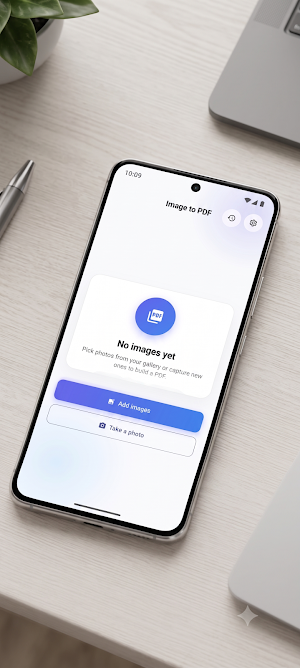
- Pick multiple photos from your gallery, or snap new ones with the camera
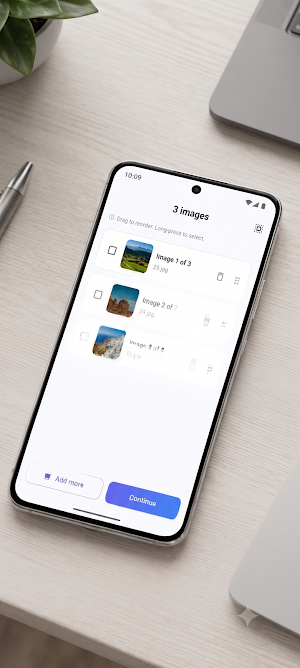
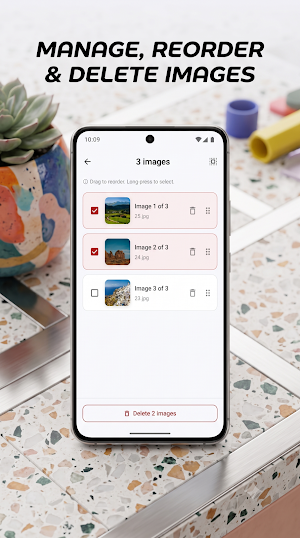
- Reorder pages by dragging, and remove any you don't need before exporting
- Choose the page size (A4, Letter, or fit-to-image) and orientation that fits your document
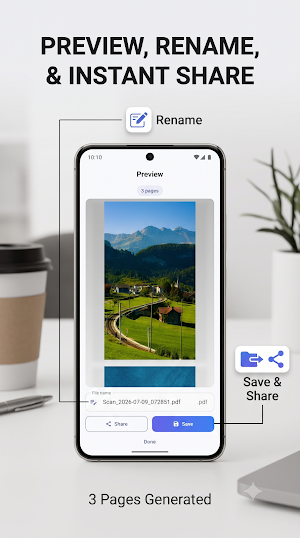
- Preview the finished PDF and rename it before saving
- Save to your device or share directly to email, chat, or cloud storage
- Revisit recent conversions any time from your history
**Who it's for:**
Perfect for turning scanned receipts, forms, ID pages, homework, whiteboard notes, or any set of photos into one clean PDF for submission, printing, archiving, or emailing — whenever a form or portal only accepts a single PDF file, not separate images.
Free to use, with a one-time Pro upgrade available to remove ads and lift the per-PDF image limit.
Convert your first PDF in under a minute — download ImageToPDF now.
**Why ImageToPDF:**
- **Fast.** Pick images, reorder them, and export — done in a few taps.
- **Private.** Every conversion happens entirely on your device. Your photos are never uploaded anywhere.
- **Offline.** No internet connection needed for the core conversion — works anywhere.
- **No login.** No account, no sign-up, ever.
- **No watermark.** Your PDFs are yours, clean and unmarked.
**What you can do:**
- Pick multiple photos from your gallery, or snap new ones with the camera
- Reorder pages by dragging, and remove any you don't need before exporting
- Choose the page size (A4, Letter, or fit-to-image) and orientation that fits your document
- Preview the finished PDF and rename it before saving
- Save to your device or share directly to email, chat, or cloud storage
- Revisit recent conversions any time from your history
**Who it's for:**
Perfect for turning scanned receipts, forms, ID pages, homework, whiteboard notes, or any set of photos into one clean PDF for submission, printing, archiving, or emailing — whenever a form or portal only accepts a single PDF file, not separate images.
Free to use, with a one-time Pro upgrade available to remove ads and lift the per-PDF image limit.
Convert your first PDF in under a minute — download ImageToPDF now.
What’s new
Version 1.0.0 · Updated July 9, 2026
Initial release: convert photos to PDF, reorder and manage your selection, choose page size and orientation, preview and rename before saving, and revisit recent conversions from history.
Alternatives to Image to PDF - PDF Converter
Looking for apps like Image to PDF - PDF Converter? Here are 6 similar Android apps on Google Play. All of them are free to download.
-
Scan2Review: QR Reviews
-
GeoStamp Map Camera
-
AccessHub - Event QR Entry
-
Nudge
-
2048: Swipe & Merge Puzzle
-
Snow Wallet: Card & Docs Vault
| App | Rating | Price | Installs | Last updated | Compare |
|---|---|---|---|---|---|
| Image to PDF - PDF Converter | – | Free | 1+ | Jul 9, 2026 | |
| Scan2Review: QR Reviews | – | Free | 5+ | Jul 22, 2026 | Compare |
| GeoStamp Map Camera | – | Free | 10+ | Aug 28, 2026 | Compare |
| AccessHub - Event QR Entry | – | Free | 100+ | May 7, 2026 | Compare |
| Nudge | – | Free | 50+ | Jun 10, 2026 | Compare |
| 2048: Swipe & Merge Puzzle | – | Free | 10+ | – | Compare |
| Snow Wallet: Card & Docs Vault | – | Free | 100+ | Aug 26, 2026 | Compare |