
SafeSurf VPN
Tools In-app purchases
Secure and fast VPN with powerful ad blocking features
- Rating
- 4.1
- 3.6K ratings
- Downloads
- 302K+
- on Google Play
- Price
- Free
- In-app purchases
- Updated
- Sep 27
- 2026 · v3.3.5
Screenshots


About SafeSurf VPN
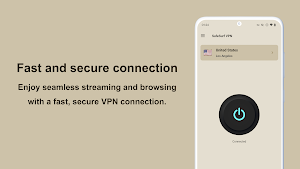
SafeSurf VPN hides your IP address and location while encrypting all your online traffic with robust security.
It also has an advanced ad blocking feature that significantly speeds up website loading times.
By removing ads, you can save up to 70% on your data usage and avoid unnecessary data consumption.
Start using SafeSurf VPN today for a smooth and secure Internet experience!
▼ Protect Your Data Online
When you use SafeSurf VPN, your IP address and virtual location are changed, ensuring your online traffic is protected from third parties. This keeps your data private at all times while you surf the internet.
▼ Stay Secure Even on Public Wi-Fi
SafeSurf VPN employs the latest encryption technology to keep your connection secure at all times. You can confidently log into accounts, perform online banking, and shop online even on public Wi-Fi hotspots.
▼ No-Log Policy
Protecting your data and privacy is our top priority. SafeSurf VPN does not collect, store or share any user's online activity or traffic data. Your online activities remain private and secure at all times.
▼ Protection from Malware
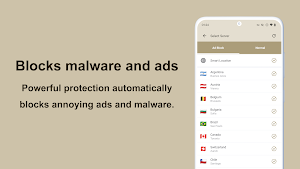
SafeSurf VPN comes with robust protection features that automatically block annoying ads, tracking, and malware. This ensures a safer and more pleasant internet experience.
▼ Global server network
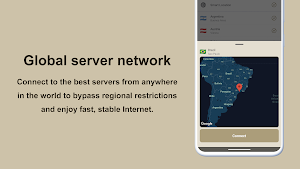
Connect to the best servers from anywhere in the world to bypass regional restrictions and enjoy fast, stable Internet.
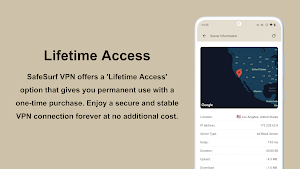
▼ Lifetime Access
SafeSurf VPN offers a 'Lifetime Access' option that gives you permanent use with a one-time purchase. Enjoy a secure and stable VPN connection forever at no additional cost.
Frequently Asked Questions
► Why I need a VPN?
VPN is virtual private network. It is a secure tunnel between your device and the internet, allowing you to stay private, remain secure, and access any online content you want-no matter where you are.
► Is VPN safe?
Using a VPN is not only safe, it adds an important layer of security to your online activities, especially on public Wi-Fi networks. We use SSL to encrypt Internet data, ensuring that third parties cannot decipher your information. When you connect to a secure VPN server, your Internet traffic passes through an encrypted tunnel, making it invisible to hackers, governments, and Internet service providers. In addition, SafeSurf VPN does not collect, store or share any user's online activity or traffic data. Your online activities remain private and secure at all times.
► Can't connect, auto-disconnect or speed is slow?
Connection problem is due to many factors, please restart your device, update the app to the latest version, refresh the server list.
► Some ads are not blocked.
Our VPN service operates in compliance with Google’s policies. As a result, some ads are intentionally not blocked. This is to balance policy compliance while maintaining user convenience. We are continuously improving our technology to provide the best browsing experience possible.
► I cannot access some streaming services.
Some streaming services may restrict access from VPNs. These services often provide content that is limited to specific regions and block access from VPN servers to prevent attempts to bypass these regional restrictions. While we strive to ensure maximum convenience for our users by continually adding new servers and improving the performance of existing ones, it can be challenging to completely bypass these restrictions.
► How to cancel the subscription in Google play?
Subscriptions on Google Play renew automatically unless you unsubscribe, if you want to unsubscribe, please open Google Play Store, tap Menu-Subscriptions-Tap the subscription you want to cancel-TapCancel subscription.
For more details: https://support.google.com/googleplay/answer/2476088
Install SafeSurf VPN and start enjoying the internet without worry today. Experience online freedom and safety!
It also has an advanced ad blocking feature that significantly speeds up website loading times.
By removing ads, you can save up to 70% on your data usage and avoid unnecessary data consumption.
Start using SafeSurf VPN today for a smooth and secure Internet experience!
▼ Protect Your Data Online
When you use SafeSurf VPN, your IP address and virtual location are changed, ensuring your online traffic is protected from third parties. This keeps your data private at all times while you surf the internet.
▼ Stay Secure Even on Public Wi-Fi
SafeSurf VPN employs the latest encryption technology to keep your connection secure at all times. You can confidently log into accounts, perform online banking, and shop online even on public Wi-Fi hotspots.
▼ No-Log Policy
Protecting your data and privacy is our top priority. SafeSurf VPN does not collect, store or share any user's online activity or traffic data. Your online activities remain private and secure at all times.
▼ Protection from Malware
SafeSurf VPN comes with robust protection features that automatically block annoying ads, tracking, and malware. This ensures a safer and more pleasant internet experience.
▼ Global server network
Connect to the best servers from anywhere in the world to bypass regional restrictions and enjoy fast, stable Internet.
▼ Lifetime Access
SafeSurf VPN offers a 'Lifetime Access' option that gives you permanent use with a one-time purchase. Enjoy a secure and stable VPN connection forever at no additional cost.
Frequently Asked Questions
► Why I need a VPN?
VPN is virtual private network. It is a secure tunnel between your device and the internet, allowing you to stay private, remain secure, and access any online content you want-no matter where you are.
► Is VPN safe?
Using a VPN is not only safe, it adds an important layer of security to your online activities, especially on public Wi-Fi networks. We use SSL to encrypt Internet data, ensuring that third parties cannot decipher your information. When you connect to a secure VPN server, your Internet traffic passes through an encrypted tunnel, making it invisible to hackers, governments, and Internet service providers. In addition, SafeSurf VPN does not collect, store or share any user's online activity or traffic data. Your online activities remain private and secure at all times.
► Can't connect, auto-disconnect or speed is slow?
Connection problem is due to many factors, please restart your device, update the app to the latest version, refresh the server list.
► Some ads are not blocked.
Our VPN service operates in compliance with Google’s policies. As a result, some ads are intentionally not blocked. This is to balance policy compliance while maintaining user convenience. We are continuously improving our technology to provide the best browsing experience possible.
► I cannot access some streaming services.
Some streaming services may restrict access from VPNs. These services often provide content that is limited to specific regions and block access from VPN servers to prevent attempts to bypass these regional restrictions. While we strive to ensure maximum convenience for our users by continually adding new servers and improving the performance of existing ones, it can be challenging to completely bypass these restrictions.
► How to cancel the subscription in Google play?
Subscriptions on Google Play renew automatically unless you unsubscribe, if you want to unsubscribe, please open Google Play Store, tap Menu-Subscriptions-Tap the subscription you want to cancel-TapCancel subscription.
For more details: https://support.google.com/googleplay/answer/2476088
Install SafeSurf VPN and start enjoying the internet without worry today. Experience online freedom and safety!
What’s new
Version 3.3.5 · Updated September 27, 2026
Improvements & bug fixes • Fixed connections getting stuck on “Connecting” and dropping (e.g. first connect) • Fixed brief freezes when VPN connection attempts overlapped
User reviews

There are problems when you want to purchase a plan. It either shows that no Internet connection or you're not in your own country. If use the browser to watch YouTube, you have to sign in to confirm that you're not a bot. With the latest version, auto disconnection still exists after 3 hours ( device type : Samsung...

I like it 😊

Ok

Just install! I seems OK! Doesn't block much ads!

Great app

AD Blocker is Awesome Fabulous and compliment's ALL Kaspersky Security Protection Anti-Virus, VPN, Anti-Theft, Plus Programs To the Maximum To Give Everyone Protection from Every Malicious AD Known to Man Globally Love You-Y'ALL KEEP UP THE GREAT WORK OF KEEPING HACKERS OUT-FANTASTIC, THE BaumDiggity Yeah Hoo
Alternatives to SafeSurf VPN
Looking for apps like SafeSurf VPN? Here are 6 similar Android apps on Google Play. The highest rated is Screenshot -Automatic trimming (4.4/5), and 3 of the 6 are free to download.
-
Ad Blocker 4.0
-
Rotation Control 4.1
-
Screenshot -Automatic trimming 4.4
-
Ad Blocker Pro 4.1
-
Mute Camera Plus
-
Auto-rotate Control Pro 4.0
| App | Rating | Price | Installs | Last updated | Compare |
|---|---|---|---|---|---|
| SafeSurf VPN | 4.1 / 5 | Free | 100,000+ | Sep 27, 2026 | |
| Ad Blocker | 4.0 / 5 | Free | 1,000,000+ | Oct 27, 2026 | Compare |
| Rotation Control | 4.1 / 5 | Free | 1,000,000+ | Oct 31, 2026 | Compare |
| Screenshot -Automatic trimming | 4.4 / 5 | Free | 1,000,000+ | Oct 7, 2026 | Compare |
| Ad Blocker Pro | 4.1 / 5 | 3.49 USD | 100,000+ | Oct 7, 2026 | Compare |
| Mute Camera Plus | – | 2.49 USD | 10,000+ | – | Compare |
| Auto-rotate Control Pro | 4.1 / 5 | 1.99 USD | 50,000+ | Aug 23, 2020 | Compare |
Compare SafeSurf VPN with the top alternatives: ratings, updates, ASO score and keyword gaps →