

Flux AI To-Do List: Task Notes
Productivity In-app purchases Contains ads
Smart AI voice planner: To-Do List, tasks, notes, reminders and speech to text.
- Downloads
- 100+
- on Google Play
- Price
- Free
- In-app purchases
- Updated
- Jul 22
- 2026 · v1.3.2
Screenshots


About Flux AI To-Do List: Task Notes
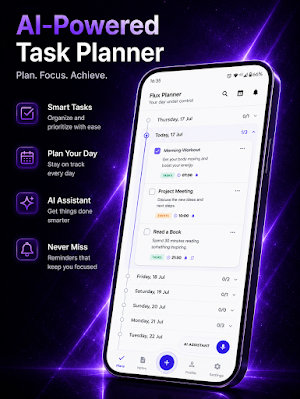
Flux AI To-Do List: Tasks & Notes helps you turn voice into organized notes, tasks, events and reminders.
Speak naturally, and Flux helps capture what you mean. Create quick notes, plan daily tasks, save important events, set reminders and keep your ideas organized in one clean workspace.
AI VOICE PLANNER
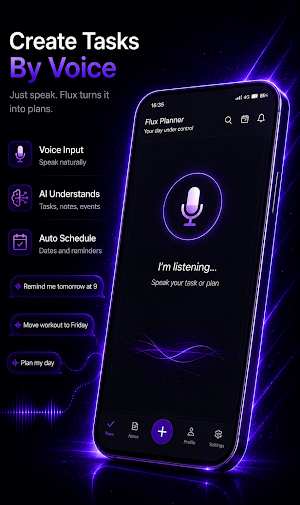
Stop typing everything manually. With fast voice input, you can capture thoughts, plans and tasks in seconds. Flux can understand natural commands and turn them into structured records.
You can say things like:
“Add a task to call John tomorrow at 3 PM”
“Create an event for Friday evening”
“Write a note about my project idea”
“Move this task to tomorrow”
“Add this text to my note”
NOTES, TASKS, EVENTS AND REMINDERS
Flux is more than a simple notepad. It combines:
Notes for ideas, thoughts and text
Tasks for things you need to do
Events for plans and important moments
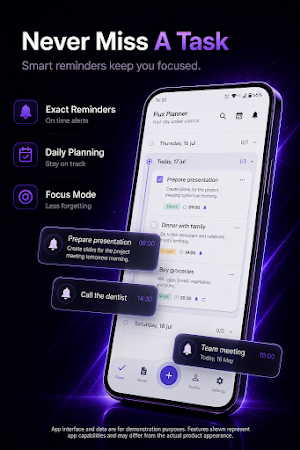
Reminders so you do not forget what matters
Everything is organized in a clean timeline, so your day feels easier to manage.
SMART AI COMMANDS
Use AI to work with your records faster:
Create notes, tasks and events
Move tasks or events to another day
Edit titles, text, dates and times
Add more text to existing records
Archive, restore or delete records
Search for what you saved
Flux is designed to understand natural language, so you do not need to speak like a robot.
FAST AND MINIMAL DESIGN
Flux is built for speed and clarity:
One-tap voice input
Clean modern interface
Timeline view for daily planning
Quick filters for notes, tasks and events
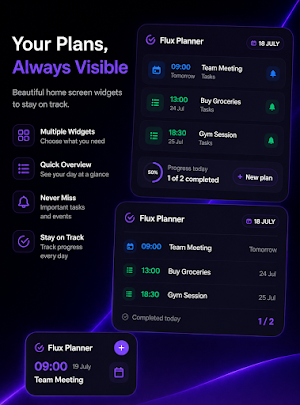
Home screen widget for upcoming tasks
Beautiful dark and light themes
PRIVATE BY DEFAULT
You can use Flux locally without signing in. Your records stay on your device unless you choose to sign in and sync.
Optional Google sign-in lets you sync your notes, tasks and events across devices. You stay in control of your data.
PERFECT FOR
Daily planning
Voice notes
To-do lists
Study notes
Work ideas
Personal reminders
Project planning
Quick thoughts you do not want to forget
WHY FLUX AI To-Do List?
Fast voice to text
AI-powered organization
Notes, tasks and events in one place
Reminders and planning tools
Modern design
Optional cloud sync
Private local mode
Download Flux AI To-Do List and turn your voice into clear notes, tasks and reminders.
Speak naturally, and Flux helps capture what you mean. Create quick notes, plan daily tasks, save important events, set reminders and keep your ideas organized in one clean workspace.
AI VOICE PLANNER
Stop typing everything manually. With fast voice input, you can capture thoughts, plans and tasks in seconds. Flux can understand natural commands and turn them into structured records.
You can say things like:
“Add a task to call John tomorrow at 3 PM”
“Create an event for Friday evening”
“Write a note about my project idea”
“Move this task to tomorrow”
“Add this text to my note”
NOTES, TASKS, EVENTS AND REMINDERS
Flux is more than a simple notepad. It combines:
Notes for ideas, thoughts and text
Tasks for things you need to do
Events for plans and important moments
Reminders so you do not forget what matters
Everything is organized in a clean timeline, so your day feels easier to manage.
SMART AI COMMANDS
Use AI to work with your records faster:
Create notes, tasks and events
Move tasks or events to another day
Edit titles, text, dates and times
Add more text to existing records
Archive, restore or delete records
Search for what you saved
Flux is designed to understand natural language, so you do not need to speak like a robot.
FAST AND MINIMAL DESIGN
Flux is built for speed and clarity:
One-tap voice input
Clean modern interface
Timeline view for daily planning
Quick filters for notes, tasks and events
Home screen widget for upcoming tasks
Beautiful dark and light themes
PRIVATE BY DEFAULT
You can use Flux locally without signing in. Your records stay on your device unless you choose to sign in and sync.
Optional Google sign-in lets you sync your notes, tasks and events across devices. You stay in control of your data.
PERFECT FOR
Daily planning
Voice notes
To-do lists
Study notes
Work ideas
Personal reminders
Project planning
Quick thoughts you do not want to forget
WHY FLUX AI To-Do List?
Fast voice to text
AI-powered organization
Notes, tasks and events in one place
Reminders and planning tools
Modern design
Optional cloud sync
Private local mode
Download Flux AI To-Do List and turn your voice into clear notes, tasks and reminders.
What’s new
Version 1.3.2 · Updated July 22, 2026
- Fixed bugs and improved stability.
User reviews

Very attractive Looking and Using

great

Top class AI todo list app so far!
Alternatives to Flux AI To-Do List: Task Notes
Looking for apps like Flux AI To-Do List: Task Notes? Here is 1 similar Android app on Google Play.
| App | Rating | Price | Installs | Compare |
|---|---|---|---|---|
| Flux AI To-Do List: Task Notes | – | Free | 100+ | |
| Flux Files: File Manager | – | Free | 1,000+ | Compare |