

AI Screenshot Organizer
Tools Contains ads
Smart screenshot organizer with search & reminders
- Downloads
- 533+
- on Google Play
- Price
- Free
- No in-app purchases
- Updated
- Feb 27
- 2026 · v0.0.4
Screenshots


About AI Screenshot Organizer
AI Screenshot Organizer helps you organize, search, and manage your screenshots more efficiently.
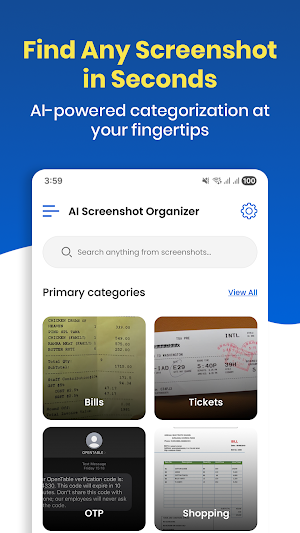
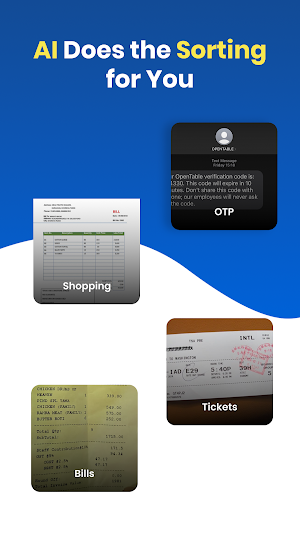
Instead of scrolling endlessly through your gallery, the app automatically detects screenshots and organizes them into useful categories such as bills, tickets, shopping, documents, and more.
Key Features
Smart Screenshot Organization
Automatically detects screenshots and groups them into helpful categories.
Fast Search
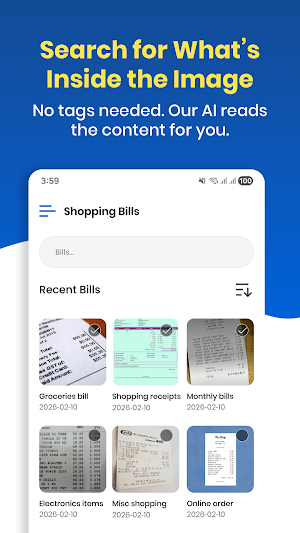
Search screenshots by keywords, extracted text, dates, or categories.
On‑Device Processing
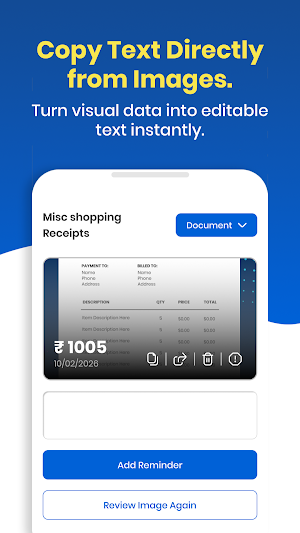
All screenshot analysis and text extraction happen directly on your device. Your images are not uploaded to external servers.
Reminder Support
Create reminders from important screenshots so you don’t miss deadlines or events.
Cleanup Tools
Identify old or unnecessary screenshots and free up storage space easily.
Important Folder
Mark screenshots as important for quick access anytime.
Privacy First
• Screenshot processing is performed locally on your device
• No cloud upload of your images
• You remain in control of your data
The app may display ads using Google AdMob to support development.
Permissions Used
• READ_MEDIA_IMAGES – To detect and organize screenshots stored on your device
• POST_NOTIFICATIONS – To send reminder alerts and scan updates
You can manage permissions anytime in your device settings.
Who Is This App For?
AI Screenshot Organizer is useful for anyone who frequently takes screenshots and wants to keep them organized and easy to find.
Instead of scrolling endlessly through your gallery, the app automatically detects screenshots and organizes them into useful categories such as bills, tickets, shopping, documents, and more.
Key Features
Smart Screenshot Organization
Automatically detects screenshots and groups them into helpful categories.
Fast Search
Search screenshots by keywords, extracted text, dates, or categories.
On‑Device Processing
All screenshot analysis and text extraction happen directly on your device. Your images are not uploaded to external servers.
Reminder Support
Create reminders from important screenshots so you don’t miss deadlines or events.
Cleanup Tools
Identify old or unnecessary screenshots and free up storage space easily.
Important Folder
Mark screenshots as important for quick access anytime.
Privacy First
• Screenshot processing is performed locally on your device
• No cloud upload of your images
• You remain in control of your data
The app may display ads using Google AdMob to support development.
Permissions Used
• READ_MEDIA_IMAGES – To detect and organize screenshots stored on your device
• POST_NOTIFICATIONS – To send reminder alerts and scan updates
You can manage permissions anytime in your device settings.
Who Is This App For?
AI Screenshot Organizer is useful for anyone who frequently takes screenshots and wants to keep them organized and easy to find.
Alternatives to AI Screenshot Organizer
Looking for apps like AI Screenshot Organizer? Here are 6 similar Android apps on Google Play. The highest rated is Photo Lab - Faceswap AI (3.8/5), and all 6 are free to download.
-
Super VPN: Fast & Safe VPN
-
Live Earth: GPS Map Tracker
-
TrimMaster: Video Audio Cutter
-
Facehub: AI Headshots Creator
-
Photo Lab - Faceswap AI 3.8
-
Video Downloader - Story Saver 3.2
| App | Rating | Price | Installs | Last updated | Compare |
|---|---|---|---|---|---|
| AI Screenshot Organizer | – | Free | 500+ | Feb 27, 2026 | |
| Super VPN: Fast & Safe VPN | – | Free | 100,000+ | – | Compare |
| Live Earth: GPS Map Tracker | – | Free | 500,000+ | May 15, 2026 | Compare |
| TrimMaster: Video Audio Cutter | – | Free | 100+ | Feb 25, 2026 | Compare |
| Facehub: AI Headshots Creator | – | Free | 1,000+ | Apr 1, 2026 | Compare |
| Photo Lab - Faceswap AI | 3.8 / 5 | Free | 10,000+ | – | Compare |
| Video Downloader - Story Saver | 3.2 / 5 | Free | 100,000+ | – | Compare |