
Draw Text Notepad: Paper Notes
SM Infotech Art & Design In-app purchases Contains ads
🎨 Create, Customize, Draw & Note with Style! All-in-one creativity tool.🖌️✍️📋
- Downloads
- 1K+
- on Google Play
- Price
- Free
- In-app purchases
- Updated
- Jan 27
- 2025 · v1.0.0
Screenshots


About Draw Text Notepad: Paper Notes
Create, Draw and Note Like Never Before!
This app is your all-in-one drawing tool for creativity and productivity. Whether you’re sketching, jotting ideas, or crafting colorful text notes, this app makes it easy, fun and efficient!
Features That Make Your Notes Stand Out:
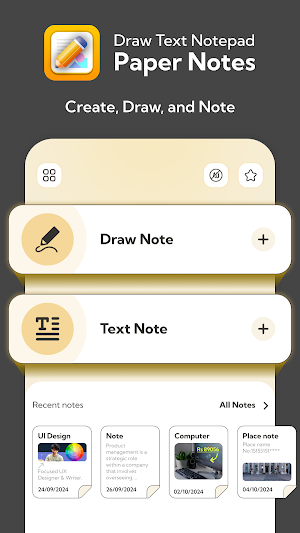
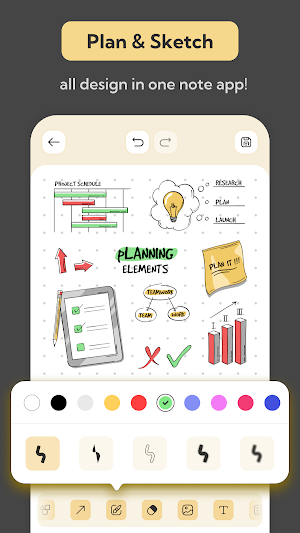
🖌️Draw Note
• Select your favorite backdrop, papers and colors.
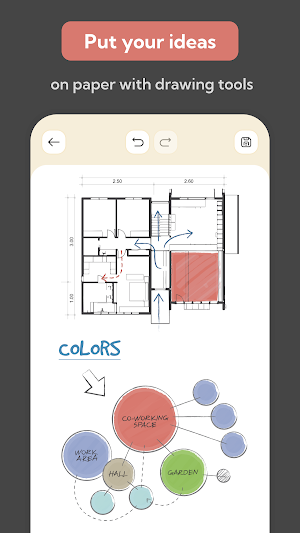
• Use amazing tools like bordered or filled shapes, colorful brush lines and erasers.
• Add photos from camera or gallery directly to the canvas.
• Enjoy an array of stickers to make your notes pop!
Capture Your Thoughts with Style
✍️Draw Text
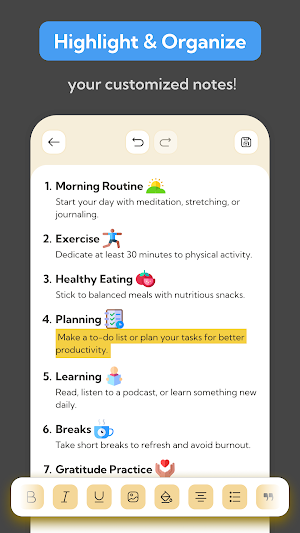
• Write text notes with powerful editing tools.
• Style your text: Bold, Italic, Underline, Strike-through.
• Add dividers, superscripts (X²), subscripts (X₂), hyperlinks & many more options.
• Change text size, font and color for customization.
• Highlight important text with ease.
• Share your text notes as images or plain text.
📋Home Screen Notes
• Quickly access and view all your recent notes directly from the Home Screen.
Why Choose Draw Text Notepad?
🎨 Perfect for artists, writers, and anyone who loves to stay organized.
📋 Combines creativity and productivity in one app.
🔗 Easily share your ideas with friends or save them for later.
Use Cases
1. For Creative Professionals
• Sketch and Brainstorm Ideas: Artists, designers and illustrators can quickly sketch rough ideas or brainstorm concepts using the drawing tools and customizable canvases.
• Design Mood Boards: Combine drawings, text, photos, and stickers to create mood boards or visual inspiration.
2. Hobby and Leisure
• Recipe Notes: Write down recipes and add photos & share with anyone.
• Travel Journals: Document travel experiences with a mix of text notes, and photos.
4. Project Planning
• Project Planning: Use drawing tools to outline workflows, draw timelines, and attach notes for task details.
5. Creative Note-Taking
• Style your notes with colorful text, fun fonts, and highlights. Add sketches or doodles to organize your thoughts with a creative touch.
6. Instant Sketch Pad
• Draw, doodle, or design effortlessly with brushes, shapes, and vibrant colors. Perfect for quick ideas or sharing your art.
7. Personalized Journals & Lists
• Create stylish journals or to-do lists with notes, drawings, stickers, and photos. Make everyday tasks fun and organized!
Download the app now and experience the simplest way to create, draw and share notes with style!
This app is your all-in-one drawing tool for creativity and productivity. Whether you’re sketching, jotting ideas, or crafting colorful text notes, this app makes it easy, fun and efficient!
Features That Make Your Notes Stand Out:
🖌️Draw Note
• Select your favorite backdrop, papers and colors.
• Use amazing tools like bordered or filled shapes, colorful brush lines and erasers.
• Add photos from camera or gallery directly to the canvas.
• Enjoy an array of stickers to make your notes pop!
Capture Your Thoughts with Style
✍️Draw Text
• Write text notes with powerful editing tools.
• Style your text: Bold, Italic, Underline, Strike-through.
• Add dividers, superscripts (X²), subscripts (X₂), hyperlinks & many more options.
• Change text size, font and color for customization.
• Highlight important text with ease.
• Share your text notes as images or plain text.
📋Home Screen Notes
• Quickly access and view all your recent notes directly from the Home Screen.
Why Choose Draw Text Notepad?
🎨 Perfect for artists, writers, and anyone who loves to stay organized.
📋 Combines creativity and productivity in one app.
🔗 Easily share your ideas with friends or save them for later.
Use Cases
1. For Creative Professionals
• Sketch and Brainstorm Ideas: Artists, designers and illustrators can quickly sketch rough ideas or brainstorm concepts using the drawing tools and customizable canvases.
• Design Mood Boards: Combine drawings, text, photos, and stickers to create mood boards or visual inspiration.
2. Hobby and Leisure
• Recipe Notes: Write down recipes and add photos & share with anyone.
• Travel Journals: Document travel experiences with a mix of text notes, and photos.
4. Project Planning
• Project Planning: Use drawing tools to outline workflows, draw timelines, and attach notes for task details.
5. Creative Note-Taking
• Style your notes with colorful text, fun fonts, and highlights. Add sketches or doodles to organize your thoughts with a creative touch.
6. Instant Sketch Pad
• Draw, doodle, or design effortlessly with brushes, shapes, and vibrant colors. Perfect for quick ideas or sharing your art.
7. Personalized Journals & Lists
• Create stylish journals or to-do lists with notes, drawings, stickers, and photos. Make everyday tasks fun and organized!
Download the app now and experience the simplest way to create, draw and share notes with style!
User reviews

love
Alternatives to Draw Text Notepad: Paper Notes
Looking for apps like Draw Text Notepad: Paper Notes? Here are 6 similar Android apps on Google Play. The highest rated is Bluetooth volume controller (4.2/5), and all 6 are free to download.
-
TV file transfer 3.8
-
Bluetooth volume controller 4.2
-
OTG Checker & File Manager 3.3
-
My Folder : Safe Secure Hidden 4.0
-
Text Code Writer & Editor 3.0
-
My Location Timeline on Map 3.4
| App | Rating | Price | Installs | Last updated | Compare |
|---|---|---|---|---|---|
| Draw Text Notepad: Paper Notes | – | Free | 1,000+ | Jan 27, 2025 | |
| TV file transfer | 3.8 / 5 | Free | 1,000,000+ | Mar 18, 2026 | Compare |
| Bluetooth volume controller | 4.2 / 5 | Free | 1,000,000+ | – | Compare |
| OTG Checker & File Manager | 3.3 / 5 | Free | 100,000+ | – | Compare |
| My Folder : Safe Secure Hidden | 4.0 / 5 | Free | 1,000,000+ | Sep 21, 2026 | Compare |
| Text Code Writer & Editor | 3.0 / 5 | Free | 100,000+ | – | Compare |
| My Location Timeline on Map | 3.4 / 5 | Free | 100,000+ | Mar 18, 2026 | Compare |
Similar apps on Google Play
- TV file transfer
- Bluetooth volume controller
- OTG Checker & File Manager
- My Folder : Safe Secure Hidden
- Text Code Writer & Editor
- My Location Timeline on Map
- Applock with Face
- GPS Speedometer: Speed Tracker
- The Original Piano
- Voice Announcer
- Noise Reducer: Better Sound
- Voice Lock : Speak to Unlock
- Internet Speed & Network Test
- Enable Speaker Mode
- Sunrise & Sunset Timings
- Text On Video
- Phone Configuration Checker
- All Smart Tools - Daily Uses
- My Font - Font Keyboard
- 5G / 4G Volte Testing
- Snap Pose Camera: Guided Poses
- GPS Video: Video with Location