

Sticky Notes for Android
Productivity
You can use Sticky Notes with a tablet pen or a standard touchpad.
- Rating
- 3.5
- 121 ratings
- Downloads
- 10K+
- on Google Play
- Price
- Free
- No in-app purchases
- Updated
- Jul 8
- 2016 · v1.2
Screenshots


About Sticky Notes for Android
Sticky Notes support pen and touch input, too you can even switch between different input methods within the space of a single note. Sticky Notes is available only in the android phone or smartphone
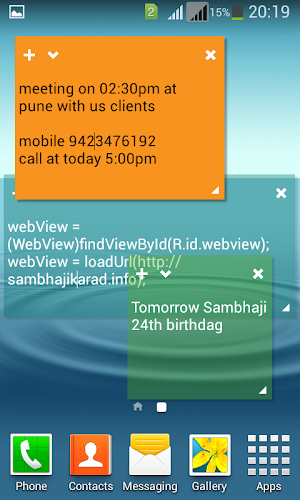
You can use Sticky Notes to write a to-do list, jot down a phone number, or do anything else that you'd use a pad of paper for. You can use Sticky Notes with a tablet pen or a standard touchpad. To write a note using a tablet pen, simply start writing on the note where you want the ink to appear. To type a note, click where you want the text to appear, and then start typing.
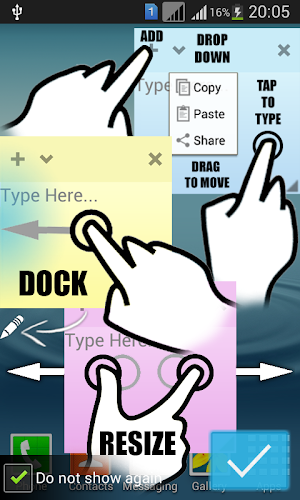
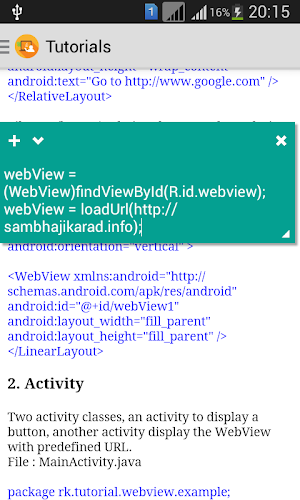
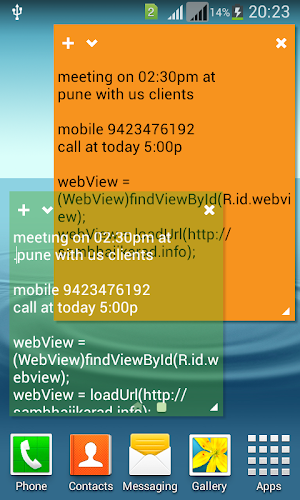
Sticky notes that stay on top of all other apps! Easily dock them to the left side to keep your screen real-estate at full potential. Useful for quick note taking. Closing a note will delete its text. All stickies are auto-saved!.
Note
*To re-size a note, drag an edge or corner of the note to make it larger or smaller.
*Sticky Notes closes if you delete all of your notes. To create a new note, reopen Sticky Notes.
*Click the plus sign in the top left corner to create a new note, or click the x in the right corner to delete an existing note.
*If you paste text into the Sticky Note, it will maintain most of its original formatting. You'll notice a scroll bar on the right if there’s more text than can be displayed on the screen
Features:
- On top of all other apps (access from anywhere)
- Dock to the side & re-size
- Copy/Paste/Share
- Smooth fun animations & colors
- Save the state of the stickies
- Simple & Clean look
- Use very less memory
- Rotated anywhere on your device screen
- One Touch Zoom in and zoom out options
You can use Sticky Notes to write a to-do list, jot down a phone number, or do anything else that you'd use a pad of paper for. You can use Sticky Notes with a tablet pen or a standard touchpad. To write a note using a tablet pen, simply start writing on the note where you want the ink to appear. To type a note, click where you want the text to appear, and then start typing.
Sticky notes that stay on top of all other apps! Easily dock them to the left side to keep your screen real-estate at full potential. Useful for quick note taking. Closing a note will delete its text. All stickies are auto-saved!.
Note
*To re-size a note, drag an edge or corner of the note to make it larger or smaller.
*Sticky Notes closes if you delete all of your notes. To create a new note, reopen Sticky Notes.
*Click the plus sign in the top left corner to create a new note, or click the x in the right corner to delete an existing note.
*If you paste text into the Sticky Note, it will maintain most of its original formatting. You'll notice a scroll bar on the right if there’s more text than can be displayed on the screen
Features:
- On top of all other apps (access from anywhere)
- Dock to the side & re-size
- Copy/Paste/Share
- Smooth fun animations & colors
- Save the state of the stickies
- Simple & Clean look
- Use very less memory
- Rotated anywhere on your device screen
- One Touch Zoom in and zoom out options
What’s new
Version 1.2 · Updated July 8, 2016
* On top of all other apps (access from anywhere) * Dock to the side & re-size * Copy/Paste/Share * Fix the bugs * Improve performance
User reviews

Great app.... just add Pin to home screen button (not to fly all the time on the screen while using other apps)
Thanks, just sticky note app work in android 5!
Best app
idk
Couldn't find good ones to keep the note on my screen. I have with this one tough :D
Simple. Would be better if allow archiving/restoring notes, and disabling transparency.
Alternatives to Sticky Notes for Android
Looking for apps like Sticky Notes for Android? Here are 6 similar Android apps on Google Play. The highest rated is Learn Web Development Pro (4.6/5), and 3 of the 6 are free to download.
-
StatusPad - Status & Video dow
-
Learn Android Java Pro
-
Learn .Net Framework Pro
-
Learn Web Development Pro 4.6
-
FlashLight Super Battery Saver
-
Learn Web Development 3.9
| App | Rating | Price | Installs | Last updated | Compare |
|---|---|---|---|---|---|
| Sticky Notes for Android | 3.5 / 5 | Free | 10,000+ | Jul 8, 2016 | |
| StatusPad - Status & Video dow | – | Free | 100+ | – | Compare |
| Learn Android Java Pro | – | 2.99 USD | 100+ | – | Compare |
| Learn .Net Framework Pro | – | 2.99 USD | 100+ | Sep 13, 2026 | Compare |
| Learn Web Development Pro | 4.6 / 5 | 2.99 USD | 100+ | Sep 13, 2026 | Compare |
| FlashLight Super Battery Saver | – | Free | 1,000+ | Mar 10, 2016 | Compare |
| Learn Web Development | 3.9 / 5 | Free | 100,000+ | – | Compare |