
QuickGIF - GIF Maker & Editor
Tools Contains ads
Create GIFs from photos or videos, then edit frames, speed, and size.
- Downloads
- 10+
- on Google Play
- Price
- Free
- No in-app purchases
- Updated
- Jul 14
- 2026 · v1.0.0
Screenshots

About QuickGIF - GIF Maker & Editor
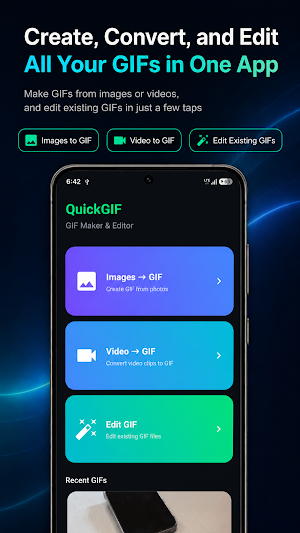
QuickGIF is a simple GIF maker and editor for creating animated GIFs from photos and videos.
Turn multiple photos into a GIF, convert a selected part of a video into an animated GIF, or edit an existing GIF with practical controls for frames, speed, playback order, and output size.
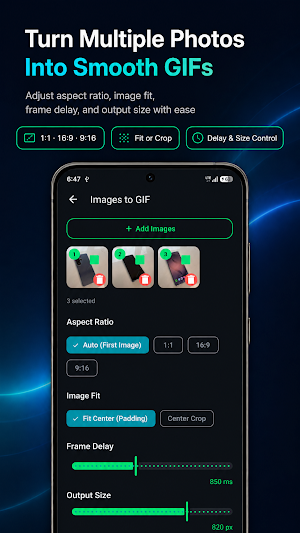
[Create GIFs from Photos]
• Select multiple photos and turn them into an animated GIF
• Review image order and remove unwanted frames
• Use the first photo size automatically
• Choose 1:1, 16:9, or 9:16 aspect ratios
• Keep the full image with padding or fill the frame with center crop
• Adjust frame delay and output size
[Convert Video to GIF]
• Select a video and choose the part you want to convert
• Move through the video in up to 15-second sections
• Choose 5, 10, 15, or 20 FPS
• Adjust GIF output size
• Convert vertical and horizontal videos with ease
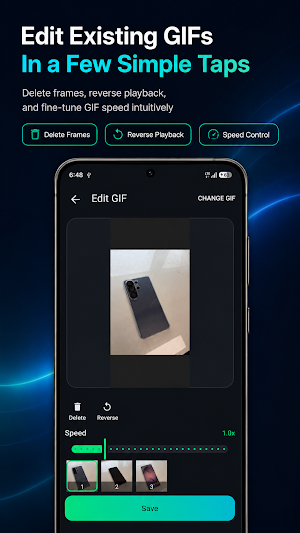
[Edit Existing GIFs]
• Open an existing GIF file
• Delete unwanted frames
• Reverse GIF playback
• Adjust playback speed
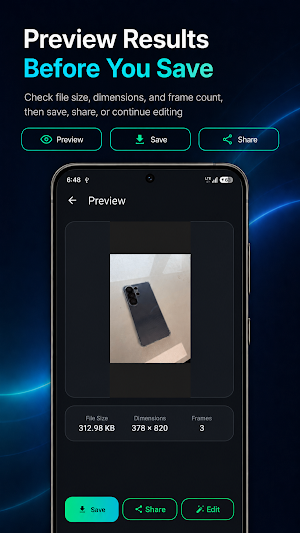
• Save and share your edited GIF
QuickGIF is useful when you want to make a photo GIF, create a short reaction GIF from a video, save a memorable moment as an animated image, or quickly refine an existing GIF.
Create, edit, save, and share GIFs without complicated tools.
Turn multiple photos into a GIF, convert a selected part of a video into an animated GIF, or edit an existing GIF with practical controls for frames, speed, playback order, and output size.
[Create GIFs from Photos]
• Select multiple photos and turn them into an animated GIF
• Review image order and remove unwanted frames
• Use the first photo size automatically
• Choose 1:1, 16:9, or 9:16 aspect ratios
• Keep the full image with padding or fill the frame with center crop
• Adjust frame delay and output size
[Convert Video to GIF]
• Select a video and choose the part you want to convert
• Move through the video in up to 15-second sections
• Choose 5, 10, 15, or 20 FPS
• Adjust GIF output size
• Convert vertical and horizontal videos with ease
[Edit Existing GIFs]
• Open an existing GIF file
• Delete unwanted frames
• Reverse GIF playback
• Adjust playback speed
• Save and share your edited GIF
QuickGIF is useful when you want to make a photo GIF, create a short reaction GIF from a video, save a memorable moment as an animated image, or quickly refine an existing GIF.
Create, edit, save, and share GIFs without complicated tools.
Alternatives to QuickGIF - GIF Maker & Editor
Looking for apps like QuickGIF - GIF Maker & Editor? Here are 6 similar Android apps on Google Play. All of them are free to download.
-
Paper Summary: AI PDF
-
Ppobgi: Random Picker & Games
-
MY4CUT - Photo Booth
-
로또 1등 분석 - 번호 통계·추천·당첨 확인
-
Book Report - Reading
-
Name Fortune: Numerology
| App | Rating | Price | Installs | Last updated | Compare |
|---|---|---|---|---|---|
| QuickGIF - GIF Maker & Editor | – | Free | 10+ | Jul 14, 2026 | |
| Paper Summary: AI PDF | – | Free | 5+ | – | Compare |
| Ppobgi: Random Picker & Games | – | Free | 5+ | – | Compare |
| MY4CUT - Photo Booth | – | Free | 50+ | Sep 9, 2026 | Compare |
| 로또 1등 분석 - 번호 통계·추천·당첨 확인 | – | Free | 100+ | – | Compare |
| Book Report - Reading | – | Free | 10+ | – | Compare |
| Name Fortune: Numerology | – | Free | 10+ | – | Compare |