
Convert Document
Vishwakarmas app Productivity
Convert, edit, merge & manage PDF/Image files effortlessly in one smart toolbox.
- Downloads
- 750+
- on Google Play
- Price
- Free
- No in-app purchases
- Updated
- Sep 7
- 2026 · v2.6
Screenshots

About Convert Document
Convert Document is a powerful all-in-one PDF and Image toolbox designed to manage, edit, convert, and protect your documents effortlessly. Whether you are a student, professional, business owner, or everyday user, this smart tool helps you handle all your PDF and image tasks in one place with ease and speed.
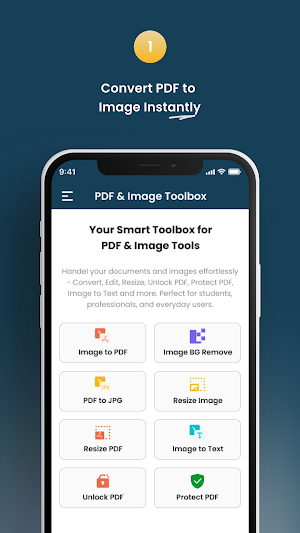
With an intuitive interface and a wide range of features, Convert Document lets you convert images to PDF, extract text, merge files, scan documents, resize photos and PDFs, unlock passwords, protect with encryption, and much more. Manage your documents efficiently from your mobile device anytime, anywhere.
✨ Key Features
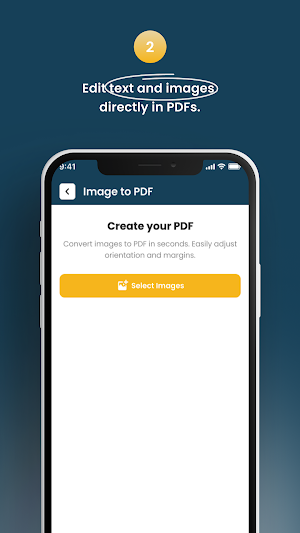
Image to PDF – Combine multiple images and convert them into a high-quality PDF instantly
PDF to JPG – Convert an entire PDF or selected pages into image format
Image Background Remove – Remove background from images easily
Document Scan – Turn your camera into a pocket scanner
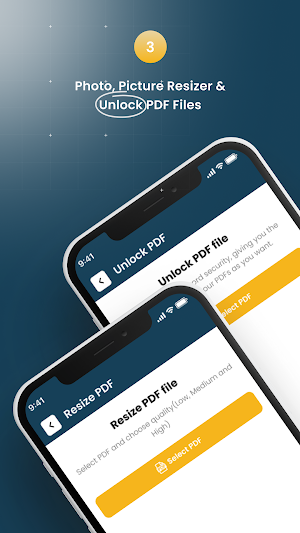
Resize PDF – Reduce PDF file size without losing clarity
Resize Image – Compress or resize photos instantly
Merge PDF – Join multiple PDF files into a single document
Image to Text (OCR) – Extract editable text from images using advanced OCR
Unlock PDF – Remove security restrictions from password-protected PDFs
Protect PDF – Add password protection and enhance file security
Edit PDF – Add text, highlight areas, annotate & modify content
Passport Photo – Create passport-size photos in official sizes for any country
💡 Why Choose Convert Document?
Simple, clean, and easy-to-use interface
Fast and secure file processing
Works offline for many tools
Optimized for professionals & daily users
Supports multiple formats and high-quality output
No watermark or quality loss
Safe and private—files remain on your device
📍 Who Is This App For?
Students & Teachers
Business Professionals
Office & Corporate Work
Designers & Photographers
Government application and form uploads
Content creators & freelancers
🎯 Use Cases
Create project reports or assignments
Convert scanned documents into PDF
Compress and upload documents for online submissions
Extract text from printed material
Combine multiple PDFs into one file
Generate passport photos for official use
Remove background for product listings
🔒 Privacy & Security
Your files are never uploaded to any server. All operations happen directly on your device. Your data remains fully private and secure.
Start Working Smarter
With Convert Document, all your PDF and image tasks become fast, easy and professional.
👉 Download now and simplify your document management experience!
With an intuitive interface and a wide range of features, Convert Document lets you convert images to PDF, extract text, merge files, scan documents, resize photos and PDFs, unlock passwords, protect with encryption, and much more. Manage your documents efficiently from your mobile device anytime, anywhere.
✨ Key Features
Image to PDF – Combine multiple images and convert them into a high-quality PDF instantly
PDF to JPG – Convert an entire PDF or selected pages into image format
Image Background Remove – Remove background from images easily
Document Scan – Turn your camera into a pocket scanner
Resize PDF – Reduce PDF file size without losing clarity
Resize Image – Compress or resize photos instantly
Merge PDF – Join multiple PDF files into a single document
Image to Text (OCR) – Extract editable text from images using advanced OCR
Unlock PDF – Remove security restrictions from password-protected PDFs
Protect PDF – Add password protection and enhance file security
Edit PDF – Add text, highlight areas, annotate & modify content
Passport Photo – Create passport-size photos in official sizes for any country
💡 Why Choose Convert Document?
Simple, clean, and easy-to-use interface
Fast and secure file processing
Works offline for many tools
Optimized for professionals & daily users
Supports multiple formats and high-quality output
No watermark or quality loss
Safe and private—files remain on your device
📍 Who Is This App For?
Students & Teachers
Business Professionals
Office & Corporate Work
Designers & Photographers
Government application and form uploads
Content creators & freelancers
🎯 Use Cases
Create project reports or assignments
Convert scanned documents into PDF
Compress and upload documents for online submissions
Extract text from printed material
Combine multiple PDFs into one file
Generate passport photos for official use
Remove background for product listings
🔒 Privacy & Security
Your files are never uploaded to any server. All operations happen directly on your device. Your data remains fully private and secure.
Start Working Smarter
With Convert Document, all your PDF and image tasks become fast, easy and professional.
👉 Download now and simplify your document management experience!
What’s new
Version 2.6 · Updated September 7, 2026
Bug Fix
User reviews

good app
nice

PDF merg is good option

its very good to use and easy

very good

very good aap gives excellence performance
Alternatives to Convert Document
Looking for apps like Convert Document? Here are 6 similar Android apps on Google Play. All of them are free to download.





| App | Rating | Price | Installs | Last updated | Compare |
|---|---|---|---|---|---|
| Convert Document | – | Free | 500+ | Sep 7, 2026 | |
| AgMart | – | Free | 500+ | – | Compare |
| Village Notes | – | Free | 10+ | Sep 18, 2026 | Compare |
| Bostad och Hyra | – | Free | 0+ | Oct 12, 2026 | Compare |
| Steadly: Goal Tracker | – | Free | 10+ | Mar 30, 2026 | Compare |
| Indonesia Calendar 2026 | – | Free | 100+ | Jul 26, 2026 | Compare |
| SUPERB REALTY | – | Free | 10+ | Oct 8, 2026 | Compare |
Compare Convert Document with the top alternatives: ratings, updates, ASO score and keyword gaps →
Similar apps on Google Play
- AgMart
- Village Notes
- Bostad och Hyra
- Steadly: Goal Tracker
- Indonesia Calendar 2026
- SUPERB REALTY
- LVB Prime
- Ring Sizer
- SnapZia: Screenshot Organizer
- Paripesa
- Smithscape Locksmith tools
- Hello Haven
- Bus Monitor
- Homie Family Organizer
- Stubfolio
- PDF Reader & Viewer - All PDF
- Pangram AI Detector
- OpenClaw AI Agent Dashboard
- PickMagnet
- FocusPort: Focus & App Blocker
- Privnotes - Notes & To Do
- Condomínio Paulistano
- 台語輸入法
- PrivNotesPro - Offline Notepad
- TOWM