
Heic Converter Heic to Jpg/Png
Tools
Convert Heic,heif to Jpg/Png offline. Fast,no uploads. Heic/Heif converter
- Downloads
- 115+
- on Google Play
- Price
- Free
- No in-app purchases
- Updated
- Aug 30
- 2026 · v3.0
Screenshots
About Heic Converter Heic to Jpg/Png
HEIC Converter lets you convert HEIC and HEIF photos to JPG, PNG, or WebP — right on your device, with no uploads and no waiting.
Took a photo on your iPhone and can't open it on your Android phone, PC, or tablet? HEIC (High Efficiency Image Container) is the default photo format on Apple devices, but most Android apps, social media platforms, email clients, and websites still don't support it. HEIC Converter solves this instantly.
FAST AND SIMPLE CONVERSION
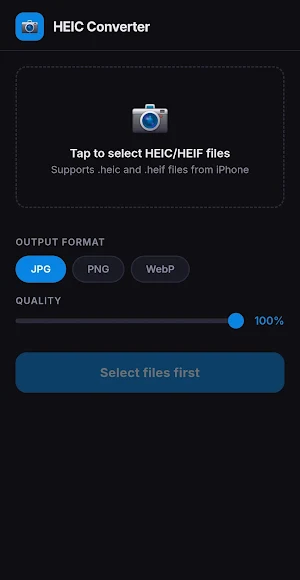
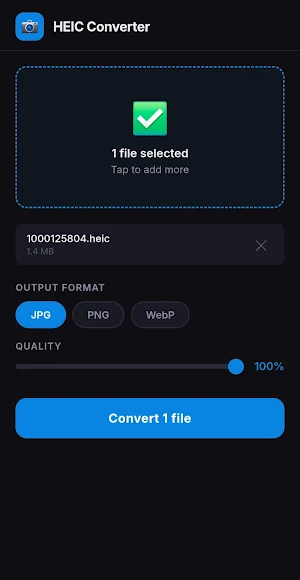
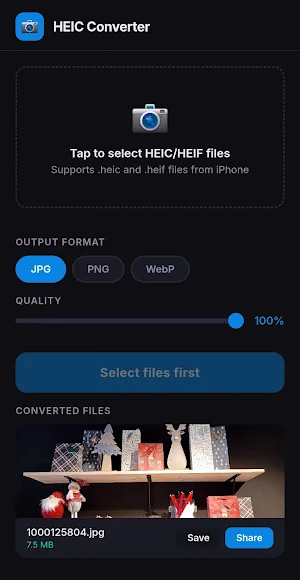
Pick your HEIC or HEIF files, choose your output format, tap convert — done. No confusing menus, no sign-ups, no file size limits. Convert one photo or an entire batch at once.
MULTIPLE OUTPUT FORMATS
Convert HEIC files to JPG for maximum compatibility, PNG for lossless quality, or WebP for smaller file sizes. You choose what works best for your needs.
ADJUSTABLE QUALITY
Fine-tune the output quality with an easy slider. Need a smaller file for messaging? Lower the quality. Need a crisp image for printing? Max it out.
BATCH CONVERSION
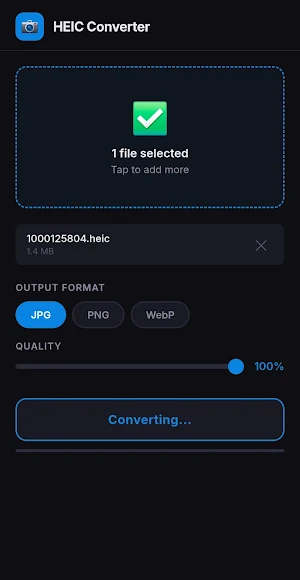
Select multiple HEIC photos and convert them all in one go. A progress bar keeps you updated so you always know how far along your batch is.
100% OFFLINE AND PRIVATE
Every conversion happens entirely on your device. Your photos are never uploaded to any server, cloud, or third-party service. No internet connection is needed to convert your files. Your photos stay yours.
SAVE AND SHARE
Save converted photos directly to your device or share them to any app — WhatsApp, Instagram, email, Google Drive, or anywhere else.
NO ACCOUNT REQUIRED
Open the app and start converting. There is no sign-up, no login, and no personal information collected.
LIGHTWEIGHT AND FREE
HEIC Converter is designed to be small, fast, and easy on your battery. It is completely free to use with no daily limits.
PERFECT FOR
• Opening iPhone photos on Android devices
• Preparing HEIC images for upload to websites and social media
• Converting HEIC photos received via email, AirDrop, or file transfer
• Making photos compatible with older apps and software
• Batch converting an entire photo library from HEIC to JPG, PNG, or WebP
If you have feature requests or run into any issues, feel free to reach out — we'd love to hear from you.
[email protected]
Took a photo on your iPhone and can't open it on your Android phone, PC, or tablet? HEIC (High Efficiency Image Container) is the default photo format on Apple devices, but most Android apps, social media platforms, email clients, and websites still don't support it. HEIC Converter solves this instantly.
FAST AND SIMPLE CONVERSION
Pick your HEIC or HEIF files, choose your output format, tap convert — done. No confusing menus, no sign-ups, no file size limits. Convert one photo or an entire batch at once.
MULTIPLE OUTPUT FORMATS
Convert HEIC files to JPG for maximum compatibility, PNG for lossless quality, or WebP for smaller file sizes. You choose what works best for your needs.
ADJUSTABLE QUALITY
Fine-tune the output quality with an easy slider. Need a smaller file for messaging? Lower the quality. Need a crisp image for printing? Max it out.
BATCH CONVERSION
Select multiple HEIC photos and convert them all in one go. A progress bar keeps you updated so you always know how far along your batch is.
100% OFFLINE AND PRIVATE
Every conversion happens entirely on your device. Your photos are never uploaded to any server, cloud, or third-party service. No internet connection is needed to convert your files. Your photos stay yours.
SAVE AND SHARE
Save converted photos directly to your device or share them to any app — WhatsApp, Instagram, email, Google Drive, or anywhere else.
NO ACCOUNT REQUIRED
Open the app and start converting. There is no sign-up, no login, and no personal information collected.
LIGHTWEIGHT AND FREE
HEIC Converter is designed to be small, fast, and easy on your battery. It is completely free to use with no daily limits.
PERFECT FOR
• Opening iPhone photos on Android devices
• Preparing HEIC images for upload to websites and social media
• Converting HEIC photos received via email, AirDrop, or file transfer
• Making photos compatible with older apps and software
• Batch converting an entire photo library from HEIC to JPG, PNG, or WebP
If you have feature requests or run into any issues, feel free to reach out — we'd love to hear from you.
[email protected]
What’s new
Version 3.0 · Updated August 30, 2026
Bug fixes and polishing for better conversions!
Alternatives to Heic Converter Heic to Jpg/Png
Looking for apps like Heic Converter Heic to Jpg/Png? Here are 6 similar Android apps on Google Play. All of them are free to download.
-
Zip Sort: Untangle Puzzle
-
Blob Shift Runner
-
Mirror Draw - Brain Puzzle
-
Brain Games: Memory, Focus, IQ
-
Photo Privacy Data Cleaner
-
Video Compressor - Reduce Size
| App | Rating | Price | Installs | Last updated | Compare |
|---|---|---|---|---|---|
| Heic Converter Heic to Jpg/Png | – | Free | 100+ | Aug 30, 2026 | |
| Zip Sort: Untangle Puzzle | – | Free | 50+ | Sep 2, 2026 | Compare |
| Blob Shift Runner | – | Free | 10+ | Sep 15, 2026 | Compare |
| Mirror Draw - Brain Puzzle | – | Free | 50+ | Aug 9, 2026 | Compare |
| Brain Games: Memory, Focus, IQ | – | Free | 50+ | Aug 29, 2026 | Compare |
| Photo Privacy Data Cleaner | – | Free | 10+ | Jul 28, 2026 | Compare |
| Video Compressor - Reduce Size | – | Free | 10+ | – | Compare |