
Sys Lens
Seven Studio Dev Tools In-app purchases Contains ads
Pro-level hardware diagnostics, device info, and real-time sensor telemetry.
- Downloads
- 12+
- on Google Play
- Price
- Free
- In-app purchases
- Updated
- Jul 30
- 2026 · v1.3.3
Screenshots


About Sys Lens
Take full control of your device with SysLens—the ultimate professional-grade system diagnostic and hardware audit utility.
Are you curious about what is happening under the hood of your smartphone? Whether you are an enthusiast, a developer, or simply looking to monitor your device’s health, SysLens provides a transparent, real-time dashboard of your hardware's performance.
Designed for efficiency and power, SysLens processes all telemetry data locally on your device, ensuring your privacy is never compromised.
Key Features
[System Telemetry Dashboard]
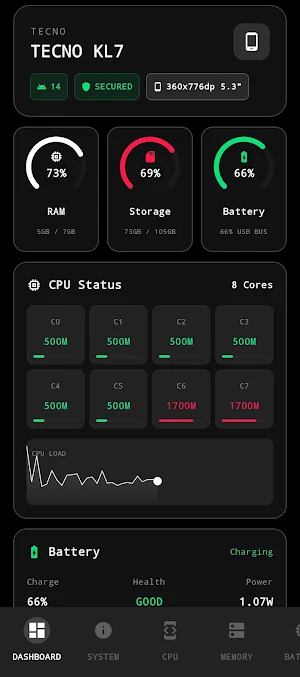
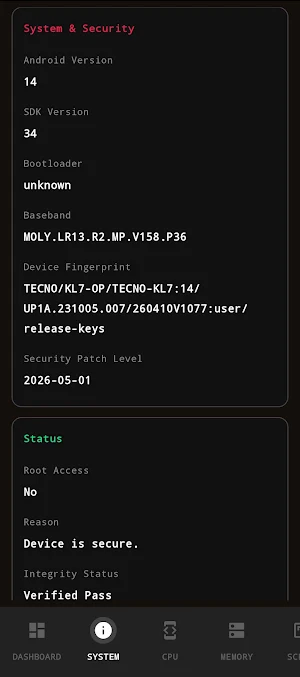
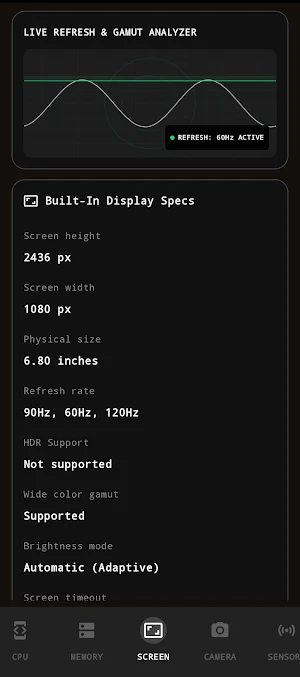
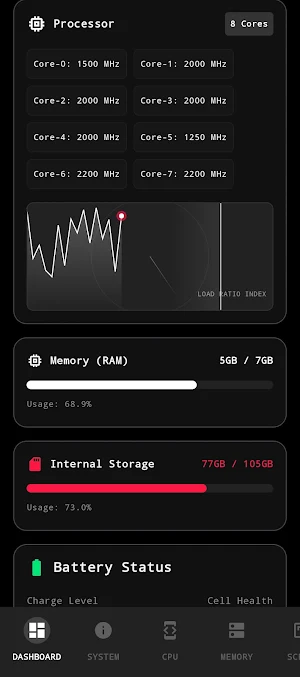
Get an exhaustive breakdown of your device's core specifications. From SoC architecture and GPU renderer details to precise RAM capacity and storage health, SysLens turns complex system logs into an easy-to-read audit.
[Real-Time Hardware Monitors]
Stay informed with live diagnostics for:
Battery Health: Monitor voltage, temperature, charge rates, and battery capacity.
Sensor Suite: Access real-time data from your Accelerometer, Gyroscope, Magnetometer, Barometer, and Light sensors.
Network Diagnostics: Audit your Wi-Fi signal strength, latency pings, and active connection details.
[The Overlay Console]
Need to monitor performance while gaming or using other apps? Our custom, low-footprint floating overlay provides real-time CPU and RAM monitoring without interrupting your workflow.
[Manual Diagnostic Suite]
Verify your hardware integrity with our manual test suite, including:
Camera & Flash: Test sensor responsiveness and LED functionality.
Biometric Integrity: Verify your device's security hardware and cryptographic enrollment state.
Why SysLens?
Privacy First: All data processing occurs entirely offline on your device. We do not run external user databases and we never collect, transmit, or monetize your personal system information.
Minimalist Design: A clean, modern, cyberpunk-inspired interface built for clarity and speed.
Professional Tooling: Perfect for verifying hardware specs, diagnosing performance drops, or ensuring your device is running at peak efficiency.
Permissions & Transparency
We adhere strictly to the principle of "minimum privilege." Permissions are requested only when necessary for specific diagnostic features:
Camera/Biometric: Used solely for hardware functionality verification tests.
Overlay (System Alert Window): Required for the optional floating performance console.
Location: Used only on specific Android versions to identify local Wi-Fi SSID details. No GPS or physical location tracking is performed
Are you curious about what is happening under the hood of your smartphone? Whether you are an enthusiast, a developer, or simply looking to monitor your device’s health, SysLens provides a transparent, real-time dashboard of your hardware's performance.
Designed for efficiency and power, SysLens processes all telemetry data locally on your device, ensuring your privacy is never compromised.
Key Features
[System Telemetry Dashboard]
Get an exhaustive breakdown of your device's core specifications. From SoC architecture and GPU renderer details to precise RAM capacity and storage health, SysLens turns complex system logs into an easy-to-read audit.
[Real-Time Hardware Monitors]
Stay informed with live diagnostics for:
Battery Health: Monitor voltage, temperature, charge rates, and battery capacity.
Sensor Suite: Access real-time data from your Accelerometer, Gyroscope, Magnetometer, Barometer, and Light sensors.
Network Diagnostics: Audit your Wi-Fi signal strength, latency pings, and active connection details.
[The Overlay Console]
Need to monitor performance while gaming or using other apps? Our custom, low-footprint floating overlay provides real-time CPU and RAM monitoring without interrupting your workflow.
[Manual Diagnostic Suite]
Verify your hardware integrity with our manual test suite, including:
Camera & Flash: Test sensor responsiveness and LED functionality.
Biometric Integrity: Verify your device's security hardware and cryptographic enrollment state.
Why SysLens?
Privacy First: All data processing occurs entirely offline on your device. We do not run external user databases and we never collect, transmit, or monetize your personal system information.
Minimalist Design: A clean, modern, cyberpunk-inspired interface built for clarity and speed.
Professional Tooling: Perfect for verifying hardware specs, diagnosing performance drops, or ensuring your device is running at peak efficiency.
Permissions & Transparency
We adhere strictly to the principle of "minimum privilege." Permissions are requested only when necessary for specific diagnostic features:
Camera/Biometric: Used solely for hardware functionality verification tests.
Overlay (System Alert Window): Required for the optional floating performance console.
Location: Used only on specific Android versions to identify local Wi-Fi SSID details. No GPS or physical location tracking is performed
What’s new
Version 1.3.3 · Updated July 30, 2026
Internal App optimization
Alternatives to Sys Lens
Looking for apps like Sys Lens? Here are 6 similar Android apps on Google Play. All of them are free to download.
-
Analytics for IG
-
Braaler AI: Unlimited Creation
-
nSens-Mobile
-
Milky Milky
-
DULCONNEX Orange
-
TesterLink - App Test Partner
| App | Rating | Price | Installs | Last updated | Compare |
|---|---|---|---|---|---|
| Sys Lens | – | Free | 10+ | Jul 30, 2026 | |
| Analytics for IG | – | Free | 100+ | – | Compare |
| Braaler AI: Unlimited Creation | – | Free | 50+ | May 15, 2024 | Compare |
| nSens-Mobile | – | Free | 100+ | May 21, 2026 | Compare |
| Milky Milky | – | Free | 100+ | Nov 22, 2023 | Compare |
| DULCONNEX Orange | – | Free | 10+ | – | Compare |
| TesterLink - App Test Partner | – | Free | 10+ | – | Compare |
Compare Sys Lens with the top alternatives: ratings, updates, ASO score and keyword gaps →
Similar apps on Google Play
- Analytics for IG
- Braaler AI: Unlimited Creation
- nSens-Mobile
- Milky Milky
- DULCONNEX Orange
- TesterLink - App Test Partner
- Morse Flash: Code, LED Sign
- Prets et Dettes
- JunkGurus - Why Wait
- Remote Phone Control
- SafetyFirst
- Aqua
- Unitech ScanBridge
- Phasm: Steganography
- Member’s Mark Wellness App
- Screen Translator All Screens
- StellarStar Signature
- Orange
- SeaViewer
- Answer
- Heal
- Flushcon
- Pipefitter's Mate: Pipe Offset
- Device Info: System & CPU Info
- CPR Takt-Check