
Somnath Quiz
Fofandi Nirav Education
Online exam app for teachers and students with quiz and results.
- Downloads
- 23+
- on Google Play
- Price
- Free
- No in-app purchases
- Updated
- Mar 10
- 2026 · v1.0
Screenshots


About Somnath Quiz
1. Teacher Registration & Login
Teachers can register securely by providing their name, email, password, and subject.
All registration information is stored securely within the application.
After registration, teachers can log in using their email and password.
Teachers also have the option to delete their account at any time from the application.
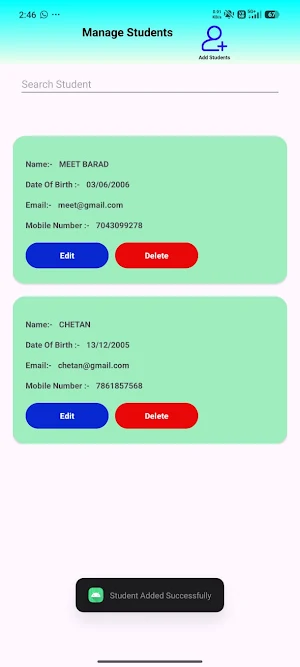
2. Student Management
Teachers can manage student information directly from the app.
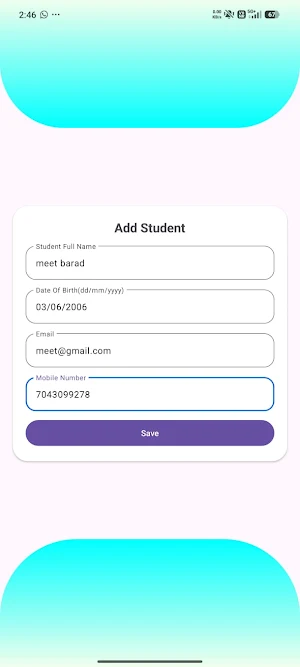
Teachers can add students by entering:
Full Name
Date of Birth
Email Address
Mobile Number
Student information such as date of birth, email, and mobile number is stored securely and is never shared with third parties.
Teachers can also:
Search students
Edit student details
Delete student records
3. Exam Creation
Teachers can create exams by entering the following details:
Exam Code
Exam Title
Subject Name
Marks per Question
Total Questions
Exam Date
Exam Start Time
Exam End Time
Question Type (MCQ or Long Question)
Teachers can add questions to the exam and publish the exam when it is ready.
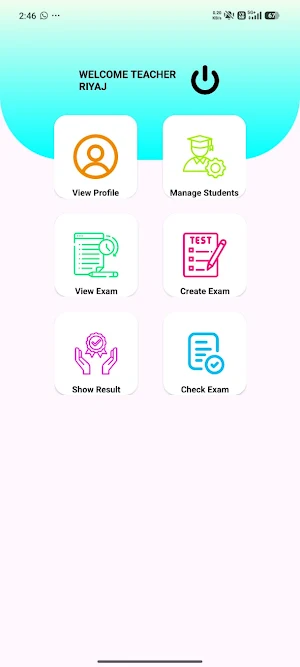
4. Exam Management
All created exams are displayed in the exam list.
Teachers can:
View exam details
Add questions to the exam
View questions
Delete exams
Publish exams for students
Once an exam is published, it becomes available for students to join.
5. Exam Evaluation
Expired exams appear in the Check Exam section.
Teachers can view the list of students who participated in the exam and evaluate their answers.
MCQ exams are automatically evaluated by the system.
Long answer questions are checked manually by the teacher.
After evaluation, results are saved and made available to students.
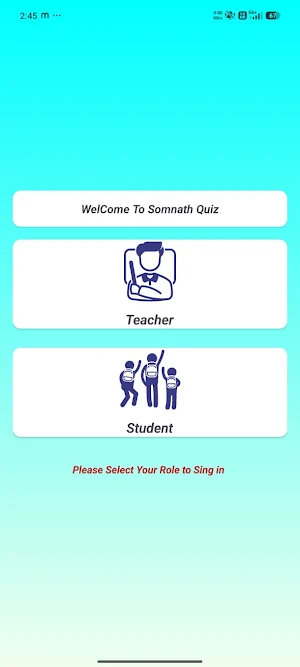
6. Student Login
Students who are added by the teacher can log in using:
Date of Birth
Mobile Number
Students can also delete their account if they no longer wish to use the application.
7. Start Exam
Students can view available exams that have been published by the teacher.
To join an exam, students must enter the exam code provided by the teacher.
Exams run only during the scheduled date and time.
When the exam time ends, the system will automatically submit the answers and store them in the database.
8. Result & Exam History
Students can view the results of exams they have completed.
MCQ exam results are displayed immediately after submission.
Long question exam results appear after teacher evaluation.
Students can also view old or expired exams and review the questions for learning purposes.
9. Data Privacy & Security
The application is designed with strong focus on user privacy and data protection.
All teacher and student data is securely stored.
Personal information such as email, mobile number, and date of birth is never shared with third parties.
Users have full control to delete their account anytime.
Teachers can register securely by providing their name, email, password, and subject.
All registration information is stored securely within the application.
After registration, teachers can log in using their email and password.
Teachers also have the option to delete their account at any time from the application.
2. Student Management
Teachers can manage student information directly from the app.
Teachers can add students by entering:
Full Name
Date of Birth
Email Address
Mobile Number
Student information such as date of birth, email, and mobile number is stored securely and is never shared with third parties.
Teachers can also:
Search students
Edit student details
Delete student records
3. Exam Creation
Teachers can create exams by entering the following details:
Exam Code
Exam Title
Subject Name
Marks per Question
Total Questions
Exam Date
Exam Start Time
Exam End Time
Question Type (MCQ or Long Question)
Teachers can add questions to the exam and publish the exam when it is ready.
4. Exam Management
All created exams are displayed in the exam list.
Teachers can:
View exam details
Add questions to the exam
View questions
Delete exams
Publish exams for students
Once an exam is published, it becomes available for students to join.
5. Exam Evaluation
Expired exams appear in the Check Exam section.
Teachers can view the list of students who participated in the exam and evaluate their answers.
MCQ exams are automatically evaluated by the system.
Long answer questions are checked manually by the teacher.
After evaluation, results are saved and made available to students.
6. Student Login
Students who are added by the teacher can log in using:
Date of Birth
Mobile Number
Students can also delete their account if they no longer wish to use the application.
7. Start Exam
Students can view available exams that have been published by the teacher.
To join an exam, students must enter the exam code provided by the teacher.
Exams run only during the scheduled date and time.
When the exam time ends, the system will automatically submit the answers and store them in the database.
8. Result & Exam History
Students can view the results of exams they have completed.
MCQ exam results are displayed immediately after submission.
Long question exam results appear after teacher evaluation.
Students can also view old or expired exams and review the questions for learning purposes.
9. Data Privacy & Security
The application is designed with strong focus on user privacy and data protection.
All teacher and student data is securely stored.
Personal information such as email, mobile number, and date of birth is never shared with third parties.
Users have full control to delete their account anytime.
User reviews

Very Nice App

very useful App.

It's Very Usefull For a Teacher ☺️

really nice app for students & teacher.

It's Very Useful For A Teacher 😊

It's Very Useful For A Teacher🤗
Alternatives to Somnath Quiz
Looking for apps like Somnath Quiz? Here are 6 similar Android apps on Google Play. All of them are free to download.





| App | Rating | Price | Installs | Last updated | Compare |
|---|---|---|---|---|---|
| Somnath Quiz | – | Free | 10+ | Mar 10, 2026 | |
| EduFeedback | – | Free | 5+ | – | Compare |
| Events Phare | – | Free | 10+ | – | Compare |
| IT Employee | – | Free | 10+ | Mar 5, 2026 | Compare |
| SchoolEra | – | Free | 50+ | Feb 22, 2026 | Compare |
| My Dairy | – | Free | 10+ | Feb 24, 2026 | Compare |
| My BCA Notes | – | Free | 500+ | Feb 16, 2026 | Compare |
Compare Somnath Quiz with the top alternatives: ratings, updates, ASO score and keyword gaps →