

Barcode to PC MAC Bluetooth
Business Contains ads
Scan and send barcodes instantly to your PC via Bluetooth _ Fast and wireless!
- Downloads
- 1.8K+
- on Google Play
- Price
- Free
- No in-app purchases
- Updated
- Nov 5
- 2025 · v1.02
Screenshots

About Barcode to PC MAC Bluetooth
📱 Turn your phone into a professional wireless barcode scanner!
Stop wasting time with expensive, bulky barcode readers.
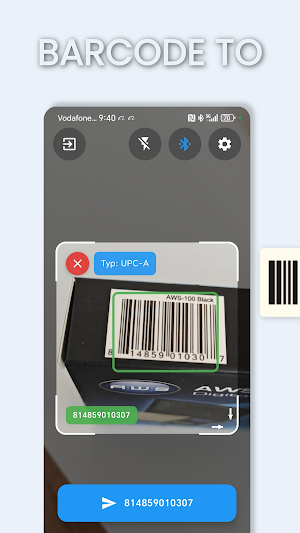
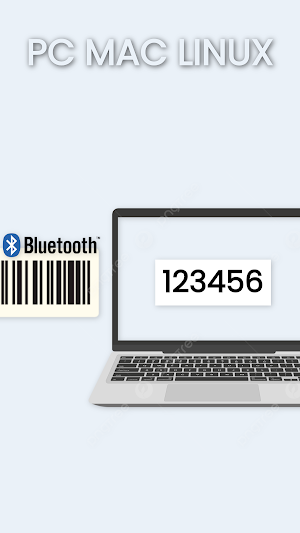
With Barcode to PC, your Android phone becomes a powerful Bluetooth barcode scanner that instantly sends scanned codes to your computer — just like a wireless keyboard.
It’s fast, simple, and works anywhere.
Whether you’re managing a store, updating inventory, or processing shipments, this app will save you time, money, and effort.
No cables. No drivers. No complicated setup. Just connect once and start scanning.
⚙️ How it works
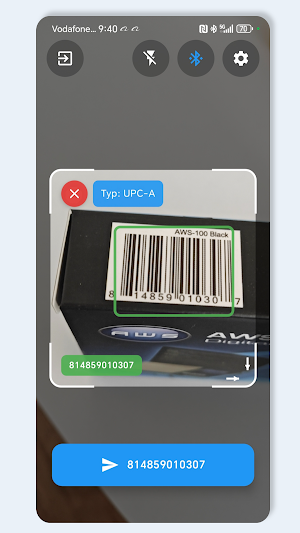
Open the app, point your camera at any barcode or QR code, and the data is automatically typed into your computer — in any program or website that accepts keyboard input.
It works with Excel, Word, Notepad, web forms, inventory systems, POS software, ERP, CRM, and more.
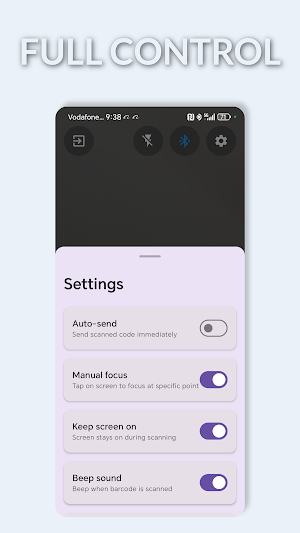
You can also switch to manual mode for controlled scanning or use automatic continuous scanning for bulk processing.
🔹 Key Features
🔍 Auto & Manual Scan Modes – Choose between hands-free scanning or manual control for precision.
🎯 Smart Crosshair Targeting – Quickly lock onto the right code with an accurate visual guide.
🔎 Zoom Function – Read even small or distant barcodes with adjustable camera zoom.
💻 Bluetooth HID Mode – Sends scanned data to your PC as if typed on a keyboard.
⌨️ Custom Key Options – Configure “Enter”, “Tab”, or “Space” automatically after each scan.
🌍 Supports All Major Codes – EAN, UPC, Code 128, Code 39, QR, DataMatrix, PDF417, and more.
⚙️ Easy Setup – Connect once, and your phone is ready to scan anytime.
⚡ Super-Fast & Reliable – Reads codes instantly, even in low light or at tricky angles.
💡 Why use Barcode to PC?
✅ Save money – No need to buy costly handheld barcode scanners.
✅ Save time – Scan and transfer data instantly, without cables or software installs.
✅ Work smarter – Integrates seamlessly with your existing workflow and software.
✅ Stay flexible – Works with any PC, laptop, or tablet supporting Bluetooth input.
✅ Boost productivity – Perfect for warehouses, retail stores, logistics, libraries, offices, and more.
🚀 The modern alternative to traditional scanners
Barcode to PC gives you the freedom to scan from anywhere — no wires, no limits.
It’s the ideal tool for inventory management, warehouse automation, and business operations where every second counts.
Turn your smartphone into a professional-grade barcode scanner today.
Experience the future of wireless scanning — simple, powerful, and efficient.
📲 Download Barcode to PC now and start scanning smarter!
Stop wasting time with expensive, bulky barcode readers.
With Barcode to PC, your Android phone becomes a powerful Bluetooth barcode scanner that instantly sends scanned codes to your computer — just like a wireless keyboard.
It’s fast, simple, and works anywhere.
Whether you’re managing a store, updating inventory, or processing shipments, this app will save you time, money, and effort.
No cables. No drivers. No complicated setup. Just connect once and start scanning.
⚙️ How it works
Open the app, point your camera at any barcode or QR code, and the data is automatically typed into your computer — in any program or website that accepts keyboard input.
It works with Excel, Word, Notepad, web forms, inventory systems, POS software, ERP, CRM, and more.
You can also switch to manual mode for controlled scanning or use automatic continuous scanning for bulk processing.
🔹 Key Features
🔍 Auto & Manual Scan Modes – Choose between hands-free scanning or manual control for precision.
🎯 Smart Crosshair Targeting – Quickly lock onto the right code with an accurate visual guide.
🔎 Zoom Function – Read even small or distant barcodes with adjustable camera zoom.
💻 Bluetooth HID Mode – Sends scanned data to your PC as if typed on a keyboard.
⌨️ Custom Key Options – Configure “Enter”, “Tab”, or “Space” automatically after each scan.
🌍 Supports All Major Codes – EAN, UPC, Code 128, Code 39, QR, DataMatrix, PDF417, and more.
⚙️ Easy Setup – Connect once, and your phone is ready to scan anytime.
⚡ Super-Fast & Reliable – Reads codes instantly, even in low light or at tricky angles.
💡 Why use Barcode to PC?
✅ Save money – No need to buy costly handheld barcode scanners.
✅ Save time – Scan and transfer data instantly, without cables or software installs.
✅ Work smarter – Integrates seamlessly with your existing workflow and software.
✅ Stay flexible – Works with any PC, laptop, or tablet supporting Bluetooth input.
✅ Boost productivity – Perfect for warehouses, retail stores, logistics, libraries, offices, and more.
🚀 The modern alternative to traditional scanners
Barcode to PC gives you the freedom to scan from anywhere — no wires, no limits.
It’s the ideal tool for inventory management, warehouse automation, and business operations where every second counts.
Turn your smartphone into a professional-grade barcode scanner today.
Experience the future of wireless scanning — simple, powerful, and efficient.
📲 Download Barcode to PC now and start scanning smarter!
Alternatives to Barcode to PC MAC Bluetooth
Looking for apps like Barcode to PC MAC Bluetooth? Here are 6 similar Android apps on Google Play. The highest rated is Weighing Smart Digital Scale (4.4/5), and all 6 are free to download.
-
Digital weight scale grams oz 3.8
-
Weighing Smart Digital Scale 4.4
-
Bluetooth digital weigh scale 3.9
-
Barcode Stock counter Scannogy
-
Screen Flashlight Color Light
-
Metal Detector - Magnetometer
| App | Rating | Price | Installs | Last updated | Compare |
|---|---|---|---|---|---|
| Barcode to PC MAC Bluetooth | – | Free | 1,000+ | Nov 5, 2025 | |
| Digital weight scale grams oz | 3.8 / 5 | Free | 1,000,000+ | Aug 21, 2026 | Compare |
| Weighing Smart Digital Scale | 4.4 / 5 | Free | 500,000+ | Aug 18, 2026 | Compare |
| Bluetooth digital weigh scale | 3.9 / 5 | Free | 50,000+ | May 12, 2026 | Compare |
| Barcode Stock counter Scannogy | – | Free | 5,000+ | – | Compare |
| Screen Flashlight Color Light | – | Free | 10,000+ | – | Compare |
| Metal Detector - Magnetometer | – | Free | 10,000+ | Oct 22, 2026 | Compare |