

나에게보내기 - 메모 일정 메모장 할일 아이디어 기록
Productivity Contains ads
A record app for memos, schedules, and ideas that is as comfortable as chatting, just for you
- Downloads
- 9+
- on Google Play
- Price
- Free
- No in-app purchases
- Updated
- Aug 1
- 2026 · v1.0.0
Screenshots


About 나에게보내기 - 메모 일정 메모장 할일 아이디어 기록
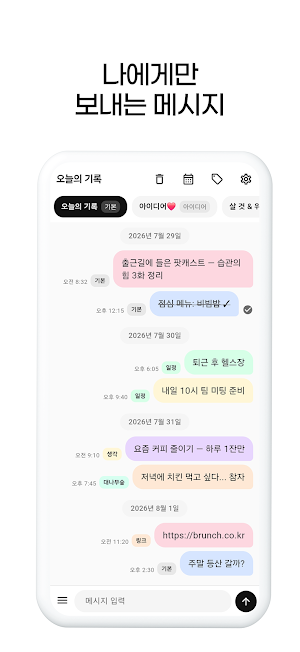
"Send to Myself" is a personal memo app for leaving messages to yourself.
It is as convenient to use as KakaoTalk, but your only conversation partner is yourself.
*Recommended for:
- When you want to gather your personal memos, diaries, and thoughts in one place
- When you want to organize your to-dos, schedules, and shopping lists without using a separate app
- When you want to save links and ideas so you can easily find them later
- When you need a lightweight and fast notepad instead of a complex note app
*How to use it:
- Instantly record ideas, to-dos, and memos
- Add photos
- Divide topics by chat room (work, daily life, ideas, etc.)
- Automatically or manually sort messages by category
- Schedule messages — deliver to your future self at a desired time
- Find past messages by month or search in the History tab
*Key Features
Personal memos written like a chat
Record memos, thoughts, and links as if sending them to yourself using a familiar speech bubble UI. It is not an app for chatting with others, but your own personal space.
**Send to Myself** Automatic Category Organization
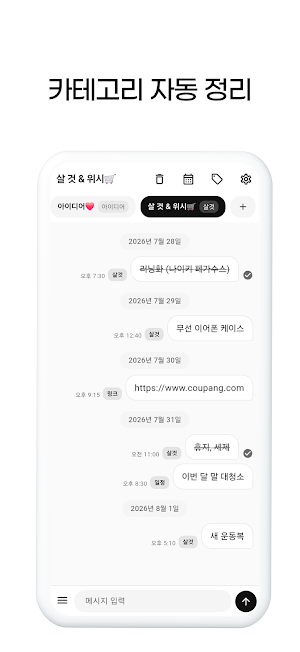
- Automatically classifies content by entering a category name + content, such as Schedule, Ideas, Things to Buy, Thoughts, Links, etc.
- Saves pasted URLs as Links
- Allows setting default categories for each chat room
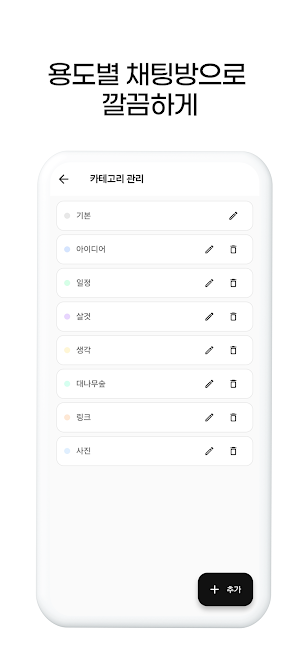
- Customize category names and colors
Chat Rooms by Purpose
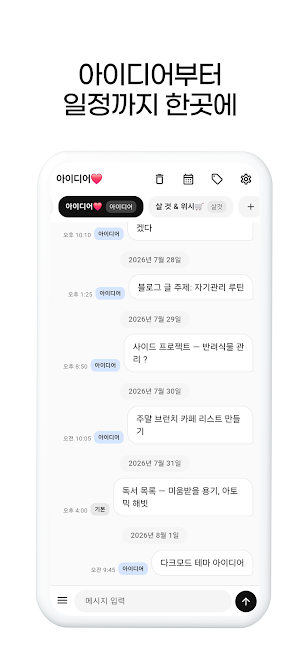
- Divide your notes into rooms like Daily Life, Ideas, Shopping, and Projects. You can also decorate room names with emojis.
Scheduled Messages & Notifications
- Schedule messages to send to yourself at your desired time.
- Enter a time like "Schedule 14:30 Meeting Preparation" or select a time on the scheduling screen. You can receive reminders via push notifications.
History & Search
- View notes organized by date and month, and quickly find old records using keyword search.
Attach Photos
- Saves images along with notes.
My Style
- Customize bubble colors, category colors, chat room backgrounds, and fonts to suit your taste.
** Message Archive
- You can export chat room messages as a **text file (txt)** to save them.
Google Sign In & Cloud Backup
- Start easily with your Google account, and save and retrieve to the cloud to continue your data even when switching devices.
How "Send to Myself" Differs from Other Note Apps
- Familiar chat UI, ready to use immediately without learning anything
- Privacy-focused, just for you, without social media sharing
- Organize categories with just input — no need to tap categories every time
- Dual organization of chat rooms + categories — easy-to-find structure
Leave your first note to yourself right now.
It is as convenient to use as KakaoTalk, but your only conversation partner is yourself.
*Recommended for:
- When you want to gather your personal memos, diaries, and thoughts in one place
- When you want to organize your to-dos, schedules, and shopping lists without using a separate app
- When you want to save links and ideas so you can easily find them later
- When you need a lightweight and fast notepad instead of a complex note app
*How to use it:
- Instantly record ideas, to-dos, and memos
- Add photos
- Divide topics by chat room (work, daily life, ideas, etc.)
- Automatically or manually sort messages by category
- Schedule messages — deliver to your future self at a desired time
- Find past messages by month or search in the History tab
*Key Features
Personal memos written like a chat
Record memos, thoughts, and links as if sending them to yourself using a familiar speech bubble UI. It is not an app for chatting with others, but your own personal space.
**Send to Myself** Automatic Category Organization
- Automatically classifies content by entering a category name + content, such as Schedule, Ideas, Things to Buy, Thoughts, Links, etc.
- Saves pasted URLs as Links
- Allows setting default categories for each chat room
- Customize category names and colors
Chat Rooms by Purpose
- Divide your notes into rooms like Daily Life, Ideas, Shopping, and Projects. You can also decorate room names with emojis.
Scheduled Messages & Notifications
- Schedule messages to send to yourself at your desired time.
- Enter a time like "Schedule 14:30 Meeting Preparation" or select a time on the scheduling screen. You can receive reminders via push notifications.
History & Search
- View notes organized by date and month, and quickly find old records using keyword search.
Attach Photos
- Saves images along with notes.
My Style
- Customize bubble colors, category colors, chat room backgrounds, and fonts to suit your taste.
** Message Archive
- You can export chat room messages as a **text file (txt)** to save them.
Google Sign In & Cloud Backup
- Start easily with your Google account, and save and retrieve to the cloud to continue your data even when switching devices.
How "Send to Myself" Differs from Other Note Apps
- Familiar chat UI, ready to use immediately without learning anything
- Privacy-focused, just for you, without social media sharing
- Organize categories with just input — no need to tap categories every time
- Dual organization of chat rooms + categories — easy-to-find structure
Leave your first note to yourself right now.
What’s new
Version 1.0.0 · Updated August 1, 2026
안정성 개선
Alternatives to 나에게보내기 - 메모 일정 메모장 할일 아이디어 기록
Looking for apps like 나에게보내기 - 메모 일정 메모장 할일 아이디어 기록? Here are 2 similar Android apps on Google Play. All of them are free to download.


| App | Rating | Price | Installs | Last updated | Compare |
|---|---|---|---|---|---|
| 나에게보내기 - 메모 일정 메모장 할일 아이디어 기록 | – | Free | 5+ | Aug 1, 2026 | |
| 노래하는파랑새 - 노래 연습 노트 | – | Free | 10+ | Jul 24, 2026 | Compare |
| 오늘한끼 - 식재료 냉장고 유통기한 관리 레시피 추천 | – | Free | 100+ | Jul 30, 2026 | Compare |