

VibeVideo: Video Editor
Video Players & Editors
Trim videos, cut out the middle and change the sound, all on your phone.
- Downloads
- 307+
- on Google Play
- Price
- Free
- No in-app purchases
- Updated
- Oct 28
- 2026 · v1.4
Screenshots


About VibeVideo: Video Editor
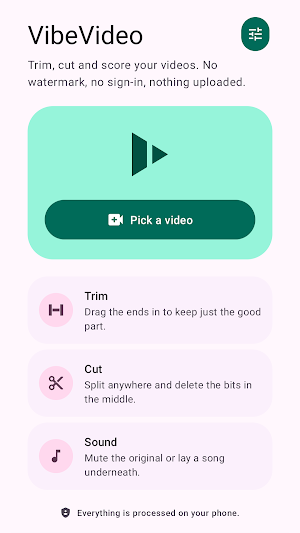
VibeVideo trims videos, cuts parts out of the middle, and changes the sound. It does all of it on your phone.
TRIM THE ENDS
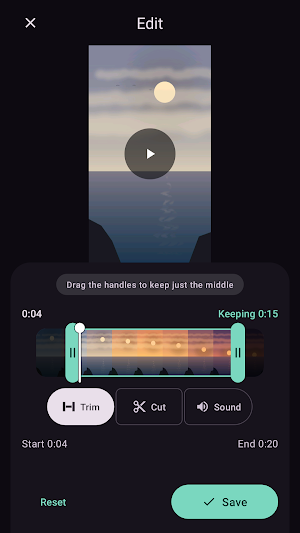
Drag a handle in from each end to keep just the part you want. Nothing is thrown away, so you can drag the handles back out again at any point. The timeline shows frames from your video, so you can see exactly where you are cutting.
CUT OUT THE MIDDLE
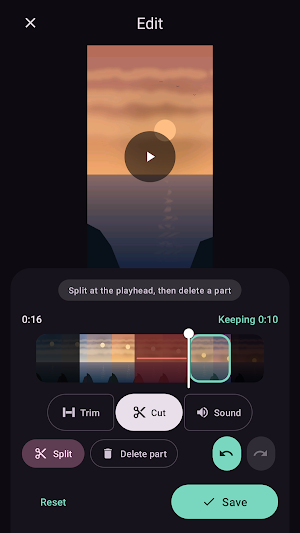
Put the playhead where you want a break, tap Split, then pick a piece and delete it. Stretches you have cut are marked on the timeline, so you can see what is going before you commit to it. Undo and redo cover every change you make.
CHANGE THE SOUND
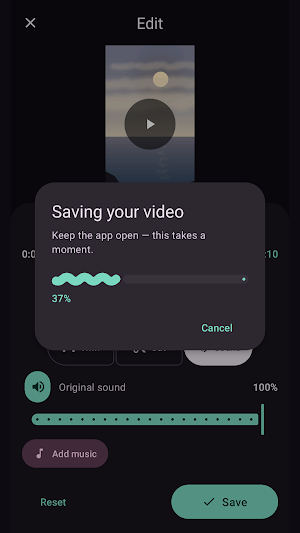
Turn the original sound down, or mute it completely. Lay a song from your phone underneath, set how loud it should be, and choose the point in the song where it should start. The preview plays the video and the music together, so you can hear the result before you save.
QUALITY
Trimming the ends alone copies the original frames across without re-encoding them, so the result keeps the quality of your original and finishes almost instantly. Cutting the middle, changing the volume or adding music all mean the video has to be rebuilt, and a Quality setting decides how much detail is kept when that happens.
SAVING AND SHARING
Finished videos go into your gallery, in a VibeVideo album. From the same screen you can hand the video straight to another app. Your original file is never modified.
WHAT IT DOES NOT DO
VibeVideo asks for no Android permissions at all, and has no internet access, so nothing you edit is able to leave your phone. There is no account to create, no advertising, and no watermark on anything you save. You choose a video with Android's own picker, which means the app only ever sees the one file you picked.
You can start from another app too: open or share a video into VibeVideo and it goes straight to the editor.
TRIM THE ENDS
Drag a handle in from each end to keep just the part you want. Nothing is thrown away, so you can drag the handles back out again at any point. The timeline shows frames from your video, so you can see exactly where you are cutting.
CUT OUT THE MIDDLE
Put the playhead where you want a break, tap Split, then pick a piece and delete it. Stretches you have cut are marked on the timeline, so you can see what is going before you commit to it. Undo and redo cover every change you make.
CHANGE THE SOUND
Turn the original sound down, or mute it completely. Lay a song from your phone underneath, set how loud it should be, and choose the point in the song where it should start. The preview plays the video and the music together, so you can hear the result before you save.
QUALITY
Trimming the ends alone copies the original frames across without re-encoding them, so the result keeps the quality of your original and finishes almost instantly. Cutting the middle, changing the volume or adding music all mean the video has to be rebuilt, and a Quality setting decides how much detail is kept when that happens.
SAVING AND SHARING
Finished videos go into your gallery, in a VibeVideo album. From the same screen you can hand the video straight to another app. Your original file is never modified.
WHAT IT DOES NOT DO
VibeVideo asks for no Android permissions at all, and has no internet access, so nothing you edit is able to leave your phone. There is no account to create, no advertising, and no watermark on anything you save. You choose a video with Android's own picker, which means the app only ever sees the one file you picked.
You can start from another app too: open or share a video into VibeVideo and it goes straight to the editor.
What’s new
Version 1.4 · Updated October 28, 2026
• Add text, emoji and your own pictures on top of your video • Transitions between clips: fade, dissolve, slide and wipe • Smoother preview, in step with the sound, also on Bluetooth earbuds • Now in 10 more languages, plus fixes for landscape and large text
Alternatives to VibeVideo: Video Editor
Looking for apps like VibeVideo: Video Editor? Here are 6 similar Android apps on Google Play. The highest rated is HTML Viewer (3.7/5), and 5 of the 6 are free to download.
-
HTML Viewer 3.7
-
Voice Saver & Audio Editor 2.8
-
PDFos: PDF Reader & Editor
-
Cleanji: Photo & Video Cleaner
-
Quardo - QR Scan & Create
-
G-Photos Saver
| App | Rating | Price | Installs | Last updated | Compare |
|---|---|---|---|---|---|
| VibeVideo: Video Editor | – | Free | 100+ | Oct 28, 2026 | |
| HTML Viewer | 3.7 / 5 | Free | 5,000,000+ | Aug 18, 2026 | Compare |
| Voice Saver & Audio Editor | 2.8 / 5 | Free | 10,000+ | Oct 15, 2026 | Compare |
| PDFos: PDF Reader & Editor | – | Free | 100+ | Oct 16, 2026 | Compare |
| Cleanji: Photo & Video Cleaner | – | Free | 50+ | Sep 13, 2026 | Compare |
| Quardo - QR Scan & Create | – | Free | 1,000+ | Aug 4, 2026 | Compare |
| G-Photos Saver | – | 1.99 USD | 1,000+ | Sep 17, 2026 | Compare |