

Screen Color Match
Productivity
Screen Color Match ensures consistent colors across multiple displays.
- Rating
- 4.5
- 33 ratings
- Downloads
- 16.3K+
- on Google Play
- Price
- Free
- No in-app purchases
- Updated
- Jun 8
- 2026 · v1.2.3
Screenshots

About Screen Color Match
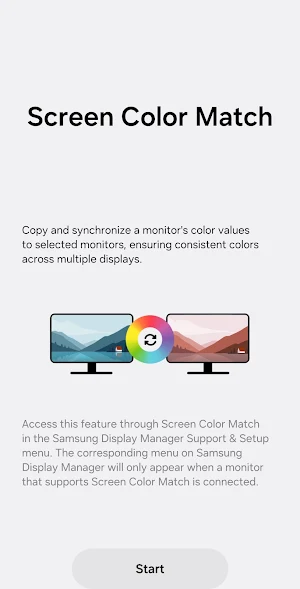
Screen Color Match copies and synchronizes a monitor's color values to selected monitors, ensuring consistent colors across multiple displays.
[Key Features]
Copy and synchronize a monitor's color values to selected monitors.
To access this feature, select Screen Color Match in the Samsung Display Manager's Support & Setup menu.
The corresponding menu on Samsung Display Manager will only appear when a monitor that supports Screen Color Match is connected.
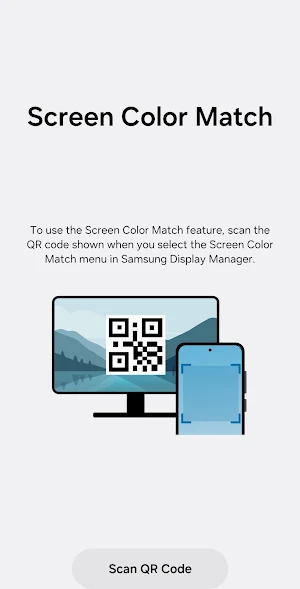
To use the Screen Color Match feature, scan the QR code shown when you enter.
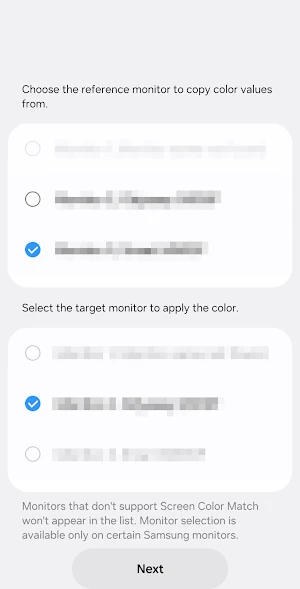
Choose the reference monitor to copy color values from, then select the target monitor to apply the color.
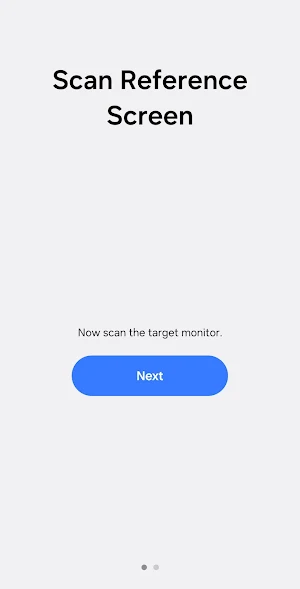
Scan the color tone via camera app from your phone, and adhere to the following instructions.
* Notice regarding app access permissions:
The following access permissions are required to provide you with this service.
Basic features of the service can be accessed even if Optional permissions are not granted.
[Optional permissions]
• Camera : Used to add pictures and scanned documents to notes
You can still open the app and access its basic functions without allowing the optional permissions.
[Key Features]
Copy and synchronize a monitor's color values to selected monitors.
To access this feature, select Screen Color Match in the Samsung Display Manager's Support & Setup menu.
The corresponding menu on Samsung Display Manager will only appear when a monitor that supports Screen Color Match is connected.
To use the Screen Color Match feature, scan the QR code shown when you enter.
Choose the reference monitor to copy color values from, then select the target monitor to apply the color.
Scan the color tone via camera app from your phone, and adhere to the following instructions.
* Notice regarding app access permissions:
The following access permissions are required to provide you with this service.
Basic features of the service can be accessed even if Optional permissions are not granted.
[Optional permissions]
• Camera : Used to add pictures and scanned documents to notes
You can still open the app and access its basic functions without allowing the optional permissions.
User reviews

This actually worked amazingly well to match up my 2 Odyssey monitors that were different models.

I downloaded SCM
Alternatives to Screen Color Match
Looking for apps like Screen Color Match? Here are 6 similar Android apps on Google Play. The highest rated is Smart Tutor for SAMSUNG Mobile (4.5/5), and all 6 are free to download.
-
Samsung Browser Beta 4.2
-
SolaXCloud 2.9
-
Galaxy Wearable 3.7
-
One Hand Operation + 4.2
-
Chaos Audio: Effects & Amp AI 4.2
-
Smart Tutor for SAMSUNG Mobile 4.5
| App | Rating | Price | Installs | Last updated | Compare |
|---|---|---|---|---|---|
| Screen Color Match | 4.5 / 5 | Free | 10,000+ | Jun 8, 2026 | |
| Samsung Browser Beta | 4.2 / 5 | Free | 5,000,000+ | Jul 8, 2026 | Compare |
| SolaXCloud | 2.9 / 5 | Free | 1,000,000+ | Sep 21, 2026 | Compare |
| Galaxy Wearable | 3.7 / 5 | Free | 1,000,000,000+ | Oct 6, 2026 | Compare |
| One Hand Operation + | 4.2 / 5 | Free | 1,000,000+ | Sep 15, 2026 | Compare |
| Chaos Audio: Effects & Amp AI | 4.2 / 5 | Free | 1,000+ | Sep 25, 2026 | Compare |
| Smart Tutor for SAMSUNG Mobile | 4.5 / 5 | Free | 100,000,000+ | – | Compare |
Compare Screen Color Match with the top alternatives: ratings, updates, ASO score and keyword gaps →
Similar apps on Google Play
- Samsung Browser Beta
- SolaXCloud
- Galaxy Wearable
- One Hand Operation +
- Chaos Audio: Effects & Amp AI
- Smart Tutor for SAMSUNG Mobile
- Samsung My Files
- PRIVARY Secure Photo Vault
- Samsung Print Service Plugin
- Sesame Search & Shortcuts
- Storage Analyzer & Disk Usage
- SmartThings
- Android System WebView Dev
- 2Do - To do List & Reminders
- Sleep Tracker - Sleep Cycle
- Device Care
- USB Audio Player PRO
- Lookout - Assisted vision
- fooView - FV Float Viewer
- Samsung Members
- Microsoft Edge Canary
- Homey — A better smart home