

SA Group Text
samapp Business
Send bulk text on your phone using excel sheet as input.
- Rating
- 3.6
- 291 ratings
- Downloads
- 5K+
- on Google Play
- Price
- $39.99
- No in-app purchases
- Updated
- Aug 12
- 2026 · v3.7.8
Screenshots

About SA Group Text
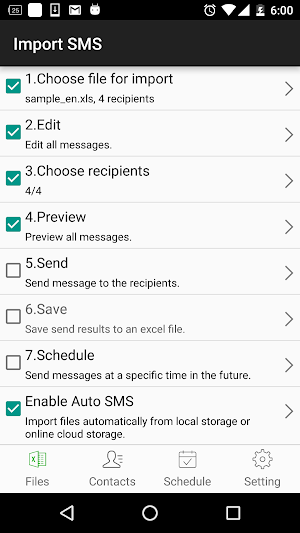
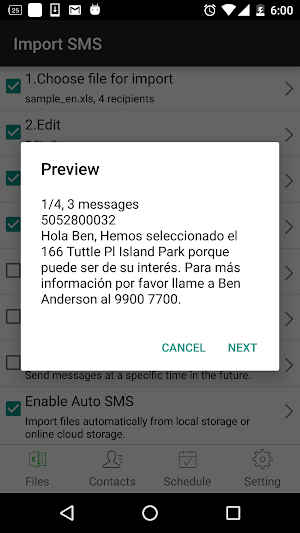
SA Group Text is the most efficient way to send group messages. You can add recipient names and phone numbers in an Excel file. You can enter static or personalized text messages right in the Excel spreadsheet. For example, if you enter “Hi {first name}, ...” in a message, the app will take the first name of the recipients and personalize the message, generating text such as “Hi David, …” , “Hi Michael, …”…
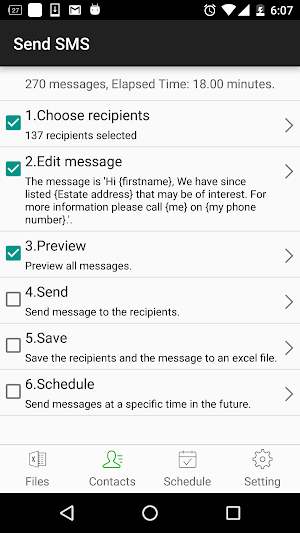
SA Group Text is also an easy way to send text messages to the contacts on your Phone. Just pick groups or individual contacts, type in a static or personalized message and send it.
With SA Group Text you can :
★ Import group Text from an Excel file via USB/Email.
★ Create your own groups in an Excel spreadsheet and send messages to them.
★ Insert tags ({firstname},{lastname},{company} etc) in your text message in order to create personalized messages. When you use this function, each message has a personal touch. For example:
Dear {firstname}, Welcome to our dinner party.
★ Use any Excel-compatible applications to create your group text messages. Be sure to save as an Excel 97-2003 Workbook.
★ Send SMS to as many recipients as you need within your Excel file
★ Create a formatted Excel file easily. The file can contain only two columns : Mobile and Message. You can find more example spreadsheets on the app’s website.
★ Create flexible group SMS in your spreadsheet.
For example “{family} Family – Practice Tomorrow at 5pm for little {kidname}!” becomes “David Family – Practice Tomorrow at 5pm for little Johnny!”. The names change over and over again.
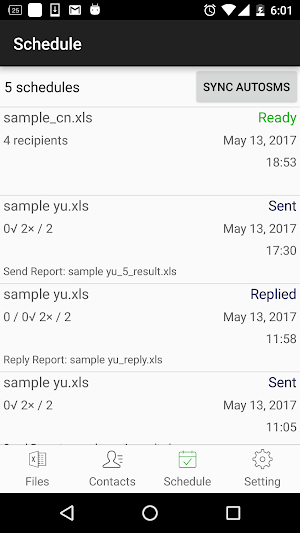
★ Schedule your messages you want to send at a specific time.
★ Set the time range of when you want your text message to send.
★ Support for Dual SIM devices (Android 5.1 or later).
★ Pause and resume schedules. You have to long press the schedule to access pause/resume option.
★ Import and send more 10,000 personalized messages in one time.
★ Send unsent messages. If the app is terminated while sending group sms, the app can continue the sending schedule after you launch the app.
★ Make send report and reply report.
★ The lite version allow you to send 120 messages each time, The full version has no limit.
★ If you provide the recipient's email address in the excel file , the same message will be sent to their email address.
In order to send messages via email, you have to
a. Enable send mail in the app’s setting page.
b. set up an email account to send messages from it.
c. add “Subject” and “EmailAddress” in the excel file. you can see the file sample-mail.xls in the app for detail.
Due to Android's SMS limitation, each app can only send 100 messages within an hour. You need to install SA Group text plug-in to extend the SMS limitation.
After download plug-ins, please go to your phone’s settings, then go to app manager, grant Send SMS permission to these plug-ins.
If the app runs on Android 8.0 and above, please enable the app running in background manually. Please also enable all Group SMS plugins running in background and send sms.
You also have to grant Run in background permission to the app and all plug-ins. Here's the way for some models to grant Run in background permission.
Huawei
go to Settings -> Battery -> Launch -> SA Group Text app
turn on Auto-launch and Run in background
Samsung
go to Settings -> Apps -> Special access -> Optimise battery usage -> All apps -> turn off SA Group Text
Vivo
go to Settings -> More Settings -> Applications -> All -> SA Group Text -> Permission -> Single Permission Setting -> Autostart
XiaoMi
Permissions -> SA Group Text -> Start in background
SA Group Text is also an easy way to send text messages to the contacts on your Phone. Just pick groups or individual contacts, type in a static or personalized message and send it.
With SA Group Text you can :
★ Import group Text from an Excel file via USB/Email.
★ Create your own groups in an Excel spreadsheet and send messages to them.
★ Insert tags ({firstname},{lastname},{company} etc) in your text message in order to create personalized messages. When you use this function, each message has a personal touch. For example:
Dear {firstname}, Welcome to our dinner party.
★ Use any Excel-compatible applications to create your group text messages. Be sure to save as an Excel 97-2003 Workbook.
★ Send SMS to as many recipients as you need within your Excel file
★ Create a formatted Excel file easily. The file can contain only two columns : Mobile and Message. You can find more example spreadsheets on the app’s website.
★ Create flexible group SMS in your spreadsheet.
For example “{family} Family – Practice Tomorrow at 5pm for little {kidname}!” becomes “David Family – Practice Tomorrow at 5pm for little Johnny!”. The names change over and over again.
★ Schedule your messages you want to send at a specific time.
★ Set the time range of when you want your text message to send.
★ Support for Dual SIM devices (Android 5.1 or later).
★ Pause and resume schedules. You have to long press the schedule to access pause/resume option.
★ Import and send more 10,000 personalized messages in one time.
★ Send unsent messages. If the app is terminated while sending group sms, the app can continue the sending schedule after you launch the app.
★ Make send report and reply report.
★ The lite version allow you to send 120 messages each time, The full version has no limit.
★ If you provide the recipient's email address in the excel file , the same message will be sent to their email address.
In order to send messages via email, you have to
a. Enable send mail in the app’s setting page.
b. set up an email account to send messages from it.
c. add “Subject” and “EmailAddress” in the excel file. you can see the file sample-mail.xls in the app for detail.
Due to Android's SMS limitation, each app can only send 100 messages within an hour. You need to install SA Group text plug-in to extend the SMS limitation.
After download plug-ins, please go to your phone’s settings, then go to app manager, grant Send SMS permission to these plug-ins.
If the app runs on Android 8.0 and above, please enable the app running in background manually. Please also enable all Group SMS plugins running in background and send sms.
You also have to grant Run in background permission to the app and all plug-ins. Here's the way for some models to grant Run in background permission.
Huawei
go to Settings -> Battery -> Launch -> SA Group Text app
turn on Auto-launch and Run in background
Samsung
go to Settings -> Apps -> Special access -> Optimise battery usage -> All apps -> turn off SA Group Text
Vivo
go to Settings -> More Settings -> Applications -> All -> SA Group Text -> Permission -> Single Permission Setting -> Autostart
XiaoMi
Permissions -> SA Group Text -> Start in background
What’s new
Version 3.7.8 · Updated August 12, 2026
1. Fixed known bugs.
User reviews

I send over 100,000 SMS weekly using this app. The flexibility of using my phone and not a PC means that I can receive replies and phone calls at the same time wherever I go. At this point in time, I've never regretted purchasing it 1 year ago. It handles duplicates.. and much more.

Can you let this application link to google sheet?

Great app

Super Super Super...!!! Simply 5 Star. Just 1 wish though - It should support the XLSX format now as the XLS format is game of the past.

Mr.; I've been using your software for a while. And with full options but no update for a long time, and please include a spot for the new version of Office. How does one access it? Often unable to access Excel's header. I will be waiting for your reply. Thanks

I love it
Alternatives to SA Group Text
Looking for apps like SA Group Text? Here are 4 similar Android apps on Google Play. The highest rated is SA Contacts (4.4/5), and 3 of the 4 are free to download.




| App | Rating | Price | Installs | Last updated | Compare |
|---|---|---|---|---|---|
| SA Group Text | 3.6 / 5 | $39.99 | 5,000+ | Aug 12, 2026 | |
| SA Contacts Lite | 3.7 / 5 | Free | 1,000,000+ | – | Compare |
| MTestM: Create your own exams | 3.7 / 5 | Free | 100,000+ | – | Compare |
| SA Group Text Lite | 3.7 / 5 | Free | 100,000+ | Aug 12, 2026 | Compare |
| SA Contacts | 4.4 / 5 | 2.99 USD | 10,000+ | – | Compare |
Compare SA Group Text with the top alternatives: ratings, updates, ASO score and keyword gaps →