
SA Contacts
samapp Business
SA Contacts is the best way to transfer contacts to and from your phone!
- Rating
- 4.8
- 828 ratings
- Downloads
- 10K+
- on Google Play
- Price
- $4.99
- No in-app purchases
- Updated
- Aug 28
- 2026 · v2.8.28
Screenshots
About SA Contacts
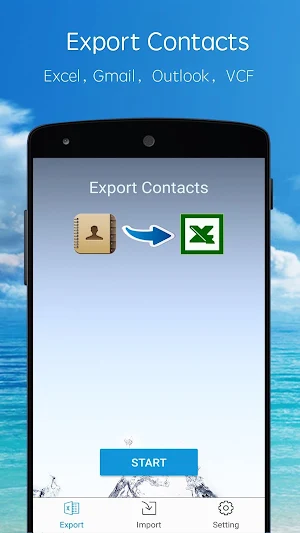
SA Contacts is the best way to transfer contacts to and from your phone! No other app lets you so easily control your phone's most valuable data:
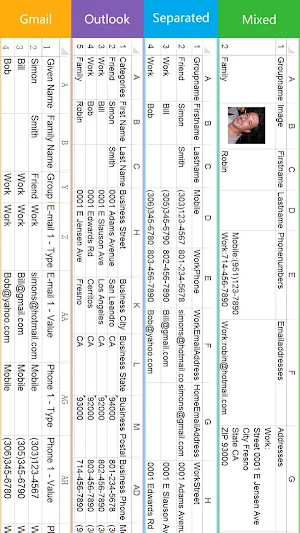
1. Update, modify and maintain your contacts easily and conveniently on your computer using Excel, OpenOffice or any other Excel-compatible application.
2. Sends all of your contacts to you from your phone in a convenient zip file by email, SD card, Dropbox, Google Drive or Box! Contact photos are sent, too!
3. You don’t need to share your contacts with Yahoo or other websites in order to have a backup. The export file contains ALL of your contacts in a convenient, easy format.
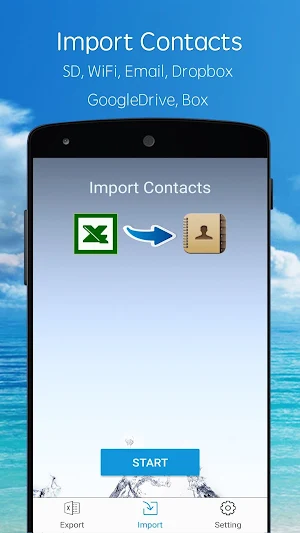
4. Restoring or changing contacts from the spreadsheet is as simple as uploading the file to your phone via USB, email, Dropbox, Google Drive or Box. It couldn't be easier.
5. You can print a hardcopy of your phone contacts.
6. You can now export phone contacts to an Excel file which can then be imported to Outlook Contacts directly.
7. You can also import contacts from an Excel file that has been exported from Outlook to your phone.
8. You can now export/import phone contacts to/from a Gmail CSV-format file(UTF-8 encoded or Unicode encoded).
9. All Contact fields except Ringtones can be exported/imported.
10. You can organise your contacts into groups easily on a spreadsheet and also assign a contact to multiple groups.
11. You can remove all phone contacts or groups before importing your organized contacts.
12. Support 10,000+ contact entries.
13. All column headers and labels in the Excel file are localized.
14. Export an Excel file with all photos included - this makes the contacts in your spreadsheet look better.
15. You can password protect your export file.
16. Export/Import contacts to/from a VCF file.
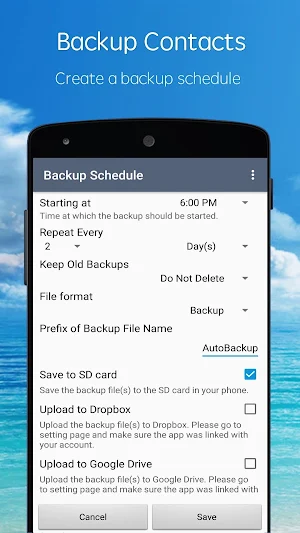
17. Schedule backup. The app can backup all contacts to SD card, Dropbox, Google Drive and Box automatically.
Tutorial videos on youtube is now available (KEYWORD: “samyuapp”).
Email: [email protected]
1. Update, modify and maintain your contacts easily and conveniently on your computer using Excel, OpenOffice or any other Excel-compatible application.
2. Sends all of your contacts to you from your phone in a convenient zip file by email, SD card, Dropbox, Google Drive or Box! Contact photos are sent, too!
3. You don’t need to share your contacts with Yahoo or other websites in order to have a backup. The export file contains ALL of your contacts in a convenient, easy format.
4. Restoring or changing contacts from the spreadsheet is as simple as uploading the file to your phone via USB, email, Dropbox, Google Drive or Box. It couldn't be easier.
5. You can print a hardcopy of your phone contacts.
6. You can now export phone contacts to an Excel file which can then be imported to Outlook Contacts directly.
7. You can also import contacts from an Excel file that has been exported from Outlook to your phone.
8. You can now export/import phone contacts to/from a Gmail CSV-format file(UTF-8 encoded or Unicode encoded).
9. All Contact fields except Ringtones can be exported/imported.
10. You can organise your contacts into groups easily on a spreadsheet and also assign a contact to multiple groups.
11. You can remove all phone contacts or groups before importing your organized contacts.
12. Support 10,000+ contact entries.
13. All column headers and labels in the Excel file are localized.
14. Export an Excel file with all photos included - this makes the contacts in your spreadsheet look better.
15. You can password protect your export file.
16. Export/Import contacts to/from a VCF file.
17. Schedule backup. The app can backup all contacts to SD card, Dropbox, Google Drive and Box automatically.
Tutorial videos on youtube is now available (KEYWORD: “samyuapp”).
Email: [email protected]
What’s new
Version 2.8.28 · Updated August 28, 2026
1. Fixed known bugs.
User reviews

Stop looking and press the Install button now. You've found the right one. I downloaded almost a dozen Contacts to Excel apps before I found this one. It does everything I wanted; putting every field in Contacts into an Excel spreadsheet. I use my Contacts to keep track of so much more information than just phone nu...

Working perfectly, but it

Keeps telling me Android memory is full. Then bombs out. Have 500 contacts so far. The internal memory card is only 14% full (of 2 gigs) and the external 64gig SD card is 24%full. It's set to save to the external card. I even removed all previous backups, to no avail. (Paid version)

True Handyman of mydevice.

Stored to phone not SD Card but exports 32 columns of data, obviously most are empty but not limited if using phone to store other info. Buy it if you want to export/backup/review contacts.

Пользуюсь давно на iOS и Android, бэкаплю в Dropbox каждый месяц на всякий случай, прога выручала не раз! Своих денег стоит. Интерфейс только бы такой же красивый как на iOS.
Alternatives to SA Contacts
Looking for apps like SA Contacts? Here are 4 similar Android apps on Google Play. The highest rated is SA Group Text (4.0/5), and 3 of the 4 are free to download.



| App | Rating | Price | Installs | Last updated | Compare |
|---|---|---|---|---|---|
| SA Contacts | 4.8 / 5 | $4.99 | 10,000+ | Aug 28, 2026 | |
| SA Contacts Lite | 3.7 / 5 | Free | 1,000,000+ | – | Compare |
| MTestM: Create your own exams | 3.7 / 5 | Free | 100,000+ | – | Compare |
| SA Group Text Lite | 3.7 / 5 | Free | 100,000+ | Aug 12, 2026 | Compare |
| SA Group Text | 4.0 / 5 | 39.99 USD | 5,000+ | – | Compare |
Compare SA Contacts with the top alternatives: ratings, updates, ASO score and keyword gaps →