

Docusight: AI Document Scanner
Tools In-app purchases
Efforlessly convert scanned images to editable document.
- Downloads
- 258+
- on Google Play
- Price
- Free
- In-app purchases
- Updated
- Sep 3
- 2026 · v1.1.3
Screenshots
About Docusight: AI Document Scanner
Tired of flat, un-selectable image scans or typing out pages of text manually? Meet Docusight—the AI-powered image-to-document converter that transforms your photos, book pages, and notes into clean, fully editable text documents.
Docusight uses advanced multimodal AI to analyze textbook pages, printed documents, and clean handwriting, converting them into industry-standard editable formats like Microsoft Word (.docx), PDF, and OpenOffice (.odt).
🚀 CORE FEATURES:
📄 PRESERVE DOCUMENT STRUCTURE
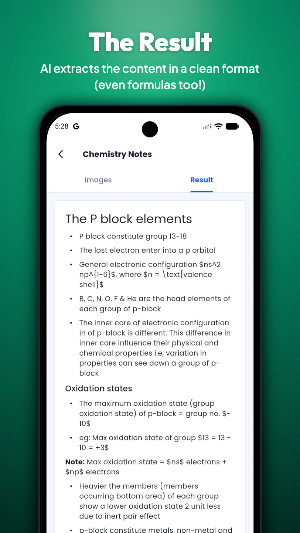
Unlike standard OCR scanners that turn your images into a messy block of unformatted text, Docusight’s AI recognizes the layout of your pages. It automatically detects headings, subheadings, paragraphs, bullet points, numbered lists, and tables, turning them into a structured, cleanly formatted document.
✍️ SCAN HANDWRITING & PRINTED TEXT
Docusight handles both typed paper documents and clean, hand-printed notes. Quickly digitize meeting whiteboards, handwritten class outlines, or printed book pages without wasting hours retyping them.
📐 MATH FORMULA SCANNING
Need to scan technical materials or academic papers? Docusight intelligently detects and formats complex mathematical equations and scientific formulas, preserving their layout so they remain readable and easy to incorporate into your digital files.
📁 LOCAL WORKSPACES & OFFLINE PROJECTS
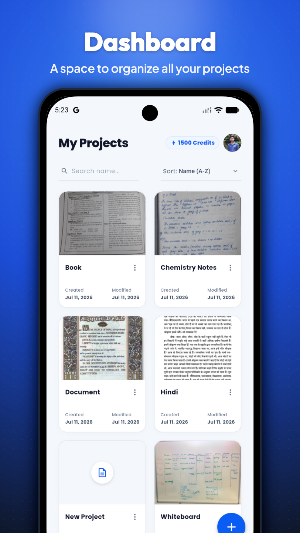
Organize your pages with absolute privacy. Create, rename, search, and manage your multi-page project folders locally on your device. Scanned page drafts are saved securely offline, with cloud transmission used solely for the document conversion process.
🔄 EASY MULTI-PAGE SEQUENCE ARRANGE
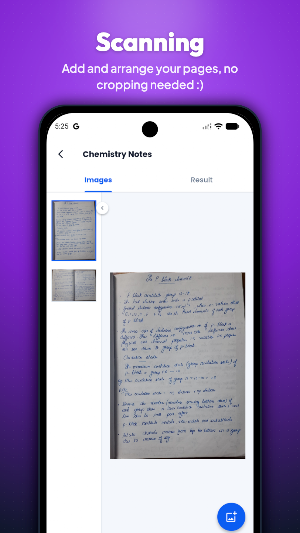
Import or capture multiple pages from your Camera or Gallery. Before converting, easily arrange the page order inside your local workspace using simple sorting controls to ensure your final document has the correct structure.
🤖 SEAMLESS PAGE-BY-PAGE STITCHING
For multi-page projects, Docusight processes pages sequentially. The AI references the headings and layout of previous pages to ensure consistent document structure and formatting across page breaks.
📤 EXPORT TO POPULAR FORMATS
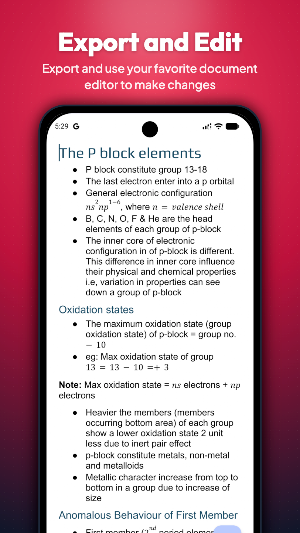
Review your scanned content in a clean preview window, copy the text to your clipboard, or export your final projects directly to your device as:
• Microsoft Word (.docx)
• Portable Document Format (.pdf)
• OpenOffice Document (.odt)
• Markdown (.md)
Docusight uses advanced multimodal AI to analyze textbook pages, printed documents, and clean handwriting, converting them into industry-standard editable formats like Microsoft Word (.docx), PDF, and OpenOffice (.odt).
🚀 CORE FEATURES:
📄 PRESERVE DOCUMENT STRUCTURE
Unlike standard OCR scanners that turn your images into a messy block of unformatted text, Docusight’s AI recognizes the layout of your pages. It automatically detects headings, subheadings, paragraphs, bullet points, numbered lists, and tables, turning them into a structured, cleanly formatted document.
✍️ SCAN HANDWRITING & PRINTED TEXT
Docusight handles both typed paper documents and clean, hand-printed notes. Quickly digitize meeting whiteboards, handwritten class outlines, or printed book pages without wasting hours retyping them.
📐 MATH FORMULA SCANNING
Need to scan technical materials or academic papers? Docusight intelligently detects and formats complex mathematical equations and scientific formulas, preserving their layout so they remain readable and easy to incorporate into your digital files.
📁 LOCAL WORKSPACES & OFFLINE PROJECTS
Organize your pages with absolute privacy. Create, rename, search, and manage your multi-page project folders locally on your device. Scanned page drafts are saved securely offline, with cloud transmission used solely for the document conversion process.
🔄 EASY MULTI-PAGE SEQUENCE ARRANGE
Import or capture multiple pages from your Camera or Gallery. Before converting, easily arrange the page order inside your local workspace using simple sorting controls to ensure your final document has the correct structure.
🤖 SEAMLESS PAGE-BY-PAGE STITCHING
For multi-page projects, Docusight processes pages sequentially. The AI references the headings and layout of previous pages to ensure consistent document structure and formatting across page breaks.
📤 EXPORT TO POPULAR FORMATS
Review your scanned content in a clean preview window, copy the text to your clipboard, or export your final projects directly to your device as:
• Microsoft Word (.docx)
• Portable Document Format (.pdf)
• OpenOffice Document (.odt)
• Markdown (.md)
What’s new
Version 1.1.3 · Updated September 3, 2026
Improved onboarding flow Cleaned up login page
Alternatives to Docusight: AI Document Scanner
Looking for apps like Docusight: AI Document Scanner? Here are 3 similar Android apps on Google Play. 2 of the 3 are free to download.



| App | Rating | Price | Installs | Last updated | Compare |
|---|---|---|---|---|---|
| Docusight: AI Document Scanner | – | Free | 100+ | Sep 3, 2026 | |
| Chain Reaction Neo+ | – | 0.49 USD | 500+ | Sep 27, 2025 | Compare |
| Wordicate | – | Free | 1,000+ | Aug 27, 2023 | Compare |
| Chain Reaction Neo | – | Free | 10,000+ | Sep 27, 2025 | Compare |