
QuickSign : Signature On Docs
Productivity In-app purchases
Sign PDFs on your phone. No account, no uploads — everything stays on device.
- Downloads
- 5+
- on Google Play
- Price
- Free
- In-app purchases
- Updated
- Aug 25
- 2026 · v1.0.0
Screenshots

About QuickSign : Signature On Docs
Sign a PDF in under a minute, without sending it anywhere.
Quicksign opens your document, puts your signature exactly where it belongs,
and writes a signed file — all on your phone. There is no account to create,
no upload, and no server. The contract you sign is seen by your device and by
whoever you send it to, and by nobody in between.
SIGN THE WAY YOU ACTUALLY SIGN
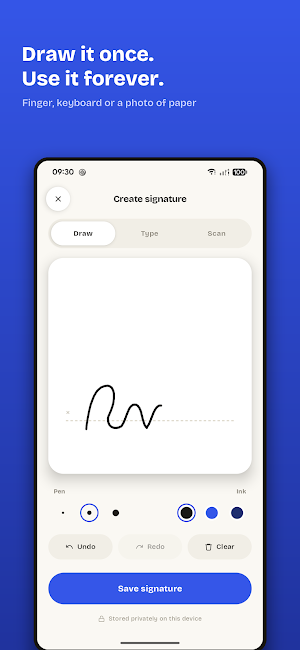
• Draw your signature with your finger, type it in a handwriting typeface, or
photograph one you signed on paper
• Save it once and it is there for every document after
• Keep initials separately, for the pages that only want initials
PLACE IT PROPERLY
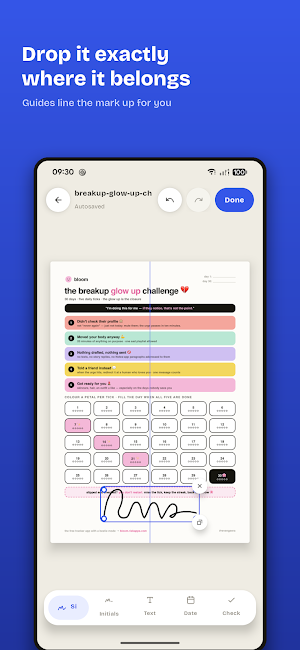
• Drag a mark anywhere, pinch to resize, twist to rotate
• Guides appear as you near the centre of the page or a one-inch margin, so
things line up without you eyeballing them
• Duplicate a mark to repeat it down a long form
• Jump straight to a page in a document that runs to fifty of them
FILL THE REST OF THE FORM
• Type into any blank on the page
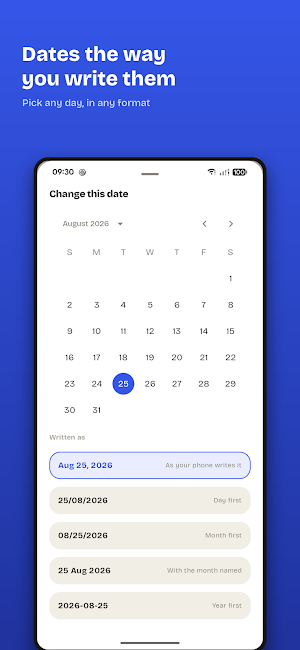
• Drop in a date — today's, or any other, in the format you actually use
• Tick boxes with a tick, a cross, a dot or a filled box
WHAT COMES OUT
• Exported at the document's own resolution, from the same coordinates the
editor used — what you placed is where it lands
• Never a watermark, on either plan
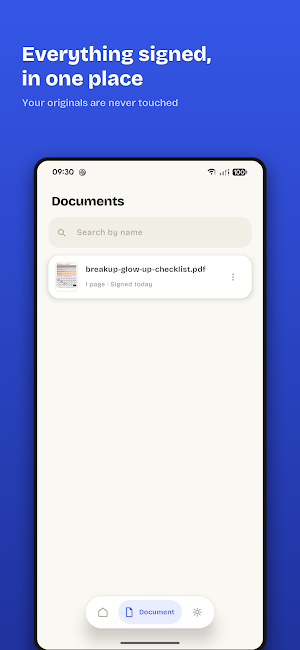
• Your original file is never modified; a signed copy is written alongside it
• Password-protected PDFs open too. The password unlocks Quicksign's working
copy and is then forgotten — never stored, never sent
PRIVACY THAT IS STRUCTURAL, NOT A PROMISE
Quicksign asks for two permissions: internet and network state, both used only
to check a Google Play purchase. It does not ask for storage access — you pick
a file through Android's own picker — and it does not ask for camera access.
There is no analytics, no crash reporting service and no advertising SDK.
FREE, AND ACTUALLY FREE
Every tool is included on the free plan and nothing is watermarked. What the
free plan limits is volume: a set number of signed documents each month, one
saved signature and one set of initials, and your most recent documents kept
in the library. Quicksign Pro lifts those limits.
A NOTE ON WHAT THIS IS
Quicksign places your signature on a document. It does not issue certificates,
verify identity or produce an audit trail. Whether an electronically signed
document is binding depends on where you are and what you are signing, so
check what your situation requires.
Privacy policy: https://riekapps.com/quicksign/privacy-policy
Terms of use: https://riekapps.com/quicksign/terms-of-service
Support: https://riekapps.com/quicksign/support
Quicksign opens your document, puts your signature exactly where it belongs,
and writes a signed file — all on your phone. There is no account to create,
no upload, and no server. The contract you sign is seen by your device and by
whoever you send it to, and by nobody in between.
SIGN THE WAY YOU ACTUALLY SIGN
• Draw your signature with your finger, type it in a handwriting typeface, or
photograph one you signed on paper
• Save it once and it is there for every document after
• Keep initials separately, for the pages that only want initials
PLACE IT PROPERLY
• Drag a mark anywhere, pinch to resize, twist to rotate
• Guides appear as you near the centre of the page or a one-inch margin, so
things line up without you eyeballing them
• Duplicate a mark to repeat it down a long form
• Jump straight to a page in a document that runs to fifty of them
FILL THE REST OF THE FORM
• Type into any blank on the page
• Drop in a date — today's, or any other, in the format you actually use
• Tick boxes with a tick, a cross, a dot or a filled box
WHAT COMES OUT
• Exported at the document's own resolution, from the same coordinates the
editor used — what you placed is where it lands
• Never a watermark, on either plan
• Your original file is never modified; a signed copy is written alongside it
• Password-protected PDFs open too. The password unlocks Quicksign's working
copy and is then forgotten — never stored, never sent
PRIVACY THAT IS STRUCTURAL, NOT A PROMISE
Quicksign asks for two permissions: internet and network state, both used only
to check a Google Play purchase. It does not ask for storage access — you pick
a file through Android's own picker — and it does not ask for camera access.
There is no analytics, no crash reporting service and no advertising SDK.
FREE, AND ACTUALLY FREE
Every tool is included on the free plan and nothing is watermarked. What the
free plan limits is volume: a set number of signed documents each month, one
saved signature and one set of initials, and your most recent documents kept
in the library. Quicksign Pro lifts those limits.
A NOTE ON WHAT THIS IS
Quicksign places your signature on a document. It does not issue certificates,
verify identity or produce an audit trail. Whether an electronically signed
document is binding depends on where you are and what you are signing, so
check what your situation requires.
Privacy policy: https://riekapps.com/quicksign/privacy-policy
Terms of use: https://riekapps.com/quicksign/terms-of-service
Support: https://riekapps.com/quicksign/support
What’s new
Version 1.0.0 · Updated August 25, 2026
The first release of Quicksign. Sign a PDF without sending it anywhere. Draw your signature, type it, or photograph one you signed on paper, place it exactly where it belongs, and export a signed copy — all on your phone. No account, no upload, no server.
Alternatives to QuickSign : Signature On Docs
Looking for apps like QuickSign : Signature On Docs? Here are 6 similar Android apps on Google Play. The highest rated is Dirty Dice: Couple Game (4.0/5), and all 6 are free to download.
-
Dirty Dice: Couple Game 4.0
-
Vibrator: Strong Vibration App
-
Cube Solver: Scan & Solve 3D
-
GPS Speedometer: Trip Tracker
-
PDF Maker: Photo to PDF
-
Bloom: 75 Day Challenge
| App | Rating | Price | Installs | Last updated | Compare |
|---|---|---|---|---|---|
| QuickSign : Signature On Docs | – | Free | 5+ | Aug 25, 2026 | |
| Dirty Dice: Couple Game | 4.0 / 5 | Free | 50,000+ | Oct 27, 2026 | Compare |
| Vibrator: Strong Vibration App | – | Free | 1,000+ | Aug 31, 2026 | Compare |
| Cube Solver: Scan & Solve 3D | – | Free | 500+ | Sep 4, 2026 | Compare |
| GPS Speedometer: Trip Tracker | – | Free | 50+ | – | Compare |
| PDF Maker: Photo to PDF | – | Free | 1+ | – | Compare |
| Bloom: 75 Day Challenge | – | Free | 50+ | Oct 20, 2026 | Compare |