
Retake: Home Launcher
One Percent Apps Productivity In-app purchases
A minimalist launcher that hides distracting apps automatically.
- Downloads
- 4.9K+
- on Google Play
- Price
- Free
- In-app purchases
- Updated
- Jul 12
- 2026 · v2.1
Screenshots

About Retake: Home Launcher
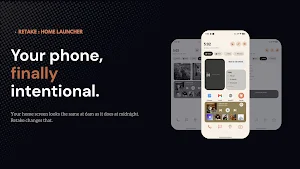
Your phone looks the same at 6am as it does at midnight. Retake changes that.
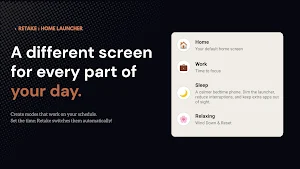
Retake is a home launcher that adapts your phone to the time of day. Set up different modes — Morning, Work, Focus, Evening — and Retake switches between them automatically on your schedule. The right apps, the right widgets, exactly when you need them.
🌅 DESIGNED FOR HOW YOU ACTUALLY LIVE
Stop seeing social media the moment you wake up. Stop accidentally opening distracting apps when you're trying to work. Retake puts you back in control by making your home screen intentional — not accidental.
⚙️ HOW IT WORKS
★ Create modes for different parts of your day
★ Choose which apps are visible (or hidden) in each mode
★ Schedule modes to switch automatically, or switch manually
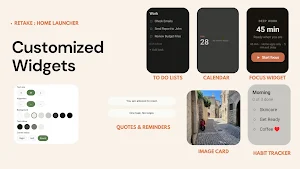
★ Add Customizable widgets that are relevant to each mode
★ Set app drawer access rules per mode
♿ ACCESSIBILITY SERVICE DISCLOSURE
Retake uses Android's AccessibilityService API to enforce app blocking rules during scheduled modes. This allows the app to detect when a blocked app is opened and return you to the home screen. This service runs only when app blocking is active. Retake does not use this permission to collect, store, or transmit any personal data.
✨ PERFECT FOR
★ Productivity-focused people who want a distraction-free workspace
★ People with ADHD who benefit from reduced decision fatigue
★ Anyone trying to build better phone habits
★ Morning routine builders and deep work enthusiasts
🆓 FREE TIER INCLUDES
★ 2 fully customisable modes
★ Scheduling & automatic switching
★ Core widget library
★ App visibility controls
⭐ RETAKE PRO
★ Unlimited modes
★ Full widget library
★ Advanced scheduling rules
★ Priority support
Your phone is your most-used tool. It's time it worked for you.
Retake is a home launcher that adapts your phone to the time of day. Set up different modes — Morning, Work, Focus, Evening — and Retake switches between them automatically on your schedule. The right apps, the right widgets, exactly when you need them.
🌅 DESIGNED FOR HOW YOU ACTUALLY LIVE
Stop seeing social media the moment you wake up. Stop accidentally opening distracting apps when you're trying to work. Retake puts you back in control by making your home screen intentional — not accidental.
⚙️ HOW IT WORKS
★ Create modes for different parts of your day
★ Choose which apps are visible (or hidden) in each mode
★ Schedule modes to switch automatically, or switch manually
★ Add Customizable widgets that are relevant to each mode
★ Set app drawer access rules per mode
♿ ACCESSIBILITY SERVICE DISCLOSURE
Retake uses Android's AccessibilityService API to enforce app blocking rules during scheduled modes. This allows the app to detect when a blocked app is opened and return you to the home screen. This service runs only when app blocking is active. Retake does not use this permission to collect, store, or transmit any personal data.
✨ PERFECT FOR
★ Productivity-focused people who want a distraction-free workspace
★ People with ADHD who benefit from reduced decision fatigue
★ Anyone trying to build better phone habits
★ Morning routine builders and deep work enthusiasts
🆓 FREE TIER INCLUDES
★ 2 fully customisable modes
★ Scheduling & automatic switching
★ Core widget library
★ App visibility controls
⭐ RETAKE PRO
★ Unlimited modes
★ Full widget library
★ Advanced scheduling rules
★ Priority support
Your phone is your most-used tool. It's time it worked for you.
What’s new
Version 2.1 · Updated July 12, 2026
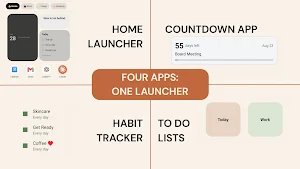
Detailed Release Notes: * Planner page with Today, Habits, Lists, and Countdowns * Habit routines, streak tracking, due-today logic, and countdown editing * Expanded Retake widgets * App Blocking Functionality using Accessibility API * Custom mode backgrounds, accent themes, and per-mode layout rules * Scheduled modes with Focus/Sleep behavior, DND support
User reviews

Easy to use and navigate, effective, would recommend

All the features are Just great...

love your idea so much

The best home launcher I've used. This app has made my phone so useful for work and getting all my errands done.

Exactly what I'm looking for, a clean interface, makes my phone use feel intentional and all the apps I really need are easy to find. This has helped me focus already and I'm excited to keep using it.
Alternatives to Retake: Home Launcher
Looking for apps like Retake: Home Launcher? Here are 6 similar Android apps on Google Play. The highest rated is 3ondokuz (4.9/5), and all 6 are free to download.
-
3ondokuz 4.9
-
PDF Viewer: PDF Launcher 3.9
-
Raangoli
-
Rare Coin Scanner & Identifier
-
CitizHub
-
Calculator – Simple & Fast
| App | Rating | Price | Installs | Last updated | Compare |
|---|---|---|---|---|---|
| Retake: Home Launcher | – | Free | 1,000+ | Jul 12, 2026 | |
| 3ondokuz | 4.9 / 5 | Free | 50,000+ | Oct 6, 2026 | Compare |
| PDF Viewer: PDF Launcher | 3.9 / 5 | Free | 10,000+ | – | Compare |
| Raangoli | – | Free | 10+ | Jun 25, 2026 | Compare |
| Rare Coin Scanner & Identifier | – | Free | 5,000+ | Oct 7, 2026 | Compare |
| CitizHub | – | Free | 1,000+ | Sep 27, 2026 | Compare |
| Calculator – Simple & Fast | – | Free | 1+ | – | Compare |
Similar apps on Google Play
- 3ondokuz
- PDF Viewer: PDF Launcher
- Raangoli
- Rare Coin Scanner & Identifier
- CitizHub
- Calculator – Simple & Fast
- Nonton DraKor Sub ID
- AI Translate: Voice & Camera
- Meds: Pill Reminder & Tracker
- Retake: Home Launcher
- PDF to Word Converter
- Sarj Map
- Betonwin
- Habit Monkey - Daily Quest
- This Truck
- Farm Operations Log
- Backbeat Ledger
- AnimeTV
- IPTV: Smart online live player
- TV Argentina Solidaria
- Hiss: White Noise & Focus
- Tools Inventory - Manage Tools
- Akcepta: Alarm & QR Scanner
- PlantMix
- Wayne Cargo