
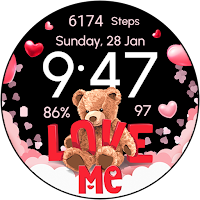
Valentine's Day Teddy - Watch
Personalization Contains ads
Wear Os Watch Face - Celebrate Valentine's Day with Teddy Bear
- Rating
- 5.0
- 8 ratings
- Downloads
- 583+
- on Google Play
- Price
- $1.49
- No in-app purchases
- Updated
- Sep 21
- 2026
Screenshots
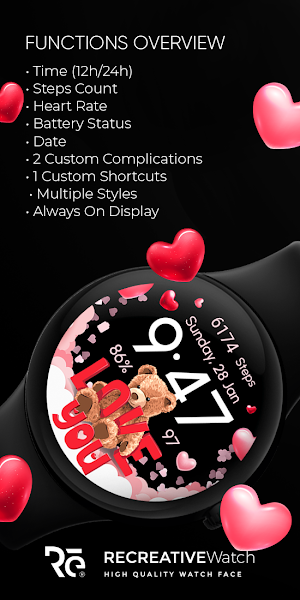


About Valentine's Day Teddy - Watch
Please read before installing
Check your watch's compatibility with WEAR OS before proceeding with the installation. (Note: Galaxy Watch 3 and Galaxy Active are not WEAR OS devices.)
✅ Compatible devices include API level 30+ Google Pixel, Galaxy Watch 4, 5, 6, and other Wear OS models.
🚨 Watch faces don't automatically apply on your watch screen after the installation. That's why you MUST set it on your watch's screen. If you need help, follow this link: https://recreative-watch.com/installation-video
🚨Why do I have to Pay Again ?🚨
It's crucial to install the watch face on the same email associated with your watch. FAILURE TO DO SO may result in an unsuccessful installation, requiring payment again when attempting to install on your watch. Reach out to us at [email protected] for assistance.
This link explains how to solve the payment-related issue.
https://www.recreative-watch.com/help/#payment-issue
💔 Before you rate us unfairly, reach out to us at [email protected], and we will send you screenshots and instructions on how to install the watch face. We are more than willing to help you step by step. 📧🤝
📵🔌If you see messages like "No watch is connected" or "❌ No Wear OS device is connected," it means you have a connectivity issue with your device or you are not using a WEAR OS device.
🚨 Please don't vent your frustrations on us and follow the steps carefully.
1. You need to install the watch face.
2. After the installation is complete, it's important to set the watch face on your watch's screen because it doesn't apply automatically.
3. Look for the watch face in the "Downloaded" section on your watch.
You can also follow these official installation tutorials provided by Samsung: 📺👇
https://www.youtube.com/watch?v=vMM4Q2-rqoM
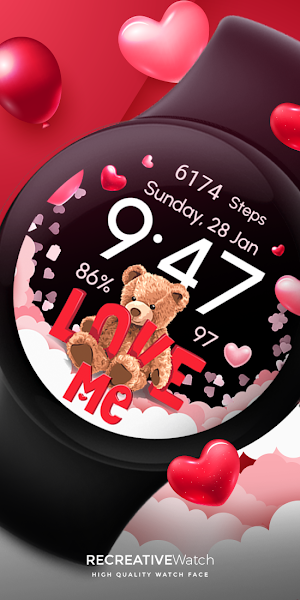
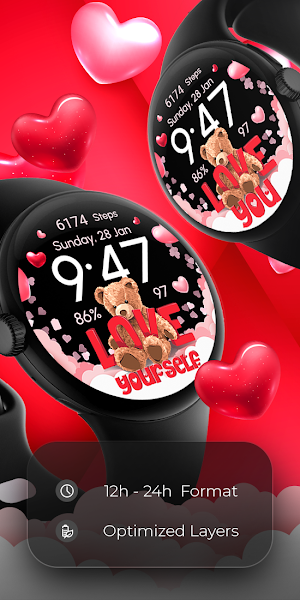
🐾💕 Dive into the adorable world of love with our Wear OS Watch Face for Valentine's Day! Motivational : Love Me, Love You, Love Yourself
⚙️ Phone App Features
This phone app is simply a tool to facilitate installation and locating the watch face on your Wear OS watch. Only the mobile app contains ads.
⚙️ Watch Face Features
• 12/24h Digital Time
• Date
• Heart Rate
• Battery
• Steps Count
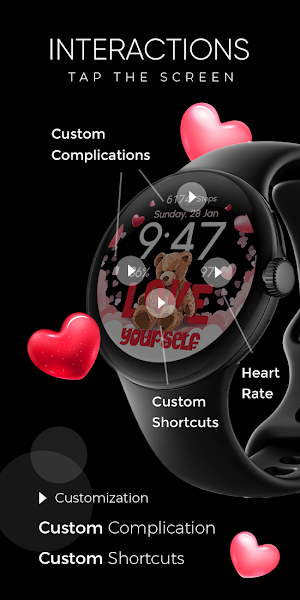
• 2 customizable Complications
• 1 customizable Shortcuts
• Multiple Variations
• Always ON Display
🎨 Customization
1 - Touch and hold display
2 - Tap on Customize option
🎨 Complications
Touch and hold display to open customization mode. You can customize the field with any data you want. For example, you can select weather, time zone, sunset/sunrise, barometer, next appointment, and more.
🔋 Battery
For better battery performance of the watch, we recommend disabling the "Always On Display" mode.
⭐ Instagram
https://www.instagram.com/recreativewfs/
⭐ Facebook
https://www.facebook.com/profile.php?id=100083117352886
Check your watch's compatibility with WEAR OS before proceeding with the installation. (Note: Galaxy Watch 3 and Galaxy Active are not WEAR OS devices.)
✅ Compatible devices include API level 30+ Google Pixel, Galaxy Watch 4, 5, 6, and other Wear OS models.
🚨 Watch faces don't automatically apply on your watch screen after the installation. That's why you MUST set it on your watch's screen. If you need help, follow this link: https://recreative-watch.com/installation-video
🚨Why do I have to Pay Again ?🚨
It's crucial to install the watch face on the same email associated with your watch. FAILURE TO DO SO may result in an unsuccessful installation, requiring payment again when attempting to install on your watch. Reach out to us at [email protected] for assistance.
This link explains how to solve the payment-related issue.
https://www.recreative-watch.com/help/#payment-issue
💔 Before you rate us unfairly, reach out to us at [email protected], and we will send you screenshots and instructions on how to install the watch face. We are more than willing to help you step by step. 📧🤝
📵🔌If you see messages like "No watch is connected" or "❌ No Wear OS device is connected," it means you have a connectivity issue with your device or you are not using a WEAR OS device.
🚨 Please don't vent your frustrations on us and follow the steps carefully.
1. You need to install the watch face.
2. After the installation is complete, it's important to set the watch face on your watch's screen because it doesn't apply automatically.
3. Look for the watch face in the "Downloaded" section on your watch.
You can also follow these official installation tutorials provided by Samsung: 📺👇
https://www.youtube.com/watch?v=vMM4Q2-rqoM
🐾💕 Dive into the adorable world of love with our Wear OS Watch Face for Valentine's Day! Motivational : Love Me, Love You, Love Yourself
⚙️ Phone App Features
This phone app is simply a tool to facilitate installation and locating the watch face on your Wear OS watch. Only the mobile app contains ads.
⚙️ Watch Face Features
• 12/24h Digital Time
• Date
• Heart Rate
• Battery
• Steps Count
• 2 customizable Complications
• 1 customizable Shortcuts
• Multiple Variations
• Always ON Display
🎨 Customization
1 - Touch and hold display
2 - Tap on Customize option
🎨 Complications
Touch and hold display to open customization mode. You can customize the field with any data you want. For example, you can select weather, time zone, sunset/sunrise, barometer, next appointment, and more.
🔋 Battery
For better battery performance of the watch, we recommend disabling the "Always On Display" mode.
https://www.instagram.com/recreativewfs/
https://www.facebook.com/profile.php?id=100083117352886
Alternatives to Valentine's Day Teddy - Watch
Looking for apps like Valentine's Day Teddy - Watch? Here are 6 similar Android apps on Google Play. The highest rated is Military Classic - Army - RE23 (4.3/5), and all 6 are free to download.
-
Military Classic - Army - RE23 4.3
-
Minimal & Simple Watch - RE 4.3
-
RE30 - Minimal - Simple 4.2
-
Outdoor - Mountain & Sea 4.2
-
RE 03 - Digital Watch Face 4.1
-
Bright Marble - Rose Gold
| App | Rating | Price | Installs | Last updated | Compare |
|---|---|---|---|---|---|
| Valentine's Day Teddy - Watch | 5.0 / 5 | $1.49 | 500+ | Sep 21, 2026 | |
| Military Classic - Army - RE23 | 4.3 / 5 | Free | 500,000+ | Oct 15, 2026 | Compare |
| Minimal & Simple Watch - RE | 4.3 / 5 | Free | 1,000,000+ | Oct 13, 2026 | Compare |
| RE30 - Minimal - Simple | 4.2 / 5 | Free | 100,000+ | Oct 15, 2026 | Compare |
| Outdoor - Mountain & Sea | 4.2 / 5 | Free | 500,000+ | Sep 21, 2026 | Compare |
| RE 03 - Digital Watch Face | 4.1 / 5 | Free | 100,000+ | Oct 15, 2026 | Compare |
| Bright Marble - Rose Gold | – | Free | 10,000+ | Oct 16, 2026 | Compare |
Similar apps on Google Play
- Military Classic - Army - RE23
- Minimal & Simple Watch - RE
- RE30 - Minimal - Simple
- Outdoor - Mountain & Sea
- RE 03 - Digital Watch Face
- Bright Marble - Rose Gold
- RE 07 - Simple & Minimal
- Santa Claus & Christmas
- Emoji Frame - Moods Seasonal
- Floral Spring Pastel - ReS14
- Floral Women's Day - ReS12
- Floral Spring Nature - ReS10
- Easter Spring Animals - ReS11
- Floral Girl Power - ReS13
- Floral Pastel Spring - ReS09
- Floral Nature Spring - ReS08
- Floral Rose Nature - ReS05
- Floral Pastel Colorful - ReS06
- Minimal Pastel Digital - ReS07
- Minimalist Analogue - RE44
- Minimal Digital Analog - RE43
- Digital Minimal Rythm - RE41
- Minimal Digital Casual - RE42
- Minimal Digital Casual - RE40
- Colorful - Modern Art - RE39
- Colorful - Fitness Art - RE38
- Colorful - Digital Art - RE37
- Valentine's Day Teddy - Watch
- Valentine's Day Elegance
- Valentine's Day Beauty Watch
- Cute Valentine's Day - Watch
- My Valentine's Day - Watch
- Valentine's Day Love - Watch
- Valentine's Day Cupid - Watch
- Valentine's Day Couple - Watch
- Floral Lavanda Spring - ReS04
- Floral Valentine's Day - ReS03
- Floral & Bright - ReS02
- Floral Elegance Spring - ReS01
- Animated New Year & Christmas
- Animated North Pole Christmas
- Animated - Christmas Tree
- New Year's Eve - Animated
- Christmas Gifts & Lights
- Christmas Globes & Decorations
- Christmas - Gingerbread
- Santa's Christmas Village
- Christmas Frame - Characters
- Winter & Christmas Friends
- RE35 - Sport & Minimal
- RE34 - Informative & Sport
- Daily Emoji Moods - RE33
- Daily Emoji Moods - RE32
- Floral & Seasonal - Wear Os
- Día de Muertos - Wear Os
- Halloween In Fire - Wear OS
- Evil Halloween - Wear OS
- Halloween Witchy Cat - Wear OS
- Halloween Cute Frame - Wear OS
- Thanksgiving Season - Wear OS
- Thanksgiving Festive - Wear OS
- RE31 - Minimal - Classic
- RE29 - Minimal - Wear Os
- Halloween Story - Characters
- Pumpkin Web - Halloween
- Spooky Halloween - Boo!
- Minimal Halloween - Neon
- Pumpkin Frame & Halloween
- Seasonal Nature - Wear OS
- Seasonal Vibes - Wear Os Watch
- Autumn: Animals & Nature
- Winter: Animals & Nature
- RE28 - Km/Mi - Health Tracking
- RE27 - Minimal - Elegant
- Zodiac Signs & Constellations
- RE26 - Minimal & Customizable
- Summer Vacation - Sunny Vibes
- Seasonal Watch - Animated
- Seasonal Cute Animals & Pets
- RE25 - Minimal - Animated
- Game - Space Racer
- RE24 - Health Tracking Fitness
- Anime Characters - Cute Art
- 4th of July - Independence Day
- Flowers Frame - Seasonal
- Pride is Love - Rainbow
- Health Tracking Fitness - RE22
- Colorful - Modern Art - RE21
- Minimal - Elegant - RE20
- Minimal - Elegant - RE19
- Minimal - Timepiece - RE18
- Minimal - Analog - RE17
- RE 16 - Minimal - Elegant
- RE15 - Km & Mile - Sport
- Seasonal Moods & Flowers
- RE14 - Minimal - Digital
- RE13 - Minimal - Health
- Easter Bunny - Watch Face
- Flowers - Spring Summer Watch
- RE12 - Minimal - Hybrid
- RE11 - Minimal - Digital
- RE10 - Minimal - Digital
- RE 09 - Minimal - Classic
- RE08 - Minimal - Elegant
- RE 06 - Informative Km & Mile
- RE 05 - Km/Mi Tracking Sport
- RE 04 - Minimal Watch Face
- Christmas Spirit - Animated
- RE 02 - Minimal Watch Face