
AudioPDF – Read PDF Aloud
Marko Sarkanj Music & Audio
Listen to PDFs anytime. Smart text to speech with background playback.
- Rating
- 4.8
- 2.3K ratings
- Downloads
- 84.8K+
- on Google Play
- Price
- Free
- No in-app purchases
- Updated
- Jun 10
- 2026 · v2.2
Screenshots


About AudioPDF – Read PDF Aloud
AudioPDF turns any PDF document into clear, natural audio so you can listen instead of read.
Listen to PDFs aloud while commuting, exercising, or working — even in the background. AudioPDF understands document structure, images, and tables to deliver a smooth, human-like listening experience.
Current PDF import support includes Latin-script languages, Russian, Ukrainian, Bulgarian, Greek, Hindi, Japanese, and Korean.
Playback quality depends on the text detected during on-device parsing and the voices available on your device.
Why AudioPDF
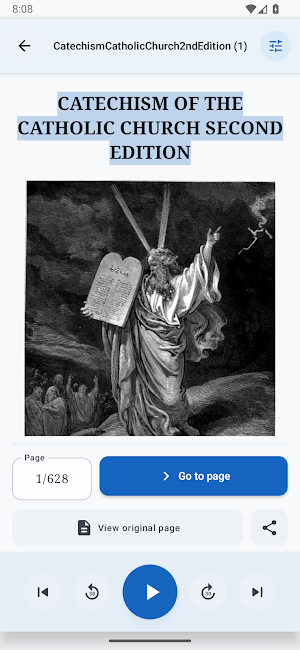
Unlike basic PDF readers, AudioPDF intelligently parses your documents. It understands headings, paragraphs, tables, and images, so the audio flows naturally and is easier to follow. Images and tables are visible in the reader screen together with their captions.
Perfect for students, professionals, and anyone who wants hands-free access to documents.
Key Features
• Clear text-to-speech with natural voices
• Multiple voice choices per language when your Android text-to-speech engine provides them
• Smart document parsing for smoother listening, including headings, paragraphs, tables, and layout
• Image-aware reading with captions, including extracted images and spoken captions where possible
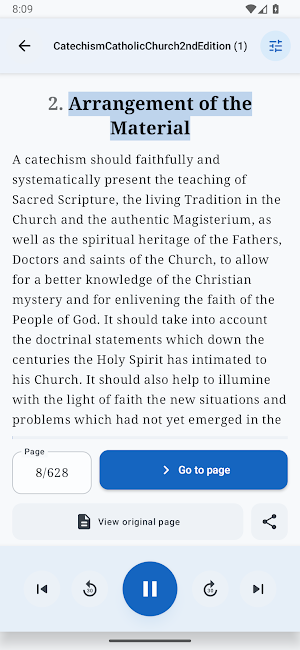
• Original page preview with playback controls and highlighting for the region currently being read
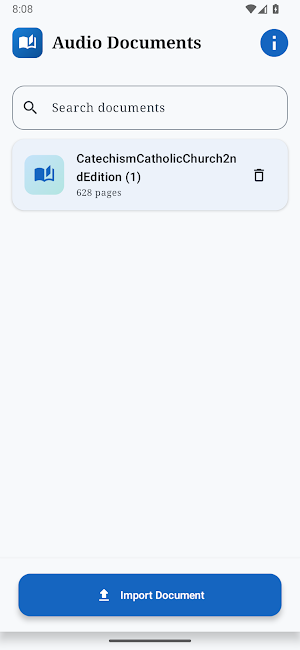
• Import PDFs from files or cloud drives
• Resume where you left off in any document
• Skip pages in PDFs and jump straight to what you need
• Simple controls for play, pause, and navigation
• Skip 30 seconds back or forward using Bluetooth headset controls
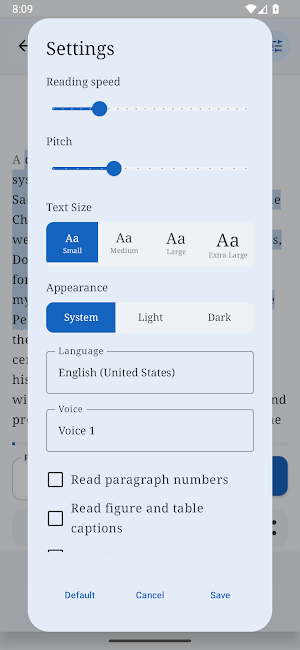
• Choose language, voice, playback speed, pitch, appearance, and reading options in app settings
• Works offline with local PDF files
• Supports PDFs in Latin-script languages, Russian, Ukrainian, Bulgarian, Greek, Hindi, Japanese, and Korean
• Available voices and playback languages depend on your device’s text-to-speech engine
Ideal For
• Listening to PDFs hands-free
• Studying and reviewing documents
• Multitasking while consuming written content
• Accessibility and reduced eye strain
Turn your PDFs into audio and listen your way with AudioPDF.
Listen to PDFs aloud while commuting, exercising, or working — even in the background. AudioPDF understands document structure, images, and tables to deliver a smooth, human-like listening experience.
Current PDF import support includes Latin-script languages, Russian, Ukrainian, Bulgarian, Greek, Hindi, Japanese, and Korean.
Playback quality depends on the text detected during on-device parsing and the voices available on your device.
Why AudioPDF
Unlike basic PDF readers, AudioPDF intelligently parses your documents. It understands headings, paragraphs, tables, and images, so the audio flows naturally and is easier to follow. Images and tables are visible in the reader screen together with their captions.
Perfect for students, professionals, and anyone who wants hands-free access to documents.
Key Features
• Clear text-to-speech with natural voices
• Multiple voice choices per language when your Android text-to-speech engine provides them
• Smart document parsing for smoother listening, including headings, paragraphs, tables, and layout
• Image-aware reading with captions, including extracted images and spoken captions where possible
• Original page preview with playback controls and highlighting for the region currently being read
• Import PDFs from files or cloud drives
• Resume where you left off in any document
• Skip pages in PDFs and jump straight to what you need
• Simple controls for play, pause, and navigation
• Skip 30 seconds back or forward using Bluetooth headset controls
• Choose language, voice, playback speed, pitch, appearance, and reading options in app settings
• Works offline with local PDF files
• Supports PDFs in Latin-script languages, Russian, Ukrainian, Bulgarian, Greek, Hindi, Japanese, and Korean
• Available voices and playback languages depend on your device’s text-to-speech engine
Ideal For
• Listening to PDFs hands-free
• Studying and reviewing documents
• Multitasking while consuming written content
• Accessibility and reduced eye strain
Turn your PDFs into audio and listen your way with AudioPDF.
What’s new
Version 2.2 · Updated June 10, 2026
AudioPDF 2.2 adds multiple voices per language when your Android TTS engine provides them, playback controls with active-region highlighting in original page preview, and Ukrainian PDF support.
User reviews

perfect

One of the best apps ever.

very good

So far, so good. A bit robotic, but it is free.

amazing app

good
Alternatives to AudioPDF – Read PDF Aloud
Looking for apps like AudioPDF – Read PDF Aloud? Here are 6 similar Android apps on Google Play. The highest rated is Learn German Daily with Readle (4.7/5), and all 6 are free to download.
-
Learn German Daily with Readle 4.7
-
Listening: Text to Speech 3.9
-
getAbstract: Book Summaries 4.4
-
Readwise Reader 4.2
-
AI Voice: Text to Speech TTS 4.3
-
Jasper AI Copy Content Writer 4.5
| App | Rating | Price | Installs | Last updated | Compare |
|---|---|---|---|---|---|
| AudioPDF – Read PDF Aloud | 4.8 / 5 | Free | 50,000+ | Jun 10, 2026 | |
| Learn German Daily with Readle | 4.7 / 5 | Free | 500,000+ | Sep 22, 2026 | Compare |
| Listening: Text to Speech | 3.9 / 5 | Free | 100,000+ | Oct 14, 2026 | Compare |
| getAbstract: Book Summaries | 4.4 / 5 | Free | 100,000+ | – | Compare |
| Readwise Reader | 4.2 / 5 | Free | 100,000+ | Oct 25, 2026 | Compare |
| AI Voice: Text to Speech TTS | 4.3 / 5 | Free | 1,000,000+ | Aug 5, 2026 | Compare |
| Jasper AI Copy Content Writer | 4.5 / 5 | Free | 100,000+ | Oct 29, 2026 | Compare |
Similar apps on Google Play
- Learn German Daily with Readle
- Listening: Text to Speech
- getAbstract: Book Summaries
- Readwise Reader
- AI Voice: Text to Speech TTS
- Jasper AI Copy Content Writer
- Arno: DET, TOEFL, PTE, IELTS
- Bilingual Books: Parallel Read
- BeConfident
- Dolphin EasyReader
- Aimigo Language Coach
- FBReader: Favorite Book Reader
- Falcon PDF - Editor & Tools
- GeeksforGeeks - Learn To Code
- NaturalReader - Text to Speech
- Speechify – Text to Speech
- The Crypto App: News & Alerts
- Foxit PDF Editor
- eReader Prestigio: Book Reader
- eBoox: ePub PDF e-book Reader
- Writer Journal - Text,Note
- Kajabi
- Typr — Voice to PDF
- ReadEra – book reader pdf epub
- Notta-Transcribe Audio to Text
- RiseGuide: Expert Insights
- HumanGO: AI Training Planner
- pdfFiller Edit, fill, sign PDF
- Sider: AI GPT Deep Chat
- PDFelement-PDF Editor & Reader
- Scribd: 300M+ documents
- PDF AI: Podcast, Notes, Slides
- SignNow: Sign & Fill PDF Docs
- Rocketbook
- iLovePDF: PDF Editor & Scanner
- PDF Reader & Editor: Xodo
- PDF Merge: Scan, Sign & Edit
- Mobi PDF・Editor・Scanner・Reader
- AI Chat: AI Chatbot Assistant
- PDF Editor – Edit Everything!
- PDF Reader(KDAN PDF): Edit PDF
- Zyntra Craft: Easy Text Editor