

SnapDic
Books & Reference Contains ads
Point. Scan. Learn. The camera dictionary that turns reading into mastery.
- Downloads
- 10+
- on Google Play
- Price
- Free
- No in-app purchases
- Updated
- Aug 17
- 2026 · v1.0.5
Screenshots

About SnapDic
Stop typing every word you don't know.
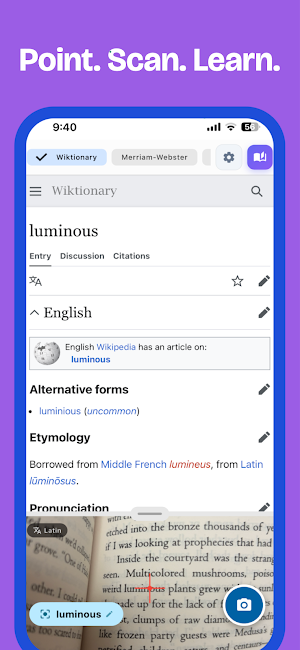
SnapDic is the camera-powered dictionary that lets you point at any word and instantly get its definition. No more switching between apps or tedious typing -- just snap and learn.
> WHY SNAPDIC?
Traditional Dictionary Problem:
You see an unfamiliar word in a book. You open a dictionary app. You type it character by character. By the time you find the meaning, you've lost your reading flow.
SnapDic Solution:
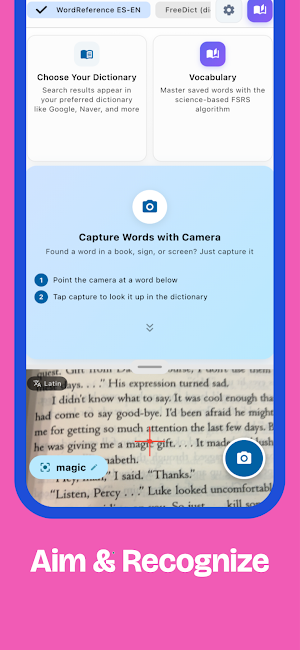
Point your camera. Tap the word. Get the definition. Done in 2 seconds.
> KEY FEATURES
[INSTANT CAMERA LOOKUP]
- Point at any printed text
- Tap the word you want to look up
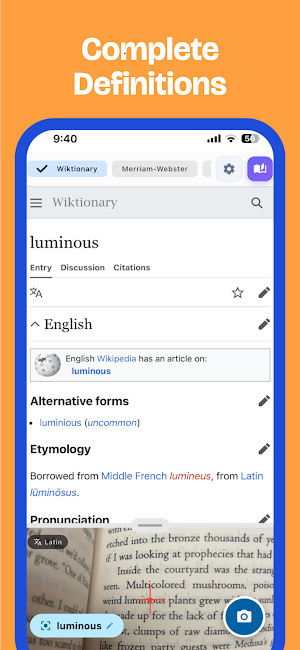
- Get definitions instantly
- Works with books, documents, signs, menus
[SMART VOCABULARY BUILDER]
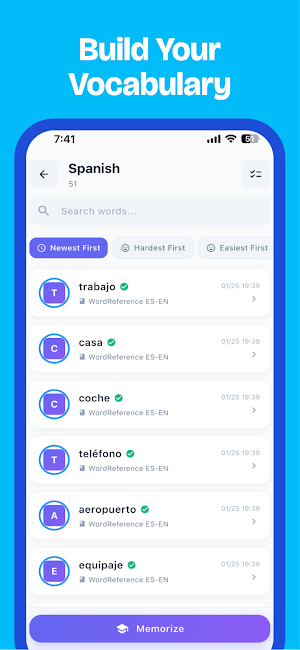
- Save words to custom vocabulary books
- Organize by topic, language, or project
- Never lose a word you've looked up
[FSRS SPACED REPETITION]
- Science-backed memorization system
- Optimized review intervals
- Actually remember the words you learn
[OFFLINE DICTIONARY]
- Download dictionaries for offline use
- Perfect for travel or low-connectivity areas
- Multiple language support (Pro)
[BEAUTIFUL DESIGN]
- Clean, distraction-free interface
- Dark mode support (Pro)
- Multiple themes (Pro)
> WHO IS THIS FOR?
- Language learners studying new vocabulary
- Students reading academic texts
- Travelers navigating foreign countries
- Professionals reading technical documents
- Book lovers who hate interrupting their flow
- Anyone tired of typing words into dictionaries
> SNAPDIC PRO
Unlock the full experience:
- Unlimited daily searches
- Unlimited vocabulary books
- Offline dictionary access
- Ad-free learning
- Dark mode & premium themes
- Export your vocabulary
> HOW IT WORKS
1. Point your camera at any text
2. Tap the word you want to define
3. View the definition instantly
4. Save to your vocabulary (optional)
5. Review with spaced repetition
No typing. No app switching. Just learning.
---
Download SnapDic and never struggle with unfamiliar words again.
Questions or feedback? Contact us at [email protected]
SnapDic is the camera-powered dictionary that lets you point at any word and instantly get its definition. No more switching between apps or tedious typing -- just snap and learn.
> WHY SNAPDIC?
Traditional Dictionary Problem:
You see an unfamiliar word in a book. You open a dictionary app. You type it character by character. By the time you find the meaning, you've lost your reading flow.
SnapDic Solution:
Point your camera. Tap the word. Get the definition. Done in 2 seconds.
> KEY FEATURES
[INSTANT CAMERA LOOKUP]
- Point at any printed text
- Tap the word you want to look up
- Get definitions instantly
- Works with books, documents, signs, menus
[SMART VOCABULARY BUILDER]
- Save words to custom vocabulary books
- Organize by topic, language, or project
- Never lose a word you've looked up
[FSRS SPACED REPETITION]
- Science-backed memorization system
- Optimized review intervals
- Actually remember the words you learn
[OFFLINE DICTIONARY]
- Download dictionaries for offline use
- Perfect for travel or low-connectivity areas
- Multiple language support (Pro)
[BEAUTIFUL DESIGN]
- Clean, distraction-free interface
- Dark mode support (Pro)
- Multiple themes (Pro)
> WHO IS THIS FOR?
- Language learners studying new vocabulary
- Students reading academic texts
- Travelers navigating foreign countries
- Professionals reading technical documents
- Book lovers who hate interrupting their flow
- Anyone tired of typing words into dictionaries
> SNAPDIC PRO
Unlock the full experience:
- Unlimited daily searches
- Unlimited vocabulary books
- Offline dictionary access
- Ad-free learning
- Dark mode & premium themes
- Export your vocabulary
> HOW IT WORKS
1. Point your camera at any text
2. Tap the word you want to define
3. View the definition instantly
4. Save to your vocabulary (optional)
5. Review with spaced repetition
No typing. No app switching. Just learning.
---
Download SnapDic and never struggle with unfamiliar words again.
Questions or feedback? Contact us at [email protected]
Alternatives to SnapDic
Looking for apps like SnapDic? Here are 6 similar Android apps on Google Play. All of them are free to download.
-
Dice Rune – 3D RPG Dice Roller
-
Flowmodoro - Pomodoro in Flow
-
漢検まいにち - 漢字検定対策アプリ
-
Moodient - AI wellness coach
-
한자하루 – 급수 시험 대비 한자 학습
-
SynapSet - Habit Tracker
| App | Rating | Price | Installs | Last updated | Compare |
|---|---|---|---|---|---|
| SnapDic | – | Free | 10+ | Aug 17, 2026 | |
| Dice Rune – 3D RPG Dice Roller | – | Free | 50+ | – | Compare |
| Flowmodoro - Pomodoro in Flow | – | Free | 10+ | Oct 20, 2026 | Compare |
| 漢検まいにち - 漢字検定対策アプリ | – | Free | 10+ | – | Compare |
| Moodient - AI wellness coach | – | Free | 10+ | Aug 30, 2026 | Compare |
| 한자하루 – 급수 시험 대비 한자 학습 | – | Free | 5,000+ | Oct 7, 2026 | Compare |
| SynapSet - Habit Tracker | – | Free | 10+ | Aug 30, 2026 | Compare |
Compare SnapDic with the top alternatives: ratings, updates, ASO score and keyword gaps →