

Lucky Sun
ANDEX Tools
Lucky Sun - Tanning timer with skin type and manual UV setup
- Downloads
- 1+
- on Google Play
- Price
- Free
- No in-app purchases
- Updated
- Jul 19
- 2026 · v1.0
Screenshots


About Lucky Sun
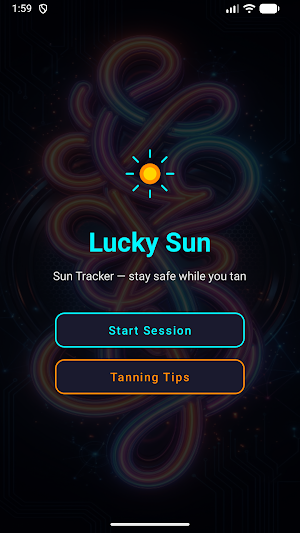
☀️ WELCOME TO Lucky Sun
Lucky Sun is a tanning session timer for outdoor use. Plan each visit with a countdown, skin-type settings, and manual UV input so you know when to start, pause, and finish. The app helps you structure sun exposure time from settings you enter — it does not read live weather or device location.
🎯 CORE FEATURES
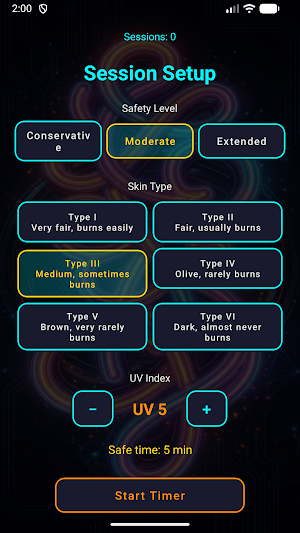
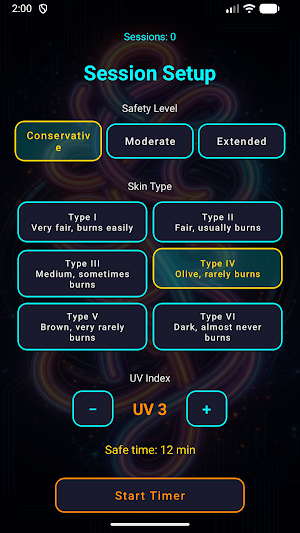
Choose your Fitzpatrick skin type, set the UV index manually, pick a safety level, and see a calculated session length before you go outside. During the session, an animated sun timer counts down with tap-to-pause control. When the timer finishes or you finish early, Lucky Sun shows a clear result screen.
🔧 SESSION SETUP
• Skin Type — Six Fitzpatrick categories (Type I through Type VI), each with a short description such as fair skin that burns easily or darker skin that rarely burns. • Safety Level — Conservative, Moderate, or Extended. Each level uses a different calculation factor and sets a default UV value that you can change. • UV Index — Adjust from 1 to 11 with plus and minus controls. You enter the value to match current conditions. • Safe Time Preview — Instantly see how many minutes your session is scheduled to last. • Session Counter — View fully completed sessions; the count appears on the setup screen and is saved locally.
⚙️ SESSION LENGTH CALCULATION
Lucky Sun calculates planned minutes from skin type, the UV index you enter, and your safety level. Higher UV reduces the calculated window. Minimum planned session length is three minutes.
⏱️ SUN TIMER
Custom circular display with animated rays and a large countdown:
• Tap the display to pause or resume. • Status bar shows remaining time, UV index, skin type number, and extensions left. • Extend Session adds one minute per tap, up to three extensions per session. • Stop Early ends the session before the countdown finishes.
When the timer reaches zero, the session is complete and your completed total increases by one. Early stops and used extensions appear on the result screen without adding to the completed count.
📋 SESSION RESULTS
• Session Complete — You finished the planned countdown; completed total increases. • Session Stopped — Messages explaining early exit or used extensions.
Start a New Session with saved preferences or return Home.
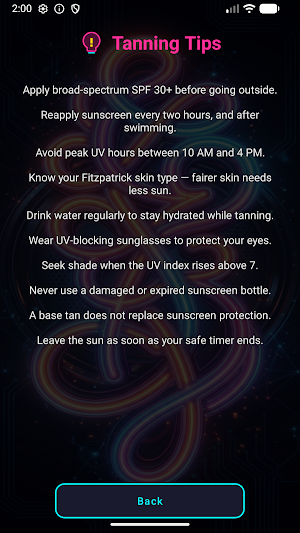
💡 TANNING TIPS
Ten reminders built into Lucky Sun:
• Apply broad-spectrum SPF 30+ before going outside. • Reapply sunscreen every two hours, and after swimming. • Avoid peak UV hours between 10 AM and 4 PM. • Know your Fitzpatrick skin type — fairer skin needs less sun. • Drink water regularly while tanning. • Wear UV-blocking sunglasses. • Seek shade when the UV index rises above 7. • Never use damaged or expired sunscreen. • A base tan does not replace sunscreen protection. • Leave the sun when your planned timer ends.
General guidance only — not professional medical advice.
💾 SAVED SETTINGS
Lucky Sun stores your last skin type, UV index, safety level, and completed session count locally on your device.
🎨 DESIGN
Neon-accent layout with large touch buttons and a readable status bar. Home offers Start Session and Tanning Tips; setup, timer, and result screens stay simple and one-handed.
🌤️ FOR OUTDOOR SESSIONS
Lucky Sun is for structured tanning timing instead of guessing exposure time. Set your profile, adjust UV when conditions change, run the countdown, pause when needed, and review each result.
Open Lucky Sun, configure your session, and let the timer guide your time in the sun from the settings you choose.
Lucky Sun is a tanning session timer for outdoor use. Plan each visit with a countdown, skin-type settings, and manual UV input so you know when to start, pause, and finish. The app helps you structure sun exposure time from settings you enter — it does not read live weather or device location.
🎯 CORE FEATURES
Choose your Fitzpatrick skin type, set the UV index manually, pick a safety level, and see a calculated session length before you go outside. During the session, an animated sun timer counts down with tap-to-pause control. When the timer finishes or you finish early, Lucky Sun shows a clear result screen.
🔧 SESSION SETUP
• Skin Type — Six Fitzpatrick categories (Type I through Type VI), each with a short description such as fair skin that burns easily or darker skin that rarely burns. • Safety Level — Conservative, Moderate, or Extended. Each level uses a different calculation factor and sets a default UV value that you can change. • UV Index — Adjust from 1 to 11 with plus and minus controls. You enter the value to match current conditions. • Safe Time Preview — Instantly see how many minutes your session is scheduled to last. • Session Counter — View fully completed sessions; the count appears on the setup screen and is saved locally.
⚙️ SESSION LENGTH CALCULATION
Lucky Sun calculates planned minutes from skin type, the UV index you enter, and your safety level. Higher UV reduces the calculated window. Minimum planned session length is three minutes.
⏱️ SUN TIMER
Custom circular display with animated rays and a large countdown:
• Tap the display to pause or resume. • Status bar shows remaining time, UV index, skin type number, and extensions left. • Extend Session adds one minute per tap, up to three extensions per session. • Stop Early ends the session before the countdown finishes.
When the timer reaches zero, the session is complete and your completed total increases by one. Early stops and used extensions appear on the result screen without adding to the completed count.
📋 SESSION RESULTS
• Session Complete — You finished the planned countdown; completed total increases. • Session Stopped — Messages explaining early exit or used extensions.
Start a New Session with saved preferences or return Home.
💡 TANNING TIPS
Ten reminders built into Lucky Sun:
• Apply broad-spectrum SPF 30+ before going outside. • Reapply sunscreen every two hours, and after swimming. • Avoid peak UV hours between 10 AM and 4 PM. • Know your Fitzpatrick skin type — fairer skin needs less sun. • Drink water regularly while tanning. • Wear UV-blocking sunglasses. • Seek shade when the UV index rises above 7. • Never use damaged or expired sunscreen. • A base tan does not replace sunscreen protection. • Leave the sun when your planned timer ends.
General guidance only — not professional medical advice.
💾 SAVED SETTINGS
Lucky Sun stores your last skin type, UV index, safety level, and completed session count locally on your device.
🎨 DESIGN
Neon-accent layout with large touch buttons and a readable status bar. Home offers Start Session and Tanning Tips; setup, timer, and result screens stay simple and one-handed.
🌤️ FOR OUTDOOR SESSIONS
Lucky Sun is for structured tanning timing instead of guessing exposure time. Set your profile, adjust UV when conditions change, run the countdown, pause when needed, and review each result.
Open Lucky Sun, configure your session, and let the timer guide your time in the sun from the settings you choose.
Alternatives to Lucky Sun
Looking for apps like Lucky Sun? Here are 5 similar Android apps on Google Play. The highest rated is Orangetheory (4.8/5), and all 5 are free to download.





| App | Rating | Price | Installs | Last updated | Compare |
|---|---|---|---|---|---|
| Lucky Sun | – | Free | 1+ | Jul 19, 2026 | |
| Blue Sky Vitamin | 4.7 / 5 | Free | 1,000+ | Oct 8, 2026 | Compare |
| Walkbox Self-Guided Tours | – | Free | 10,000+ | – | Compare |
| Orangetheory | 4.8 / 5 | Free | 500,000+ | Oct 20, 2026 | Compare |
| Embr Wave 2 | 4.7 / 5 | Free | 50,000+ | Jun 25, 2026 | Compare |
| HydroJug | 4.8 / 5 | Free | 10,000+ | Oct 15, 2026 | Compare |
Compare Lucky Sun with the top alternatives: ratings, updates, ASO score and keyword gaps →