
Radar Pulse
DAAB (UK) LTD Tools
Radar Pulse -- timezone scope for your team.
- Downloads
- 1+
- on Google Play
- Price
- Free
- No in-app purchases
- Updated
- Aug 1
- 2026 · v1.0
Screenshots


About Radar Pulse
Radar Pulse is a small private timezone tracker styled like a vintage CRT radar scope. Your home city sits at the centre of a circular phosphor-green scope; every contact you add becomes a magenta BLIP placed at its hour-offset angle around the home. Read the radar at a glance and you know exactly where everyone is on the planet without doing hour math. The action lives INSIDE the radar -- you tap the green centre button to drop a new blip. No FAB, no banner, no top pill.
THE SCOPE
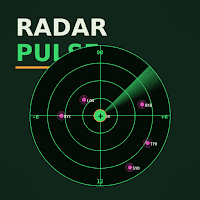
A 220px circular dial with three phosphor rings (1h, 6h, 12h distance from home), a crosshair, and cardinal hour markers (00 at top, 12 at bottom, -6 left, +6 right). Each contact is a small magenta dot placed at angular position `(offsetHours / 12) * 180 - 90` degrees, with its airport-style 3-letter code underneath. Pinned contacts get an amber ring around the dot.
THE CENTRE BUTTON
A bright phosphor-green circle sits at the very centre of the scope. Tap it and a compose sheet pops up: name, city picker, notes. The centre is your HOME -- the action is the most reachable position on the screen by design, and the visual element doubles as the affordance.
THE LOG LIST
Below the radar is a compact single-line LOG of all your blips. Each row: small magenta dot, airport code, city + name + hour delta, big local time. Reads like a control-tower readout, dense but legible.
THE OVERLAP READOUT
Just below the radar dial, a single line reports the longest contiguous overlap window in your local clock, when everyone is inside working hours at once -- in plain numbers like "WINDOW 14:00 - 17:00". Below it, the hint "TAP CENTRE TO ADD BLIP" reminds you where the action lives.
THE SCOPE VIEW TAB
The second bottom tab is a "Scope" view -- every unique city you track, sorted by hour offset. Each row: city name (or your custom label), IANA id, day-shift hint, contacts in that city, delta badge, big local time. A + ADD CITY pill top-right opens the same searchable picker. Long-press a row to remove all contacts in that city.
THE EDITOR
Tap a blip to open the editor. Name field, city picker (115+ IANA cities plus raw UTC offsets), free notes field. Save, pin, archive, or delete from a row of action buttons at the top.
SETTINGS
Pick your HOME city. Add a custom display label. Toggle 24h vs 12h clock. Tune the working window to any whole hour 0-23 using +/- steppers or by typing.
PRIVACY
Radar Pulse keeps every blip on your device. No sign-in, no cloud sync, no analytics, no ad SDK. The store is encrypted at rest with a key that lives in the Android Keystore. No network permissions are requested. If you uninstall the app, the data goes with it.
WHO IT IS FOR
- distributed engineering and product teams scheduling syncs across continents
- founders running calls with offices in different regions
- account managers and recruiters coordinating across timezones
- freelancers juggling clients across the EU, the Americas, and Asia
- anyone with family or close friends in another timezone who is tired of doing the hour math in their head
NO ACCOUNTS. NO CLOUD. NO ADS. JUST BLIPS.
THE SCOPE
A 220px circular dial with three phosphor rings (1h, 6h, 12h distance from home), a crosshair, and cardinal hour markers (00 at top, 12 at bottom, -6 left, +6 right). Each contact is a small magenta dot placed at angular position `(offsetHours / 12) * 180 - 90` degrees, with its airport-style 3-letter code underneath. Pinned contacts get an amber ring around the dot.
THE CENTRE BUTTON
A bright phosphor-green circle sits at the very centre of the scope. Tap it and a compose sheet pops up: name, city picker, notes. The centre is your HOME -- the action is the most reachable position on the screen by design, and the visual element doubles as the affordance.
THE LOG LIST
Below the radar is a compact single-line LOG of all your blips. Each row: small magenta dot, airport code, city + name + hour delta, big local time. Reads like a control-tower readout, dense but legible.
THE OVERLAP READOUT
Just below the radar dial, a single line reports the longest contiguous overlap window in your local clock, when everyone is inside working hours at once -- in plain numbers like "WINDOW 14:00 - 17:00". Below it, the hint "TAP CENTRE TO ADD BLIP" reminds you where the action lives.
THE SCOPE VIEW TAB
The second bottom tab is a "Scope" view -- every unique city you track, sorted by hour offset. Each row: city name (or your custom label), IANA id, day-shift hint, contacts in that city, delta badge, big local time. A + ADD CITY pill top-right opens the same searchable picker. Long-press a row to remove all contacts in that city.
THE EDITOR
Tap a blip to open the editor. Name field, city picker (115+ IANA cities plus raw UTC offsets), free notes field. Save, pin, archive, or delete from a row of action buttons at the top.
SETTINGS
Pick your HOME city. Add a custom display label. Toggle 24h vs 12h clock. Tune the working window to any whole hour 0-23 using +/- steppers or by typing.
PRIVACY
Radar Pulse keeps every blip on your device. No sign-in, no cloud sync, no analytics, no ad SDK. The store is encrypted at rest with a key that lives in the Android Keystore. No network permissions are requested. If you uninstall the app, the data goes with it.
WHO IT IS FOR
- distributed engineering and product teams scheduling syncs across continents
- founders running calls with offices in different regions
- account managers and recruiters coordinating across timezones
- freelancers juggling clients across the EU, the Americas, and Asia
- anyone with family or close friends in another timezone who is tired of doing the hour math in their head
NO ACCOUNTS. NO CLOUD. NO ADS. JUST BLIPS.
Alternatives to Radar Pulse
Looking for apps like Radar Pulse? Here are 4 similar Android apps on Google Play. The highest rated is Caden Lane (5.0/5), and all 4 are free to download.
-
Footpath Route Planner 4.6
-
Tripomatic Planner & Maps 4.2
-
Caden Lane 5.0
-
Sea Trials - USCG License Exam 4.4
| App | Rating | Price | Installs | Last updated | Compare |
|---|---|---|---|---|---|
| Radar Pulse | – | Free | 1+ | Aug 1, 2026 | |
| Footpath Route Planner | 4.6 / 5 | Free | 1,000,000+ | – | Compare |
| Tripomatic Planner & Maps | 4.2 / 5 | Free | 1,000,000+ | Sep 21, 2026 | Compare |
| Caden Lane | 5.0 / 5 | Free | 10,000+ | Sep 16, 2026 | Compare |
| Sea Trials - USCG License Exam | 4.4 / 5 | Free | 10,000+ | Oct 29, 2026 | Compare |
Compare Radar Pulse with the top alternatives: ratings, updates, ASO score and keyword gaps →