
Quizen Lock - Lock Browser CBT
Riezfian Raditya Susanto Education
Anti-cheat and distraction-free CBT exam browser application for schools/campuses
- Downloads
- 4.1K+
- on Google Play
- Price
- Free
- No in-app purchases
- Updated
- Oct 6
- 2026 · v1.0.8
Screenshots

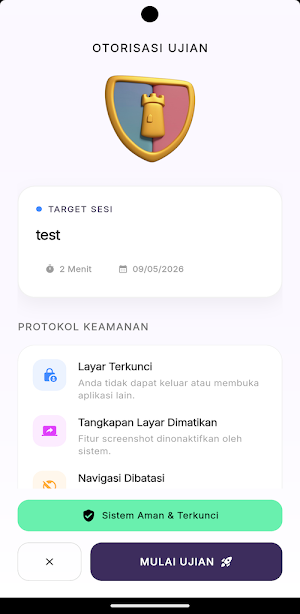
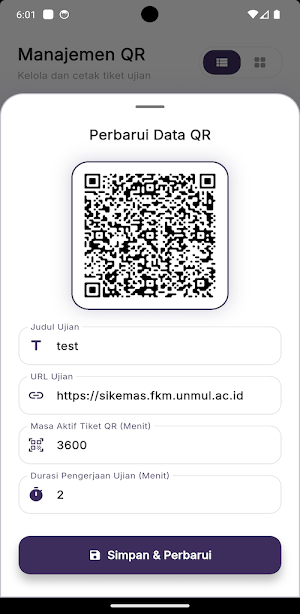
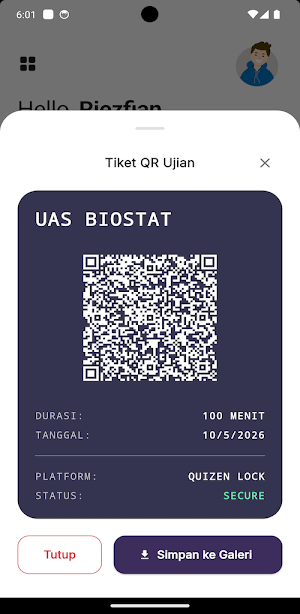


About Quizen Lock - Lock Browser CBT
Quizen Lock is a modern Computer-Based Test (CBT) / Lockdown Browser application specifically designed to create a safe, fair, and distraction-free digital exam environment. It is ideal for use by schools, universities, tutoring centers, and institutions for midterm exams, final exams, and daily quizzes.
This application acts as a digital shield, ensuring students are fully focused on their exam paper by blocking cheating attempts during the test session.
✨ QUIZEN LOCK'S OUTSTANDING FEATURES:
🔒 Lockdown Security System
Once the exam begins, users cannot open other apps, split-screen, or use floating widgets. Force-closing the app will end the exam session.
📷 Quick Entry via QR Code
No need to type in long exam links (URLs). Students simply scan the QR code ticket provided by the teacher/proctor to enter the exam room directly.
🚫 Block Distractions
Quizen Lock helps students maintain concentration by ensuring that exams are not interrupted by third-party apps, thus maximizing cognitive performance.
⚡ Lightweight & Battery-Saving
Designed using cutting-edge technology (Flutter), this app is very lightweight, doesn't overload your phone's memory (RAM), and runs smoothly even on low-spec devices.
🛡️ Privacy Security (100% Secure)
We respect student privacy. This app functions solely as a portal to your school's exam system. We do not collect, read, or send any photos, files, or personal data from your device to third parties.
📝 HOW TO USE (For Students):
Open the Quizen Lock app.
Allow camera access (for scanning purposes only).
Scan the exam QR code provided by your proctor/teacher.
Concentrate on the exam questions.
When finished, press the "Submit" button, and your device will return to normal.
For Teachers & Educational Institutions:
Quizen Lock is a client-side application that can be connected to various exam platforms, such as Google Forms and your school's existing web-based applications. Provide a standardized, modern, and reliable exam experience.
Raise academic integrity standards at your institution. Download Quizen Lock now and experience a secure and convenient digital exam experience!
This application acts as a digital shield, ensuring students are fully focused on their exam paper by blocking cheating attempts during the test session.
✨ QUIZEN LOCK'S OUTSTANDING FEATURES:
🔒 Lockdown Security System
Once the exam begins, users cannot open other apps, split-screen, or use floating widgets. Force-closing the app will end the exam session.
📷 Quick Entry via QR Code
No need to type in long exam links (URLs). Students simply scan the QR code ticket provided by the teacher/proctor to enter the exam room directly.
🚫 Block Distractions
Quizen Lock helps students maintain concentration by ensuring that exams are not interrupted by third-party apps, thus maximizing cognitive performance.
⚡ Lightweight & Battery-Saving
Designed using cutting-edge technology (Flutter), this app is very lightweight, doesn't overload your phone's memory (RAM), and runs smoothly even on low-spec devices.
🛡️ Privacy Security (100% Secure)
We respect student privacy. This app functions solely as a portal to your school's exam system. We do not collect, read, or send any photos, files, or personal data from your device to third parties.
📝 HOW TO USE (For Students):
Open the Quizen Lock app.
Allow camera access (for scanning purposes only).
Scan the exam QR code provided by your proctor/teacher.
Concentrate on the exam questions.
When finished, press the "Submit" button, and your device will return to normal.
For Teachers & Educational Institutions:
Quizen Lock is a client-side application that can be connected to various exam platforms, such as Google Forms and your school's existing web-based applications. Provide a standardized, modern, and reliable exam experience.
Raise academic integrity standards at your institution. Download Quizen Lock now and experience a secure and convenient digital exam experience!
What’s new
Version 1.0.8 · Updated October 6, 2026
Fitur anti copy paste pada halaman ujian
User reviews

👍🏼👍🏼👍🏼

Aplikasinya sangat mantap. Bisa mengunci kemenangan Arsenal tahun ini 🔥🔥🔥
Alternatives to Quizen Lock - Lock Browser CBT
Looking for apps like Quizen Lock - Lock Browser CBT? Here are 6 similar Android apps on Google Play. All of them are free to download.



| App | Rating | Price | Installs | Last updated | Compare |
|---|---|---|---|---|---|
| Quizen Lock - Lock Browser CBT | – | Free | 1,000+ | Oct 6, 2026 | |
| Vihaya Course | – | Free | 10+ | Jun 13, 2026 | Compare |
| EdYoda | – | Free | 100+ | Jul 11, 2026 | Compare |
| Nextalk: AI English Tutor | – | Free | 5,000+ | Oct 2, 2026 | Compare |
| Safe Exchange | – | Free | 10+ | Oct 28, 2025 | Compare |
| Indicus | – | Free | 10+ | Jul 17, 2026 | Compare |
| Electrical & Electronic Master | – | Free | 1,000+ | Jan 1, 2026 | Compare |
Similar apps on Google Play
- Vihaya Course
- EdYoda
- Nextalk: AI English Tutor
- Safe Exchange
- Indicus
- Electrical & Electronic Master
- COMAS Trainer+
- Overbooked Academy
- Êzîdxan Schule
- PEARLFECTIONIST(A)
- Interior Coordinator Prep
- UCS Educa
- CAA Brasileiro BLA
- garmin Forerunner 970 guide
- Integrationsprüfung ÖIF A2 B1
- CreVia
- SIE Securities Essentials Prep
- Senostik (Asesmen Diagnostik)
- InPronunci: Accent Training
- Flamerz
- Skoolbooks
- Telecom Installer 1D Prep
- CS Exit Exam Ethiopia
- Turkish Fairy Tales Stories
- Student AllToolkit Offline