
QR Quick: scan and generate QR
Tools In-app purchases Contains ads
Fast QR & barcode scanner and generator with offline scan and smart history plus
- Downloads
- 374+
- on Google Play
- Price
- Free
- In-app purchases
- Updated
- Dec 21
- 2025 · v2.2.1-211225
Screenshots
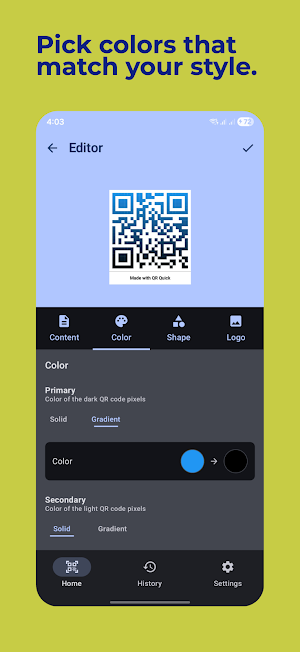


About QR Quick: scan and generate QR
QRQuick is a fast, all-in-one QR Code Scanner, Barcode Reader, and QR Generator — built for speed, simplicity, and privacy.
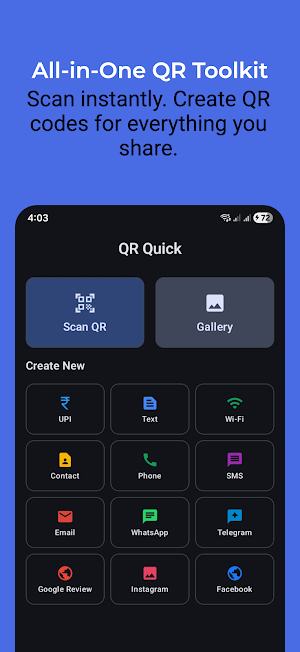
Scan QR codes and popular barcodes instantly, or decode codes from images in your Gallery. Create beautiful QR codes for Wi-Fi, links, text, payments, and more — then share or save with one tap.
🚀 Scan faster
Instant scan: point and scan automatically
Supports popular formats: QR, Data Matrix, UPC, EAN, Code 39, and more
Scan from Gallery: decode codes from any image
Flashlight + Zoom: scan in low light or from a distance
Continuous mode: keep scanning without restarting
Smart actions: auto-open links, auto-copy text, optional vibration
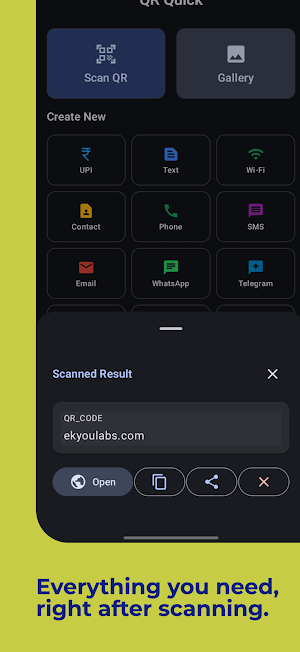
Quick result sheet: Open / Copy / Share instantly
✨ Create QR codes for everything
Text / URL
Wi-Fi (WPA / WEP / Open)
UPI payment QR 💰
Contact (vCard)
Phone / SMS / Email
Social links (WhatsApp, Instagram, Telegram, and more)
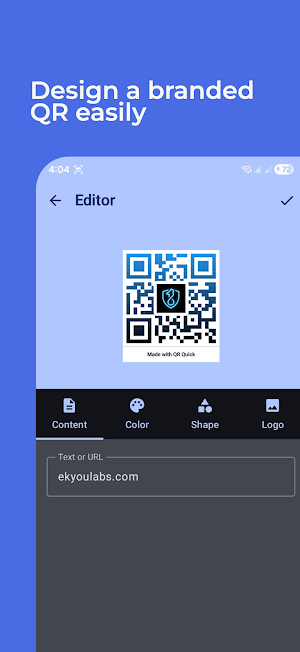
Logo QR: add your brand/logo in the center
🗂️ Clean history that helps
Saves scanned and generated codes automatically
Separate sections for scans and created QRs
QR previews for generated items
One-tap Share / Save / Edit / Clone / Delete
Clear history anytime
🎨 Nice to use
Modern Material interface
Light / Dark / System theme support
Fullscreen QR preview
Polished icon, splash, and settings
🔐 Privacy first
No sign-in required
Works offline for scanning and generating
Only the permissions you choose:
- Camera for live scan
- Gallery access only when importing images
⚙️ Extras
Customize scan behavior in Settings
Share generated QRs as high-quality images
Optional branding removal via in-app option
📘 How to use
1. Tap Scan (or Gallery) to decode a code
2. Tap Create to generate a QR and customize it
3. Find everything later in History
If you enjoy QRQuick, please rate us on Google Play ⭐
Scan QR codes and popular barcodes instantly, or decode codes from images in your Gallery. Create beautiful QR codes for Wi-Fi, links, text, payments, and more — then share or save with one tap.
🚀 Scan faster
Instant scan: point and scan automatically
Supports popular formats: QR, Data Matrix, UPC, EAN, Code 39, and more
Scan from Gallery: decode codes from any image
Flashlight + Zoom: scan in low light or from a distance
Continuous mode: keep scanning without restarting
Smart actions: auto-open links, auto-copy text, optional vibration
Quick result sheet: Open / Copy / Share instantly
✨ Create QR codes for everything
Text / URL
Wi-Fi (WPA / WEP / Open)
UPI payment QR 💰
Contact (vCard)
Phone / SMS / Email
Social links (WhatsApp, Instagram, Telegram, and more)
Logo QR: add your brand/logo in the center
🗂️ Clean history that helps
Saves scanned and generated codes automatically
Separate sections for scans and created QRs
QR previews for generated items
One-tap Share / Save / Edit / Clone / Delete
Clear history anytime
🎨 Nice to use
Modern Material interface
Light / Dark / System theme support
Fullscreen QR preview
Polished icon, splash, and settings
🔐 Privacy first
No sign-in required
Works offline for scanning and generating
Only the permissions you choose:
- Camera for live scan
- Gallery access only when importing images
⚙️ Extras
Customize scan behavior in Settings
Share generated QRs as high-quality images
Optional branding removal via in-app option
📘 How to use
1. Tap Scan (or Gallery) to decode a code
2. Tap Create to generate a QR and customize it
3. Find everything later in History
If you enjoy QRQuick, please rate us on Google Play ⭐
What’s new
Version 2.2.1-211225 · Updated December 21, 2025
🚀 What’s New in v2.2.1 ✨ All-New UI We’ve refreshed the entire app with a cleaner, modern design for a smoother and more enjoyable experience. ✨ Quick Result Sheet Scanning is now smoother than ever. View results instantly in a handy bottom sheet and quickly Open, Copy, Share, or Delete—without leaving your flow. 🛠 Fixes & Enhancements * Added in-app updates so you never miss a new version.
User reviews

nice perfect 👍😊

Best one

This app is very beautiful and easy to use

quick and easy process

very easy to use 👌

its so simple and litreallly good it makes work simple
Alternatives to QR Quick: scan and generate QR
Looking for apps like QR Quick: scan and generate QR? Here are 2 similar Android apps on Google Play. All of them are free to download.
| App | Rating | Price | Installs | Last updated | Compare |
|---|---|---|---|---|---|
| QR Quick: scan and generate QR | – | Free | 100+ | Dec 21, 2025 | |
| ZeroFill: Secure Data Eraser | – | Free | 1,000+ | Apr 13, 2026 | Compare |
| XZCam : Record Video Privately | – | Free | 1,000+ | Apr 14, 2026 | Compare |