

QA-Video Editor all in one
Video Players & Editors Contains ads
Video Editor Maker Offline, All in one Edit Video on phone
- Downloads
- 1+
- on Google Play
- Price
- Free
- No in-app purchases
- Updated
- Aug 17
- 2023 · v1.2
Screenshots
About QA-Video Editor all in one
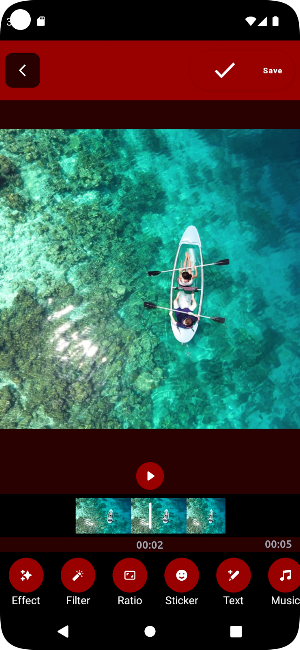
QA-Video Editor All in One is the ultimate video editing application that combines a wide range of powerful features into a single platform. With QA-Video Editor, you can effortlessly trim, reverse, convert video to MP3, create slow-motion or fast-motion effects, convert videos to GIFs, compress files, apply watermarks, crop videos, and edit them to perfection.
Main Features:
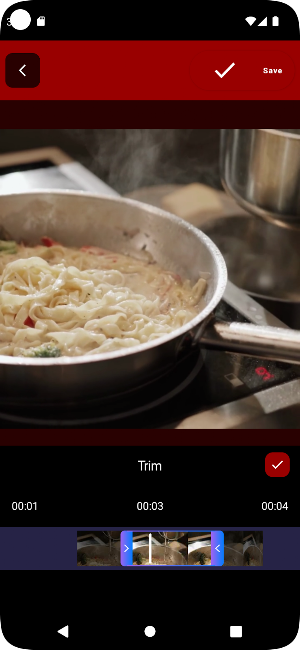
1. Trim: Easily trim unwanted sections from your videos with precision. Remove any unnecessary footage and focus on the most important moments.
2. Reverse: Create captivating and unique videos by reversing the playback direction. Watch your videos in reverse and add an intriguing twist to your content.
3. Video to MP3: Extract audio from your videos and save it as an MP3 file. This feature is perfect for converting music videos or extracting audio for other purposes.
4. Slow Motion: Slow down your videos to highlight details or create dramatic effects. Capture every frame in slow motion to add an artistic touch to your videos.
5. Fast Motion: Speed up your videos to create dynamic and energetic content. Accelerate the playback to showcase fast-paced action or condense lengthy footage.
6. Video to GIF: Convert your videos into animated GIFs effortlessly. Share captivating GIFs with your friends or use them to enhance your online presence.
7. Compress: Reduce the file size of your videos without compromising quality. Compress large videos to save storage space and easily share them online.
8. Watermark: Protect your videos by adding personalized watermarks. Add your logo or text to prevent unauthorized use and promote your brand or channel.
9. Crop: Crop and resize your videos to remove unwanted borders or adjust the aspect ratio. Ensure your videos are optimized for different platforms and devices.
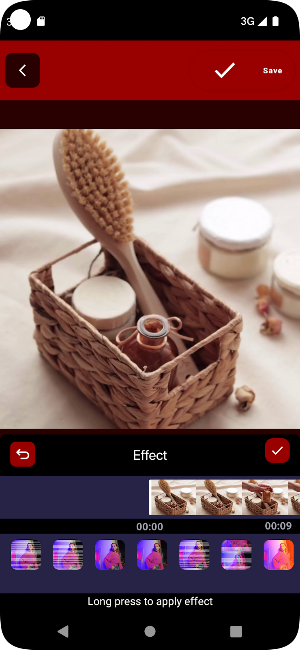
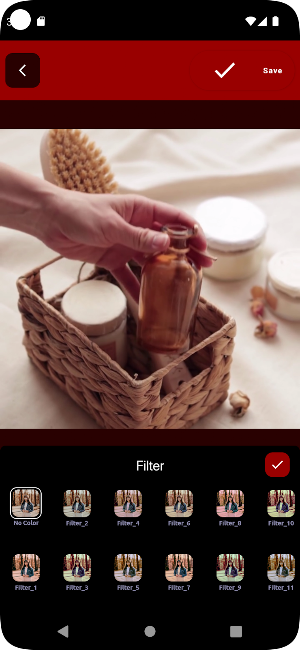
10. Edit Video: Enhance your videos with a range of editing tools. Adjust brightness, contrast, saturation, apply filters, add text, and overlay effects to make your videos visually appealing.
QA-Video Editor All in One offers a user-friendly interface that makes video editing accessible to everyone. Whether you're a professional videographer or a casual content creator, this application provides all the essential tools you need to transform your videos into stunning masterpieces. Download QA-Video Editor All in One now and unlock the full potential of your video editing capabilities.
Main Features:
1. Trim: Easily trim unwanted sections from your videos with precision. Remove any unnecessary footage and focus on the most important moments.
2. Reverse: Create captivating and unique videos by reversing the playback direction. Watch your videos in reverse and add an intriguing twist to your content.
3. Video to MP3: Extract audio from your videos and save it as an MP3 file. This feature is perfect for converting music videos or extracting audio for other purposes.
4. Slow Motion: Slow down your videos to highlight details or create dramatic effects. Capture every frame in slow motion to add an artistic touch to your videos.
5. Fast Motion: Speed up your videos to create dynamic and energetic content. Accelerate the playback to showcase fast-paced action or condense lengthy footage.
6. Video to GIF: Convert your videos into animated GIFs effortlessly. Share captivating GIFs with your friends or use them to enhance your online presence.
7. Compress: Reduce the file size of your videos without compromising quality. Compress large videos to save storage space and easily share them online.
8. Watermark: Protect your videos by adding personalized watermarks. Add your logo or text to prevent unauthorized use and promote your brand or channel.
9. Crop: Crop and resize your videos to remove unwanted borders or adjust the aspect ratio. Ensure your videos are optimized for different platforms and devices.
10. Edit Video: Enhance your videos with a range of editing tools. Adjust brightness, contrast, saturation, apply filters, add text, and overlay effects to make your videos visually appealing.
QA-Video Editor All in One offers a user-friendly interface that makes video editing accessible to everyone. Whether you're a professional videographer or a casual content creator, this application provides all the essential tools you need to transform your videos into stunning masterpieces. Download QA-Video Editor All in One now and unlock the full potential of your video editing capabilities.
What’s new
Version 1.2 · Updated August 17, 2023
Updated integrate firebase and UI
Alternatives to QA-Video Editor all in one
Looking for apps like QA-Video Editor all in one? Here are 6 similar Android apps on Google Play. All of them are free to download.
-
QA Translator All Languages
-
QA: Image to Text converter
-
QA - Office Reader documents
-
QA - MP3 Cutter & Ringtone
-
QA-Effect Photo Maker
-
QA - Todolist Daily Planner
| App | Rating | Price | Installs | Last updated | Compare |
|---|---|---|---|---|---|
| QA-Video Editor all in one | – | Free | 1+ | Aug 17, 2023 | |
| QA Translator All Languages | – | Free | 1,000+ | Oct 23, 2026 | Compare |
| QA: Image to Text converter | – | Free | 1+ | Jul 27, 2023 | Compare |
| QA - Office Reader documents | – | Free | 1,000+ | May 10, 2026 | Compare |
| QA - MP3 Cutter & Ringtone | – | Free | 5+ | Jul 22, 2023 | Compare |
| QA-Effect Photo Maker | – | Free | 1+ | Aug 27, 2023 | Compare |
| QA - Todolist Daily Planner | – | Free | 5+ | Jun 8, 2023 | Compare |