
Pyware 3D Viewer
Pygraphics, Inc. Education
Pyware 3D Viewer for use with Pyware 3D Drill Design
- Rating
- 3.4
- 74 ratings
- Downloads
- 5K+
- on Google Play
- Price
- $2.99
- No in-app purchases
- Updated
- Jul 21
- 2026 · v1.0.14
Screenshots
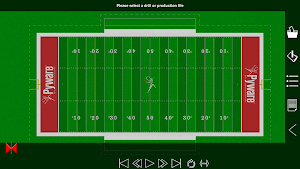
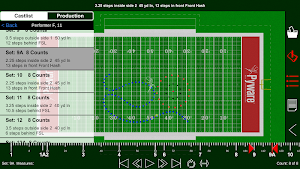
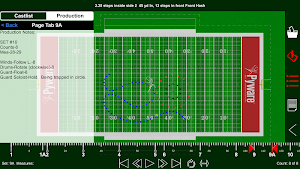
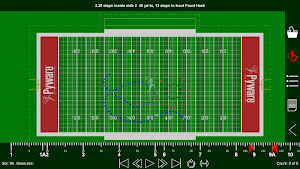


About Pyware 3D Viewer
Pyware 3D Viewer allows you to take your Pyware 3D® drills anywhere! Designed for both instructors and performers, our Pyware 3D Viewer app eliminates the need to print anything.
You’ll see your drills animate the way they were intended, because Pyware 3D Viewer actually opens Pyware 3D® files! Floats, Follow-The-Leaders, and curved pathways all animate flawlessly whether you’re watching the playback animation in fluid or step-time.
Seamlessly retrieve file updates with the press of a button. View both Production Sheet and Text Box instruction information. Open drill files for any venue: football fields, gymnasiums, parade routes; if you can design it in Pyware 3D®, you can open it in Pyware 3D Viewer!
Feature List
-Open Pyware 3D® mobile drill files (.3da)
-Files can be accessed from cloud storage services by entering a download link or scanning a QR code from within the app
-Pinch zoom, rotate, tilt and shift to view the drill from any angle
-Animation shows true pathways for all performers
-Fluid or step-time animation
-Up to 8x animation speed
-Repeat and Play All animation controls
-Count Track that allows you to stop and view any count of drill
-View entire Production Sheet and Text Box instructions
-Search for performers in the drill’s Cast List
-Switch between ensemble view and performer view
-See detailed performer coordinate instructions on any count of the drill
-Spotlight an individual performer
-Switch between 3D’s surfaces, flat color, and high contrast for the performance area
-Loads grids for any performance area (fields, gyms, streets, stages, etc.)
-Toggle step grid on/off
-Easily refresh drill files to download the latest changes
Compatible with Pyware 3D version 8 or greater.
You’ll see your drills animate the way they were intended, because Pyware 3D Viewer actually opens Pyware 3D® files! Floats, Follow-The-Leaders, and curved pathways all animate flawlessly whether you’re watching the playback animation in fluid or step-time.
Seamlessly retrieve file updates with the press of a button. View both Production Sheet and Text Box instruction information. Open drill files for any venue: football fields, gymnasiums, parade routes; if you can design it in Pyware 3D®, you can open it in Pyware 3D Viewer!
Feature List
-Open Pyware 3D® mobile drill files (.3da)
-Files can be accessed from cloud storage services by entering a download link or scanning a QR code from within the app
-Pinch zoom, rotate, tilt and shift to view the drill from any angle
-Animation shows true pathways for all performers
-Fluid or step-time animation
-Up to 8x animation speed
-Repeat and Play All animation controls
-Count Track that allows you to stop and view any count of drill
-View entire Production Sheet and Text Box instructions
-Search for performers in the drill’s Cast List
-Switch between ensemble view and performer view
-See detailed performer coordinate instructions on any count of the drill
-Spotlight an individual performer
-Switch between 3D’s surfaces, flat color, and high contrast for the performance area
-Loads grids for any performance area (fields, gyms, streets, stages, etc.)
-Toggle step grid on/off
-Easily refresh drill files to download the latest changes
Compatible with Pyware 3D version 8 or greater.
What’s new
Version 1.0.14 · Updated July 21, 2026
Various Bug Fixes
User reviews

I love this app....it gives a very clear view of any drill..great

Way better than a dot book and doesn't cost any more than one either!

It's a great app.

It has helped me a lot for my high school Marching band

Cool...

I love this app so much, alot easier than a dot book 😂
Frequently asked questions
What is Pyware 3D Viewer?
Pyware 3D Viewer is an app that allows you to view Pyware 3D drills on your mobile device without the need to print anything.
What types of animations can be seen in Pyware 3D Viewer?
Pyware 3D Viewer can animate floats, Follow-The-Leaders, and curved pathways in both fluid and step-time animation.
How can I access drill files in Pyware 3D Viewer?
You can access drill files in Pyware 3D Viewer by entering a download link or scanning a QR code from within the app. The files can be stored in cloud storage services.
What controls are available for the animation in Pyware 3D Viewer?
Pyware 3D Viewer offers controls such as pinch zoom, rotate, tilt, and shift to view the drill from any angle. It also provides options to repeat and play all animations at different speeds.
Can I view specific counts of the drill in Pyware 3D Viewer?
Yes, Pyware 3D Viewer has a Count Track feature that allows you to stop and view any count of the drill.
What other features are available in Pyware 3D Viewer?
Pyware 3D Viewer lets you view the entire Production Sheet and Text Box instructions, search for performers in the drill's Cast List, switch between ensemble view and performer view, spotlight individual performers, and toggle between different performance area displays.
What version of Pyware 3D is compatible with Pyware 3D Viewer?
Pyware 3D Viewer is compatible with Pyware 3D version 8 or greater.
Alternatives to Pyware 3D Viewer
Looking for apps like Pyware 3D Viewer? Here are 3 similar Android apps on Google Play. The highest rated is WIDAR - 3D Scan & Edit (4.4/5), and all 3 are free to download.



| App | Rating | Price | Installs | Last updated | Compare |
|---|---|---|---|---|---|
| Pyware 3D Viewer | 3.4 / 5 | $2.99 | 5,000+ | Jul 21, 2026 | |
| AstroPrint (for 3D Printing) | 3.7 / 5 | Free | 100,000+ | – | Compare |
| HOVER - Measurements in 3D | 3.7 / 5 | Free | 1,000,000+ | Oct 28, 2026 | Compare |
| WIDAR - 3D Scan & Edit | 4.4 / 5 | Free | 500+ | Mar 18, 2022 | Compare |
Compare Pyware 3D Viewer with the top alternatives: ratings, updates, ASO score and keyword gaps →