Aventra Travel
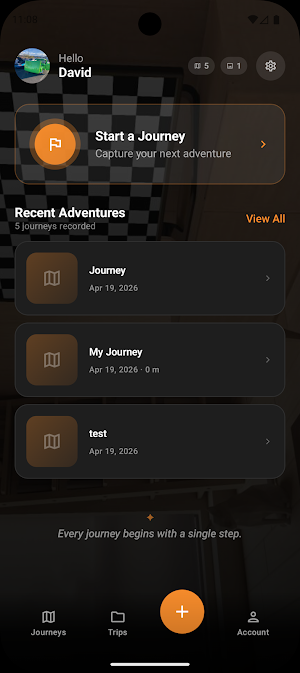
Capture trips, drop photo pins, see your route, and share live with friends.
About Aventra Travel
Aventra Travel is your pocket companion for road trips, hikes, and
spontaneous weekend adventures. Start a journey, and Aventra quietly
records your GPS route while you drive, ride, or walk — then lets you
drop photo and video pins along the way so the story of the trip lives
on your map, not just in a camera roll.
WHAT YOU CAN DO
• Record your route
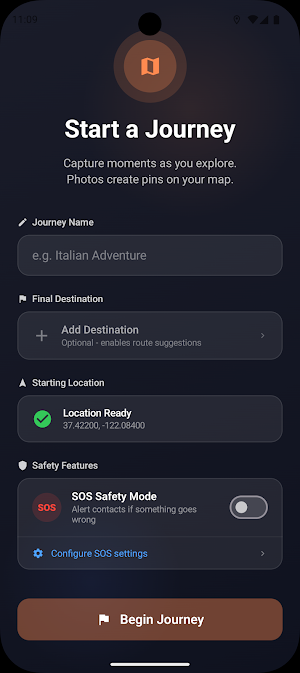
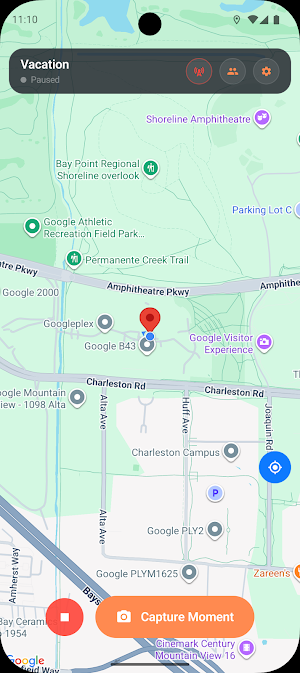
Tap Start Journey and Aventra traces your path on the map in real
time, showing distance traveled and time on the trail. Your full
route stays drawn even if you put the phone in your pocket or lock
the screen for hours.
• Capture moments that stick to places
Snap photos or short videos inside the app and they are automatically
pinned to the exact spot on the map where they were taken. Add an
optional caption. No more hunting through a camera roll for "where
was that lookout?"
• Discover nearby attractions
Opt in to ambient suggestions and Aventra surfaces parks, overlooks,
landmarks, and points of interest along your route so you notice
places you would otherwise have driven past.
• Share the adventure
Generate a public share link that friends can open in any web browser
to follow your trip, react to photos, and leave comments — no account
required on their end. Or enable live sharing to broadcast your
current location in real time to a small circle of trusted viewers.
• Group journeys into trips
Stitch multiple days on the road together into a single trip, so a
two-week vacation reads as one continuous story with chapters.
• Travel safely
An optional inactivity monitor can notify an emergency contact if
Aventra stops detecting movement for too long during a journey.
PRIVACY BY DEFAULT
• Your journey data stays on your device unless you choose to share or
sync a specific trip.
• A "Hide start location" toggle offsets the published start point by
60–120 meters in a random direction, so a shared map never reveals
your exact home.
• Permissions are only requested at the moment you use the feature that
needs them, with a plain-English explanation.
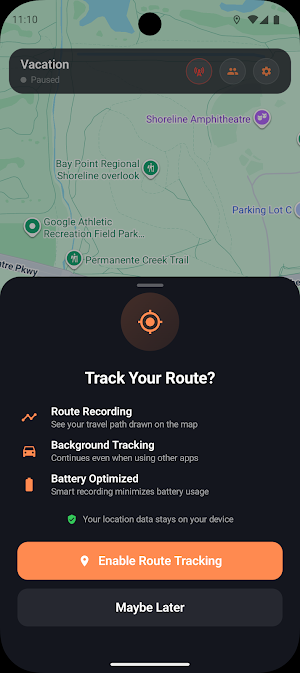
ABOUT BACKGROUND LOCATION
Aventra uses background location only while a journey is active, so
your route stays continuous when the screen is off or the app is in the
background. Before we ask for the "Allow all the time" permission, an
in-app screen (Track Your Route?) explains exactly what we record, why
we need it, and that the data stays on your device. You can disable
background tracking for any journey from Journey Settings at any time.
ABOUT THE CAMERA AND MICROPHONE
The camera is used when you tap Capture Moment to attach a photo or
short video to a pin. The microphone is used when you record a video
clip. Neither is used in the background or without your tap.
COMPATIBILITY
Aventra Travel supports Android 8.0 (Oreo) and newer. An internet
connection is required for maps, live sharing, and cloud sync.
Recording a journey offline works; shared content uploads the next
time you are online.
SUPPORT
Feedback, bug reports, and feature requests are welcome. Tap Settings
-> Help & Support inside the app, or email support through the contact
address on our Play Store listing.
Drive, hike, or wander — Aventra remembers the route so you can enjoy
the ride.
Similar Apps

Goldman Sachs Wellness
Get access to personalized financial tools and resources at no cost to you.

CoffeeSpace: Connect & Build
Build or join your early-stage startup team, from idea to first 10 hires.

Dig Local
Where to Go. What to do. Authentic things to do every day in Asheville, NC.

RAFA - AI Investment Agents
Stocks, ETFs, Options, Crypto, Portfolio Optimization & Monitoring

Team RWB
Enriching the Lives of America’s Veterans

Wanderz - Travel Guides
Authentic holidays expert-delivered, AI-powered
