

Studio Tools: Text & Image Kit
Tools
The ultimate all-in-one toolkit! Compress images, format JSON, extract PDF more
- Downloads
- 47+
- on Google Play
- Price
- Free
- No in-app purchases
- Updated
- Apr 9
- 2026 · v1.0.0
Screenshots

About Studio Tools: Text & Image Kit
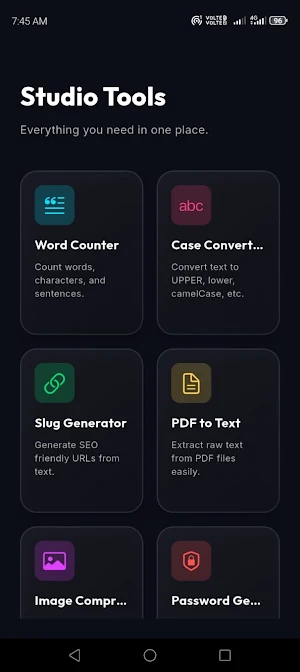
Studio Tools is your ultimate all-in-one productivity and developer toolkit designed to simplify your everyday tasks. With a premium dark glassmorphism interface, it provides a seamless, lightning-fast experience across a carefully curated set of powerful utilities.
Whether you are a developer, designer, student, or professional, Studio Tools brings exactly what you need into one single, beautiful application. No ads, no clutter—just pure productivity!
🔥 Core Features:
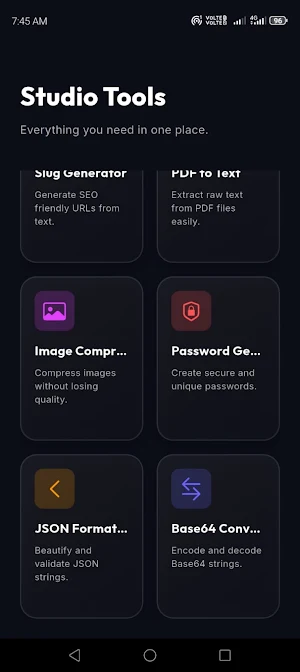
📸 Image Compressor Reduce image sizes effortlessly without losing quality! Perfect for sharing on social media or optimizing website assets. Save compressed images straight to your device with a single tap.
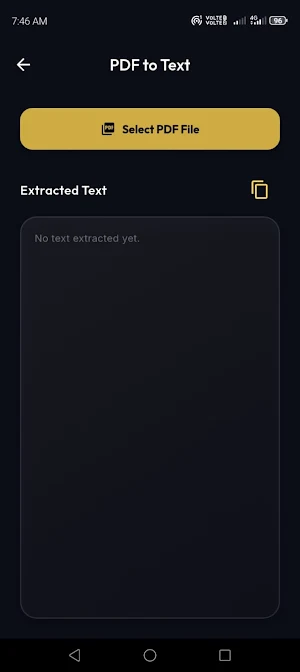
📄 PDF to Text Converter Tired of typing out PDF documents? Instantly extract clean, readable text from any PDF file and copy it to your clipboard instantly!
📝 Word & Character Counter Analyze your text in real-time. Count words, characters (with and without spaces), and paragraphs. Ideal for writers, bloggers, and students.
🔤 Case Converter Change your text format in one click. Convert any text to UPPERCASE, lowercase, camelCase, or snake_case seamlessly.
🔗 Slug Generator Boost your SEO! Instantly convert long titles and sentences into URL-friendly, hyphen-separated SEO slugs.
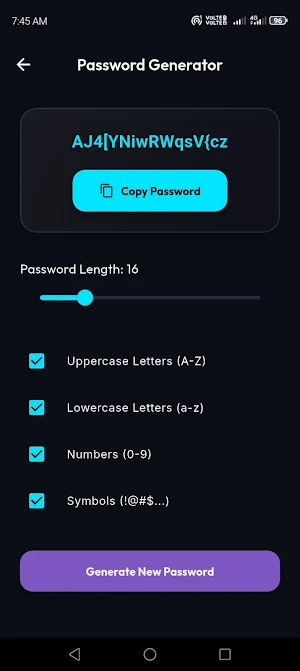
🔐 Secure Password Generator Create unbreakable, highly secure passwords up to 64 characters long! Customize with uppercase letters, lowercase letters, numbers, and symbols.
🧑💻 JSON Formatter & Beautifier Say goodbye to ugly, compressed JSON strings! Paste your raw JSON data and let Studio Tools format and beautify it for easy reading and debugging.
🔄 Base64 Encoder / Decoder Fast and secure encoding/decoding of sensitive strings into Base64 format. A very handy utility for developers!
Why choose Studio Tools? ✅ Premium Design: Sleek, modern, and eye-catching Dark Glassmorphism aesthetic. ✅ Lightweight & Fast: Does its job instantly without draining your battery. ✅ Privacy First: Your files and texts are processed locally on your device. We respect your privacy!
Simplify your digital life. Download Studio Tools today and boost your productivity!
Whether you are a developer, designer, student, or professional, Studio Tools brings exactly what you need into one single, beautiful application. No ads, no clutter—just pure productivity!
🔥 Core Features:
📸 Image Compressor Reduce image sizes effortlessly without losing quality! Perfect for sharing on social media or optimizing website assets. Save compressed images straight to your device with a single tap.
📄 PDF to Text Converter Tired of typing out PDF documents? Instantly extract clean, readable text from any PDF file and copy it to your clipboard instantly!
📝 Word & Character Counter Analyze your text in real-time. Count words, characters (with and without spaces), and paragraphs. Ideal for writers, bloggers, and students.
🔤 Case Converter Change your text format in one click. Convert any text to UPPERCASE, lowercase, camelCase, or snake_case seamlessly.
🔗 Slug Generator Boost your SEO! Instantly convert long titles and sentences into URL-friendly, hyphen-separated SEO slugs.
🔐 Secure Password Generator Create unbreakable, highly secure passwords up to 64 characters long! Customize with uppercase letters, lowercase letters, numbers, and symbols.
🧑💻 JSON Formatter & Beautifier Say goodbye to ugly, compressed JSON strings! Paste your raw JSON data and let Studio Tools format and beautify it for easy reading and debugging.
🔄 Base64 Encoder / Decoder Fast and secure encoding/decoding of sensitive strings into Base64 format. A very handy utility for developers!
Why choose Studio Tools? ✅ Premium Design: Sleek, modern, and eye-catching Dark Glassmorphism aesthetic. ✅ Lightweight & Fast: Does its job instantly without draining your battery. ✅ Privacy First: Your files and texts are processed locally on your device. We respect your privacy!
Simplify your digital life. Download Studio Tools today and boost your productivity!
What’s new
Version 1.0.0 · Updated April 9, 2026
🎉 Welcome to the initial release of Studio Tools (v1.0)! Your all-in-one offline productivity kit is here. Features in this release: • Image Compressor • PDF to Text Extractor • JSON Formatter & Beautifier • Secure Password Generator • Base64 Encoder / Decoder • Word Counter, Case Converter & Slug Gen Enjoy a lightning-fast experience with our premium dark UI. 100% private & strictly offline. Thank you for downloading!
Alternatives to Studio Tools: Text & Image Kit
Looking for apps like Studio Tools: Text & Image Kit? Here are 6 similar Android apps on Google Play. All of them are free to download.
-
Mortgage & Debt Payoff Planner
-
Decider: Spin Decision Wheel
-
தமிழ் கவிதைகள் - Tamil Poetry
-
Prompt Verse
-
24iQ: Quiz & Trivia Games
-
Resume Builder & CV Maker
| App | Rating | Price | Installs | Last updated | Compare |
|---|---|---|---|---|---|
| Studio Tools: Text & Image Kit | – | Free | 10+ | Apr 9, 2026 | |
| Mortgage & Debt Payoff Planner | – | Free | 5+ | Sep 26, 2026 | Compare |
| Decider: Spin Decision Wheel | – | Free | 5+ | – | Compare |
| தமிழ் கவிதைகள் - Tamil Poetry | – | Free | 10+ | – | Compare |
| Prompt Verse | – | Free | 5+ | Aug 19, 2026 | Compare |
| 24iQ: Quiz & Trivia Games | – | Free | 10+ | – | Compare |
| Resume Builder & CV Maker | – | Free | 10+ | Mar 29, 2026 | Compare |