

OmniCore
Shukla Tech Group Tools
All-in-one smart text, audio, and PDF tools for productivity.
- Downloads
- 2.6K+
- on Google Play
- Price
- Free
- No in-app purchases
- Updated
- Oct 3
- 2026 · v5.6.0
Screenshots


About OmniCore
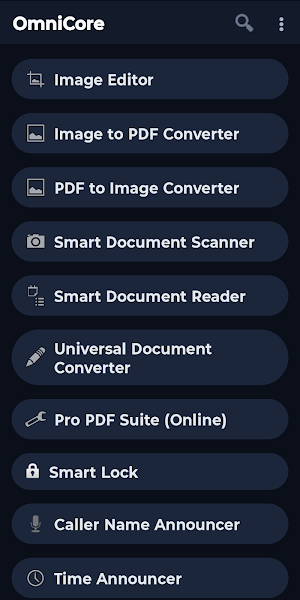
Developed by Shukla Tech Group, OmniCore is a comprehensive utility application designed to streamline your daily tasks. Built with a focus on speed, privacy, and offline processing, it combines essential tools into a single, clean dark-themed interface. All your data is processed locally on your device to ensure maximum privacy and security.
Key Features & Tools:
1. Smart Accessibility
- Payment Announcer: Securely reads incoming payment notifications aloud.
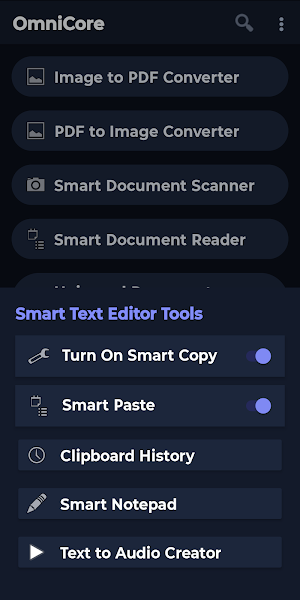
- Smart Text Editor Tools: Includes Smart Copy for screen text selection, Smart Paste via a floating icon, Smart Edit Text for instant find/replace, Clipboard History, Smart Notepad, and Smart Link Saver with auto-category detection.
- Text to Audio Creator: Convert long texts into high-quality WAV audio files.
- Virtual Screen: Instantly scan your screen to reveal hidden texts and buttons.
- Smart Focus OCR: Press and hold the 'Volume Up' button to scan and read specific screen areas.
- Time Announcer & Voice Reminder: Automated time updates and voice-based scheduling.
2. Documents and PDFs
- Document Scanner: Digitize physical documents securely.
- Document Reader: Read PDFs and text files visually or listen via Audio Mode.
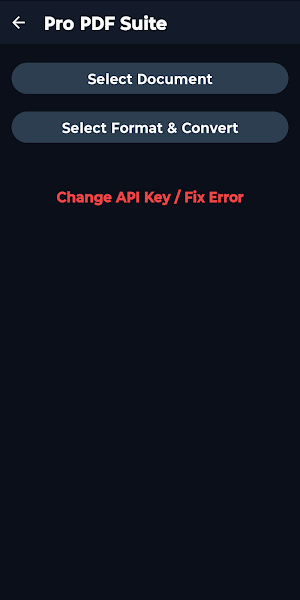
- PDF Tools: Compress PDF, Merge PDFs, Lock PDF, and Unlock PDF.
- Format Converters: Image to PDF, PDF to Image, and Document Converter.
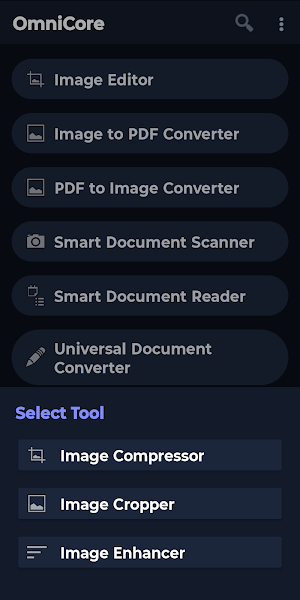
- Image Editor: Built-in Image Compressor, Image Cropper (with manual pixel control), and Image Enhancer.
3. Daily Utilities
- Smart Math: 23 built-in calculators including Basic Calculator, Smart Text Math, Discount, Age, GST, Percentage, EMI, Profit/Loss, Loan Analyzer, SIP, DA, DA Arrear, FD/RD, Fuel, Gratuity, EPF, BMI, Income Tax, Land Area, Electricity, Split Bill, API Cost, and Live Currency.
- Smart Navigation: Access GPS tools including Where Am I, Compass, Speedometer, Nearby, and Live Tracking.
- Expense Tracker: Excel-style daily expense management.
- Smart Lock: Securely lock your device screen by shaking your phone.
4. Smart Vision
- Smart Camera: Built-in camera with Portrait, HDR, Night, and Beauty modes featuring voice guidance.
- Cash Reader: Scans and identifies Indian Currency (INR) denominations accurately.
--- Accessibility & Target Audience Declaration ---
OmniCore is built with a strong focus on digital accessibility. We proudly utilize the AccessibilityService API to provide essential features specifically designed to assist visually impaired, blind, and low-vision users in navigating their devices more easily.
- Core Accessibility Features: The AccessibilityService API enables our Smart Copy, Virtual Screen, Smart Focus OCR, and Smart Lock tools. These allow the app to read on-screen text aloud for visually impaired users, detect hidden interface buttons, and lock the screen using simple physical gestures (like shaking) without needing precise touch interactions.
- Note on Battery Announcer: Our app also includes a dedicated Battery Announcer designed for visually impaired users to monitor device health audibly via a specialized foreground service.
- Absolute Data Privacy: We respect your privacy completely. The AccessibilityService API is used strictly for these local, on-device assistive functionalities. We DO NOT collect, store, transmit, or share any personal, screen, or sensitive user data. All processing happens safely and offline on your device.
What’s new
Version 5.6.0 · Updated October 3, 2026
What's new in 5.6.0? • New Video Editor category with two tools: Video Splitter cuts a video into parts for WhatsApp status, and Video Cutter saves one exact part of a video. • Document Reader and Image Reader can now open files in Visual Mode or Audio Mode. • All dialog boxes have a new, easier look. • Payment Announcer, Battery Announcer and Caller Announcer fixes. • Notifications of always-on features come back if swiped away.
User reviews

OmniCore isn't responding

It is very nice and wonderful app with clean and User friendly interface. It has a lot of Important tools of daily usage. My I am thankful to the developer from the core of my heart to create such innovative and wonderful Ideas to bring all important tools At one place.

यह application हमारी जिंदगी में चार चाँद लगा रहा है।

simply create app and helps to All blind I am really thanks to Shukla group

Wonderful application with great features. The important thing about this application is it is fully accessible for screen reader users. The hard work of the developer is highly commendable. Response is quick when bugs are reported. Hats off to the developer.

यह application बहुत ही अच्छा है। ऐसे और features आप लोग लाते जाइए। एक feature के बारे में मैं बताना चाहूंगा: SMS announcer। यह feature बहुत जरूरी है हम लोगों के लिए। तो please यह feature आप लोग लाइए: SMS announcer। उम्मीद करते हैं आप लोग और भी अच्छे-अच्छे features लाते जाएंगे।
Alternatives to OmniCore
Looking for apps like OmniCore? Here are 6 similar Android apps on Google Play. The highest rated is Phone Cleaner, Cleanix Cleanup (3.2/5), and all 6 are free to download.
-
Assistive Panel: Easy Touch
-
Reel Mint 3.1
-
CoreNest WiFi
-
Pocket Toolkit
-
Calculator
-
Phone Cleaner, Cleanix Cleanup 3.2
| App | Rating | Price | Installs | Last updated | Compare |
|---|---|---|---|---|---|
| OmniCore | – | Free | 1,000+ | Oct 3, 2026 | |
| Assistive Panel: Easy Touch | – | Free | 10,000+ | Aug 19, 2026 | Compare |
| Reel Mint | 3.1 / 5 | Free | 50,000+ | – | Compare |
| CoreNest WiFi | – | Free | 10,000+ | Aug 6, 2026 | Compare |
| Pocket Toolkit | – | Free | 5+ | – | Compare |
| Calculator | – | Free | 10,000+ | Oct 10, 2026 | Compare |
| Phone Cleaner, Cleanix Cleanup | 3.2 / 5 | Free | 50,000+ | – | Compare |
Compare OmniCore with the top alternatives: ratings, updates, ASO score and keyword gaps →
Similar apps on Google Play
- Assistive Panel: Easy Touch
- Reel Mint
- CoreNest WiFi
- Pocket Toolkit
- Calculator
- Phone Cleaner, Cleanix Cleanup
- Mirroring (AirPlay & Sunshine)
- Yojana Mitra – Govt Schemes
- Privacy Screen: Hide Display
- PDF Toolkit: Scan & View
- Wireless Printer: Print & Scan
- Optiva
- Noise Reducer - Clear Sound
- GS Tools
- Overtime Earnings Calculator
- Linkora VPN
- Sanubir
- SmartWork Kit - Employee Tools
- Offlight - Offline Flights
- CalcFlow – Just Calculate
- BLSairbag
- Privacy Cleaner
- Sherlock: Account Finder OSINT
- ClearTidy: File Cleaner
- Sarkari Yojanaye