

Assistive Panel: Easy Touch
the sa dev Tools Contains ads
Assistive touch, floating button & screen recorder. Easy touch, quick control
- Downloads
- 10K+
- on Google Play
- Price
- Free
- No in-app purchases
- Updated
- Aug 19
- 2026 · v1.0.2
Screenshots


About Assistive Panel: Easy Touch
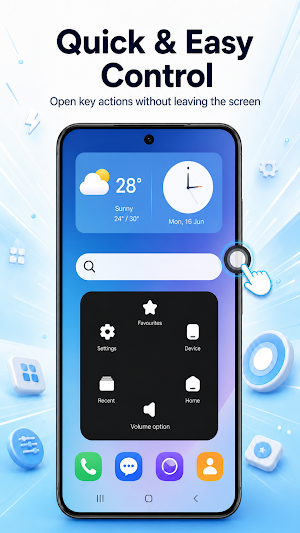
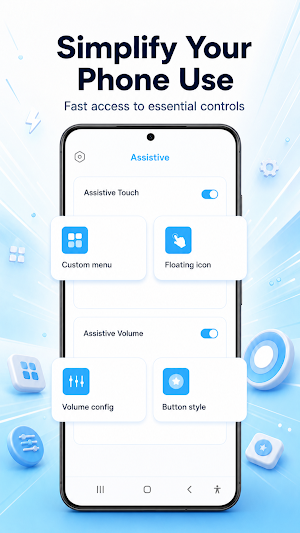
Assistive Panel is an assistive touch and easy touch tool for Android that puts every control one tap away. Add a floating button to your screen, open your favorite apps, record your screen, adjust volume and brightness, and lock your phone - without pressing a single physical button.
👆 ASSISTIVE TOUCH FLOATING BUTTON
Drag the floating button anywhere on your screen and trigger actions with a single tap, double tap or long press. Assign a different shortcut to each gesture and keep your most-used controls under your thumb.
📋 CUSTOM QUICK ACCESS MENU
Arrange the assistive touch menu exactly the way you want. Fill each slot with the shortcut you need: home, back, recent apps, notifications, favorite apps, device settings and more.
🔊 ASSISTIVE VOLUME PANEL
Give worn volume keys a rest with a floating volume button. Tap it to open sliders for media, ring and alarm volume, plus brightness and a screen darkness overlay for comfortable use at night.
🎬 SCREEN RECORDER
Record your screen with sound to capture gameplay, make tutorials or save a video call. Start and stop screen recording straight from the assistive panel.
📸 SCREENSHOT & VIRTUAL BUTTONS
Take a screenshot, expand notifications, jump to the home screen, go back, open recent apps or lock your screen with one tap. Virtual home, back and recent buttons protect the physical buttons on your device from wear.
🔦 ONE-TAP TOGGLES
Turn on the flashlight, lock screen rotation, open the camera, or jump straight to Wi-Fi, Bluetooth, airplane mode, location and battery settings.
🎨 CUSTOMIZE EVERYTHING
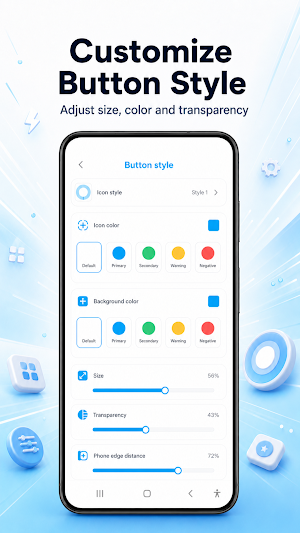
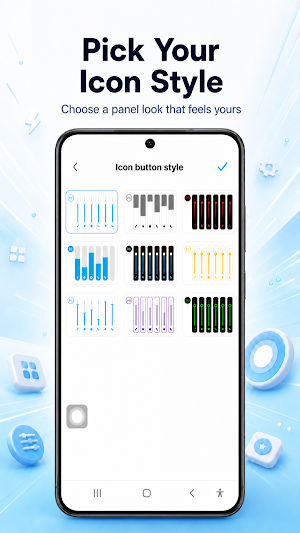
Pick your favorite icon style for the floating button and tune how it looks. Set the volume button's shape, color, size and transparency, or pin it to a fixed position on the screen edge.
🔒 PRIVACY
No account and no sign-in. Your menu layout, gestures and preferences are stored on your device. The accessibility service is used only to run the shortcuts you choose - never to collect data.
🪫 BATTERY FRIENDLY
The overlay is lightweight and designed to stay quiet in the background, so assistive touch stays on duty without weighing on your battery.
WHAT ASSISTIVE PANEL INCLUDES
✓ Assistive touch floating button with tap, double-tap and long-press gestures
✓ Easy touch menu with customizable shortcut slots
✓ Assistive volume panel with volume, brightness and darkness sliders
✓ Screen recorder with microphone audio
✓ Screenshot, lock screen and virtual navigation buttons
✓ One-tap flashlight, rotation lock and quick settings access
✓ Custom icon styles, colors, sizes and transparency
IMPORTANT NOTE
Assistive Panel uses Android's Accessibility Service to perform actions such as back, home, recent apps, notifications, screenshot and lock screen. It is used only to run the shortcuts you choose. Screenshot and lock screen actions require Android 9 or newer. Screen recording uses Android's media projection and asks for your permission before every session. Some devices pause overlay apps aggressively - if the floating button disappears, exclude Assistive Panel from battery optimization in your system settings.
👆 ASSISTIVE TOUCH FLOATING BUTTON
Drag the floating button anywhere on your screen and trigger actions with a single tap, double tap or long press. Assign a different shortcut to each gesture and keep your most-used controls under your thumb.
📋 CUSTOM QUICK ACCESS MENU
Arrange the assistive touch menu exactly the way you want. Fill each slot with the shortcut you need: home, back, recent apps, notifications, favorite apps, device settings and more.
🔊 ASSISTIVE VOLUME PANEL
Give worn volume keys a rest with a floating volume button. Tap it to open sliders for media, ring and alarm volume, plus brightness and a screen darkness overlay for comfortable use at night.
🎬 SCREEN RECORDER
Record your screen with sound to capture gameplay, make tutorials or save a video call. Start and stop screen recording straight from the assistive panel.
📸 SCREENSHOT & VIRTUAL BUTTONS
Take a screenshot, expand notifications, jump to the home screen, go back, open recent apps or lock your screen with one tap. Virtual home, back and recent buttons protect the physical buttons on your device from wear.
🔦 ONE-TAP TOGGLES
Turn on the flashlight, lock screen rotation, open the camera, or jump straight to Wi-Fi, Bluetooth, airplane mode, location and battery settings.
🎨 CUSTOMIZE EVERYTHING
Pick your favorite icon style for the floating button and tune how it looks. Set the volume button's shape, color, size and transparency, or pin it to a fixed position on the screen edge.
🔒 PRIVACY
No account and no sign-in. Your menu layout, gestures and preferences are stored on your device. The accessibility service is used only to run the shortcuts you choose - never to collect data.
🪫 BATTERY FRIENDLY
The overlay is lightweight and designed to stay quiet in the background, so assistive touch stays on duty without weighing on your battery.
WHAT ASSISTIVE PANEL INCLUDES
✓ Assistive touch floating button with tap, double-tap and long-press gestures
✓ Easy touch menu with customizable shortcut slots
✓ Assistive volume panel with volume, brightness and darkness sliders
✓ Screen recorder with microphone audio
✓ Screenshot, lock screen and virtual navigation buttons
✓ One-tap flashlight, rotation lock and quick settings access
✓ Custom icon styles, colors, sizes and transparency
IMPORTANT NOTE
Assistive Panel uses Android's Accessibility Service to perform actions such as back, home, recent apps, notifications, screenshot and lock screen. It is used only to run the shortcuts you choose. Screenshot and lock screen actions require Android 9 or newer. Screen recording uses Android's media projection and asks for your permission before every session. Some devices pause overlay apps aggressively - if the floating button disappears, exclude Assistive Panel from battery optimization in your system settings.
Alternatives to Assistive Panel: Easy Touch
Looking for apps like Assistive Panel: Easy Touch? Here are 5 similar Android apps on Google Play. The highest rated is Touch Screen Test (4.5/5), and all 5 are free to download.
-
Touch Screen Test 4.5
-
Nuki Smart Lock 4.3
-
Reveri: Relief in Minutes 4.1
-
Contours: Ski Snowboard Tour
-
Sensi 4.4
| App | Rating | Price | Installs | Last updated | Compare |
|---|---|---|---|---|---|
| Assistive Panel: Easy Touch | – | Free | 10,000+ | Aug 19, 2026 | |
| Touch Screen Test | 4.5 / 5 | Free | 1,000,000+ | Jun 26, 2026 | Compare |
| Nuki Smart Lock | 4.3 / 5 | Free | 1,000,000+ | Oct 28, 2026 | Compare |
| Reveri: Relief in Minutes | 4.1 / 5 | Free | 100,000+ | Oct 25, 2026 | Compare |
| Contours: Ski Snowboard Tour | – | Free | 1,000+ | Oct 6, 2026 | Compare |
| Sensi | 4.4 / 5 | Free | 1,000,000+ | Sep 14, 2026 | Compare |