
Picnest: Screenshots to Notes
D-J Productivity In-app purchases
Organize screenshots into useful notes and lists with AI
- Downloads
- 6.6K+
- on Google Play
- Price
- Free
- In-app purchases
- Updated
- Oct 9
- 2026 · v2.0.69
Screenshots
About Picnest: Screenshots to Notes
Your screenshots are full of things you wanted to remember. Picnest turns them into notes you can actually use.
Most screenshots end up buried in your camera roll. A book recommendation. A movie someone mentioned. A recipe. A product idea. A quote. A place to visit. A person to look up later. Useful information, trapped inside images.
Picnest helps you clean that up.
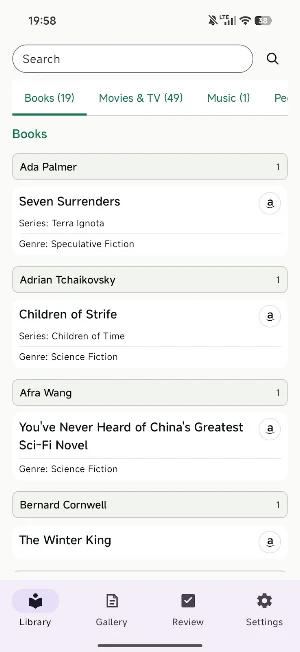
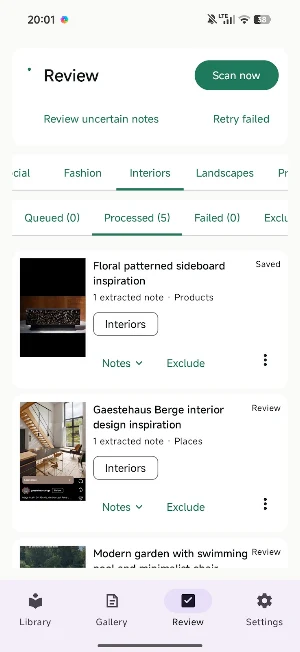
Send a screenshot to Picnest and AI extracts the important details, then turns them into clear notes, lists, and organized entries. Instead of scrolling through hundreds of screenshots, you get a growing library of saved ideas, recommendations, references, and reminders.
Picnest can help you:
• Extract useful information from screenshots
• Turn screenshots into readable notes
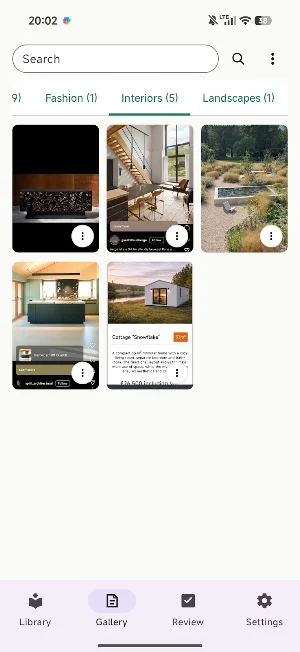
• Create lists from saved images
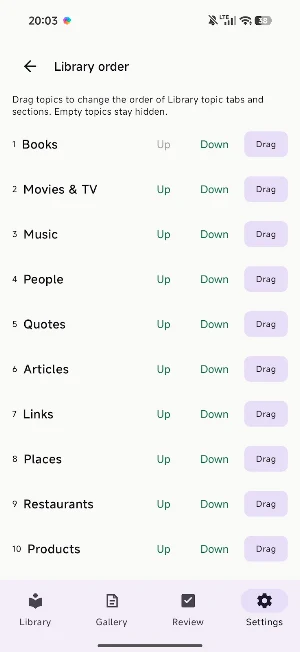
• Organize recommendations, ideas, products, people, books, movies, and more
• Reduce clutter in your camera roll
• Find saved information faster later
• Mass delete unwanted screenshots
Use Picnest for:
• Book and movie recommendations
• Products you want to compare
• Articles, quotes, and research snippets
• Recipes, restaurants, and travel ideas
• People, creators, artists, and public figures
• App screens, websites, social posts, and messages
• Anything you screenshot because “I’ll need this later”
From messy image to clear note
Picnest does more than store screenshots. It helps pull out the meaning inside them. A screenshot of a movie can become a movie note. A screenshot of a book can become a book note. A screenshot of several ideas can become a simple list.
AI-assisted, reviewable, and editable
Picnest uses AI to generate notes from your screenshots. AI can sometimes miss details or make mistakes, so your notes are always something you can review and adjust.
Less scrolling. More remembering.
Turn your screenshots into clear notes, lists, and organized ideas with Picnest.
Make your screenshots worth saving.
Most screenshots end up buried in your camera roll. A book recommendation. A movie someone mentioned. A recipe. A product idea. A quote. A place to visit. A person to look up later. Useful information, trapped inside images.
Picnest helps you clean that up.
Send a screenshot to Picnest and AI extracts the important details, then turns them into clear notes, lists, and organized entries. Instead of scrolling through hundreds of screenshots, you get a growing library of saved ideas, recommendations, references, and reminders.
Picnest can help you:
• Extract useful information from screenshots
• Turn screenshots into readable notes
• Create lists from saved images
• Organize recommendations, ideas, products, people, books, movies, and more
• Reduce clutter in your camera roll
• Find saved information faster later
• Mass delete unwanted screenshots
Use Picnest for:
• Book and movie recommendations
• Products you want to compare
• Articles, quotes, and research snippets
• Recipes, restaurants, and travel ideas
• People, creators, artists, and public figures
• App screens, websites, social posts, and messages
• Anything you screenshot because “I’ll need this later”
From messy image to clear note
Picnest does more than store screenshots. It helps pull out the meaning inside them. A screenshot of a movie can become a movie note. A screenshot of a book can become a book note. A screenshot of several ideas can become a simple list.
AI-assisted, reviewable, and editable
Picnest uses AI to generate notes from your screenshots. AI can sometimes miss details or make mistakes, so your notes are always something you can review and adjust.
Less scrolling. More remembering.
Turn your screenshots into clear notes, lists, and organized ideas with Picnest.
Make your screenshots worth saving.
Alternatives to Picnest: Screenshots to Notes
Looking for apps like Picnest: Screenshots to Notes? Here are 6 similar Android apps on Google Play. The highest rated is Wondr Note: Fun Notes & Tools (4.6/5), and all 6 are free to download.
-
Wondr Note: Fun Notes & Tools 4.6
-
Notes, Journal, Diary: PenCake 4.2
-
Avocation Goal & Habit Tracker 4.2
-
Twos: Remember & Share Things 4.2
-
touchnotes 3.5
-
Easy Diary 4.3
| App | Rating | Price | Installs | Last updated | Compare |
|---|---|---|---|---|---|
| Picnest: Screenshots to Notes | – | Free | 5,000+ | Oct 9, 2026 | |
| Wondr Note: Fun Notes & Tools | 4.6 / 5 | Free | 100,000+ | Apr 14, 2026 | Compare |
| Notes, Journal, Diary: PenCake | 4.2 / 5 | Free | 1,000,000+ | – | Compare |
| Avocation Goal & Habit Tracker | 4.2 / 5 | Free | 1,000,000+ | Apr 15, 2023 | Compare |
| Twos: Remember & Share Things | 4.2 / 5 | Free | 1,000+ | Sep 6, 2022 | Compare |
| touchnotes | 3.5 / 5 | Free | 1,000,000+ | Oct 24, 2026 | Compare |
| Easy Diary | 4.3 / 5 | Free | 50,000+ | Oct 2, 2026 | Compare |