

Earth & Moon
Personalization
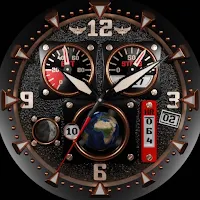
Hyper realistic 3D watch face (for watches under Wear OS 3 and above)
- Downloads
- 1.1K+
- on Google Play
- Price
- Free
- No in-app purchases
- Updated
- Feb 22
- 2024
Screenshots


About Earth & Moon
IMPORTANT Notes:
- Connect your watch to Wifi to accelerate downloading
- Please wait about 10 seconds while installing the watch face
- The Earth & Moon mobile app uses Health Connect to get updated step counts, regardless of which fitness app you use (Samsung Health, Google Fit, …)
- To synchronize the number of steps between the mobile and the watch, simply connect your watch to your mobile via Bluetooth, launch the mobile application and click on the green button "Sync Health Data"
Earth & Moon offers you:
- Stunning light effects like a real watch when you move your wrist
- 3 dials in one: gold, silver and midnight blue
- Dual time zone
- 24 selectable time zones including DST (Dual Saving Time)
- Rotating earth indicating selected time zone
- Moon phases
- Step counter
- Battery level
Please click once on the left or right of the Earth to change the time zone.
Please double click in the center to change color
- Connect your watch to Wifi to accelerate downloading
- Please wait about 10 seconds while installing the watch face
- The Earth & Moon mobile app uses Health Connect to get updated step counts, regardless of which fitness app you use (Samsung Health, Google Fit, …)
- To synchronize the number of steps between the mobile and the watch, simply connect your watch to your mobile via Bluetooth, launch the mobile application and click on the green button "Sync Health Data"
Earth & Moon offers you:
- Stunning light effects like a real watch when you move your wrist
- 3 dials in one: gold, silver and midnight blue
- Dual time zone
- 24 selectable time zones including DST (Dual Saving Time)
- Rotating earth indicating selected time zone
- Moon phases
- Step counter
- Battery level
Please click once on the left or right of the Earth to change the time zone.
Please double click in the center to change color
What’s new
Updated February 22, 2024
Icons updated
Alternatives to Earth & Moon
Looking for apps like Earth & Moon? Here are 2 similar Android apps on Google Play.
| App | Rating | Price | Installs | Compare |
|---|---|---|---|---|
| Earth & Moon | – | Free | 1,000+ | |
| Hurricane | – | 1.99 USD | 10+ | Compare |
| Dancing Snowman | – | 1.99 USD | 10+ | Compare |
Compare Earth & Moon with the top alternatives: ratings, updates, ASO score and keyword gaps →