

Secret Video Vault: App Lock
PEGAS Tools Contains ads
Secret video vault to hide photos & videos safely. Lock apps with PIN & pattern.
- Rating
- 4.0
- 896 ratings
- Downloads
- 1.4M+
- on Google Play
- Price
- Free
- No in-app purchases
- Updated
- Sep 30
- 2026 · v1.0.4
Screenshots

About Secret Video Vault: App Lock
Hide private videos, lock photos, and protect your installed apps with Secret Video Vault: App Lock — the all-in-one privacy solution for your mobile device.
Looking for a trusted secret video vault to hide private videos, secure personal photos, and lock sensitive apps? Secret Video Vault: App Lock provides military-grade local encryption and powerful app locker tools to ensure your privacy stays protected from prying eyes.
Whether you want to hide downloaded clips, lock gallery media, or prevent unauthorized access to social apps, our dual-protection system keeps your personal life completely private.
🔒 CORE FEATURES OF SECRET VIDEO VAULT: APP LOCK
1. SECURE MEDIA VAULT (HIDE VIDEOS & PHOTOS)
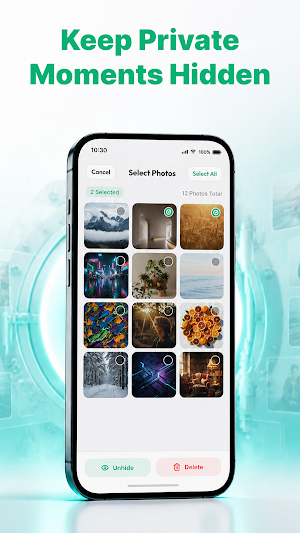
• Hide Videos & Photos: Easily import videos, personal pictures, and sensitive clips into a hidden media vault. Imported files disappear completely from your default system gallery.
• Local File Encryption: Files stored inside the secret vault are encrypted locally on your device for maximum data protection.
• Built-in Video Player & Photo Viewer: View hidden media safely inside the app without exposing files to external players.
2. POWERFUL APP LOCK (PROTECT YOUR APPS)
• Lock Any App: Secure social networks, messaging apps, gallery, and settings to prevent unauthorized access.
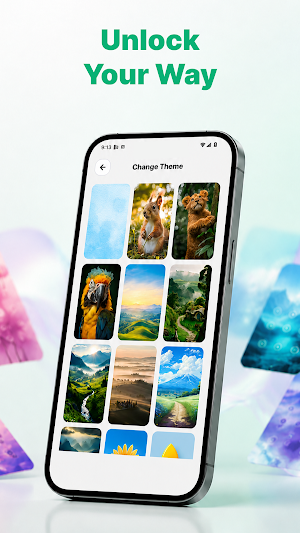
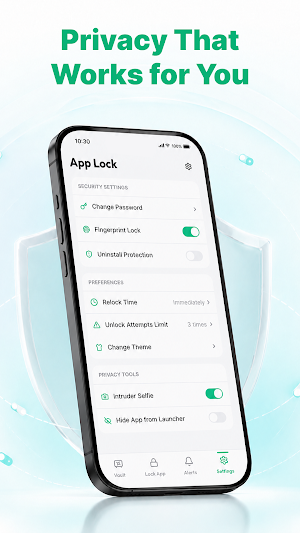
• Multiple Lock Styles: Choose between custom PIN code, pattern lock, or Biometric Fingerprint authentication to unlock your apps smoothly.
• Re-lock Options: Set immediate lock or delay options to match your daily workflow without repetitive interruptions.
3. ADVANCED PRIVACY & SECURITY TOOLS
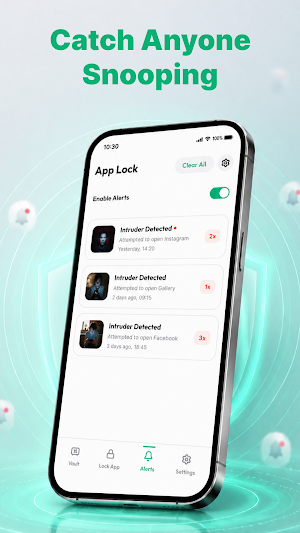
• Break-in Intruder Alerts: Automatically capture a snapshot of anyone who inputs the wrong PIN or pattern code.
• Fake Vault / Decoy Mode: Set up a secondary PIN that opens a decoy vault containing harmless media if you are forced to unlock.
• Icon Disguise: Mask the application icon as a utility tool (like a calculator or notes app) for discrete usage.
🛡️ WHY CHOOSE SECRET VIDEO VAULT?
- 100% Offline Privacy: We do not store or transmit your personal videos, photos, or password credentials to external cloud servers. Everything stays local on your phone.
- Clean & Intuitive Design: Fast file import, easy organization into folders, and instant media restoration.
- Supports All Major Formats: Full compatibility with MP4, MKV, AVI, MOV, PNG, JPG, and GIF files.
How to get started:
1. Launch Secret Video Vault: App Lock and create your master PIN, pattern, or fingerprint.
2. Go to Media Vault to import and hide private videos or photos from your gallery.
3. Switch to App Lock to select the installed apps you want to protect with password security.
Take control of your mobile privacy today! Download Secret Video Vault: App Lock to safeguard your private media and secure your personal apps with confidence.
---
Important Note for Users:
Before uninstalling the application, clearing system storage, or factory resetting your device, please unhide (restore) all encrypted videos and photos back to your device's public gallery to avoid accidental data loss.
Looking for a trusted secret video vault to hide private videos, secure personal photos, and lock sensitive apps? Secret Video Vault: App Lock provides military-grade local encryption and powerful app locker tools to ensure your privacy stays protected from prying eyes.
Whether you want to hide downloaded clips, lock gallery media, or prevent unauthorized access to social apps, our dual-protection system keeps your personal life completely private.
🔒 CORE FEATURES OF SECRET VIDEO VAULT: APP LOCK
1. SECURE MEDIA VAULT (HIDE VIDEOS & PHOTOS)
• Hide Videos & Photos: Easily import videos, personal pictures, and sensitive clips into a hidden media vault. Imported files disappear completely from your default system gallery.
• Local File Encryption: Files stored inside the secret vault are encrypted locally on your device for maximum data protection.
• Built-in Video Player & Photo Viewer: View hidden media safely inside the app without exposing files to external players.
2. POWERFUL APP LOCK (PROTECT YOUR APPS)
• Lock Any App: Secure social networks, messaging apps, gallery, and settings to prevent unauthorized access.
• Multiple Lock Styles: Choose between custom PIN code, pattern lock, or Biometric Fingerprint authentication to unlock your apps smoothly.
• Re-lock Options: Set immediate lock or delay options to match your daily workflow without repetitive interruptions.
3. ADVANCED PRIVACY & SECURITY TOOLS
• Break-in Intruder Alerts: Automatically capture a snapshot of anyone who inputs the wrong PIN or pattern code.
• Fake Vault / Decoy Mode: Set up a secondary PIN that opens a decoy vault containing harmless media if you are forced to unlock.
• Icon Disguise: Mask the application icon as a utility tool (like a calculator or notes app) for discrete usage.
🛡️ WHY CHOOSE SECRET VIDEO VAULT?
- 100% Offline Privacy: We do not store or transmit your personal videos, photos, or password credentials to external cloud servers. Everything stays local on your phone.
- Clean & Intuitive Design: Fast file import, easy organization into folders, and instant media restoration.
- Supports All Major Formats: Full compatibility with MP4, MKV, AVI, MOV, PNG, JPG, and GIF files.
How to get started:
1. Launch Secret Video Vault: App Lock and create your master PIN, pattern, or fingerprint.
2. Go to Media Vault to import and hide private videos or photos from your gallery.
3. Switch to App Lock to select the installed apps you want to protect with password security.
Take control of your mobile privacy today! Download Secret Video Vault: App Lock to safeguard your private media and secure your personal apps with confidence.
---
Important Note for Users:
Before uninstalling the application, clearing system storage, or factory resetting your device, please unhide (restore) all encrypted videos and photos back to your device's public gallery to avoid accidental data loss.
Alternatives to Secret Video Vault: App Lock
Looking for apps like Secret Video Vault: App Lock? Here are 6 similar Android apps on Google Play. All of them are free to download.
-
Smart Contact: Message & Block
-
Origami: Paper Folding Art
-
Easy Screen Mirroring: TV Cast
-
Universal Remote for All TV
-
TV Cast: HD Screen Mirroring
-
Always On Display: DIY Themes
| App | Rating | Price | Installs | Last updated | Compare |
|---|---|---|---|---|---|
| Secret Video Vault: App Lock | 4.0 / 5 | Free | 1,000,000+ | Sep 30, 2026 | |
| Smart Contact: Message & Block | – | Free | 500,000+ | Sep 30, 2026 | Compare |
| Origami: Paper Folding Art | – | Free | 500+ | Sep 30, 2026 | Compare |
| Easy Screen Mirroring: TV Cast | – | Free | 10,000+ | Oct 31, 2026 | Compare |
| Universal Remote for All TV | – | Free | 10,000+ | – | Compare |
| TV Cast: HD Screen Mirroring | – | Free | 1,000+ | – | Compare |
| Always On Display: DIY Themes | – | Free | 1,000+ | – | Compare |